16GB Vs 24GB MacBook Air: Which M5 Model Should You Actually Buy?
Some of the links in this post are affiliate links, which means I may earn a small commission if you choose to make a purchase at no extra cost to you. As an Amazon Associate, I earn from qualifying purchases. Read my full Ethics & Affiliate Relationship Disclaimer.
For years, the MacBook Air starting at 8GB of RAM felt outdated. Now Apple has finally pushed the baseline to 16GB, which is definitely better, but honestly, it no longer feels generous. It feels like the minimum.
That is really the core of the decision with the M5 MacBook Air. Is 16GB enough, or is 24GB the smarter buy? After spending time comparing both versions, the answer is pretty clear to me: both are good, but 24GB is where the MacBook Air starts to feel truly comfortable. If your workload is light and disciplined, 16GB can absolutely get the job done. But if you multitask heavily, keep apps open, do creative work, or want to run local AI tools, the 24GB upgrade makes a noticeable difference.
Why 16GB No Longer Feels Like a Lot
Modern macOS is heavier than it used to be. There is simply more going on in the background all the time. iMessage is always there, indexing never really stops, and modern web browsers can chew through memory with surprising speed.
Open up Activity Monitor on a typical machine with Slack running, several browser tabs open, and a video call happening in the background, and it is not unusual to see memory pressure sitting in the yellow. That does not mean the computer is unusable. It probably will not lag badly in that moment. But it does mean the system is working harder than you might expect just to stay smooth. That is why 16GB now feels like the new floor rather than the sweet spot. It is enough for a lot of people, but it does not leave much breathing room.
The Test Setup: Why This Comparison Is Tricky
One thing worth understanding before comparing the 16GB and 24GB M5 MacBook Air models is that this is not a perfectly clean RAM-only comparison. The base 16GB M5 MacBook Air uses a binned chip with two fewer GPU cores than the 24GB version tested. You can upgrade the 16GB model to get the 10-core GPU, but that has to be configured at purchase and costs an extra $100.
At that point, the math starts to matter:
Upgrading the 16GB model to the better GPU costs $100
Moving to the 24GB version costs $200 more and includes the better GPU plus the extra memory
That makes the 24GB configuration look like the much better value. To make the comparison more useful, I also looked at a 15-inch MacBook Air with the 10-core GPU and 16GB of RAM. That way, the testing included:
13-inch MacBook Air with 16GB RAM
13-inch MacBook Air with 24GB RAM
15-inch MacBook Air with 16GB RAM and 10-core GPU
That helped separate GPU differences from memory differences a bit more clearly.
Where The 24GB MacBook Air Actually Feels Better
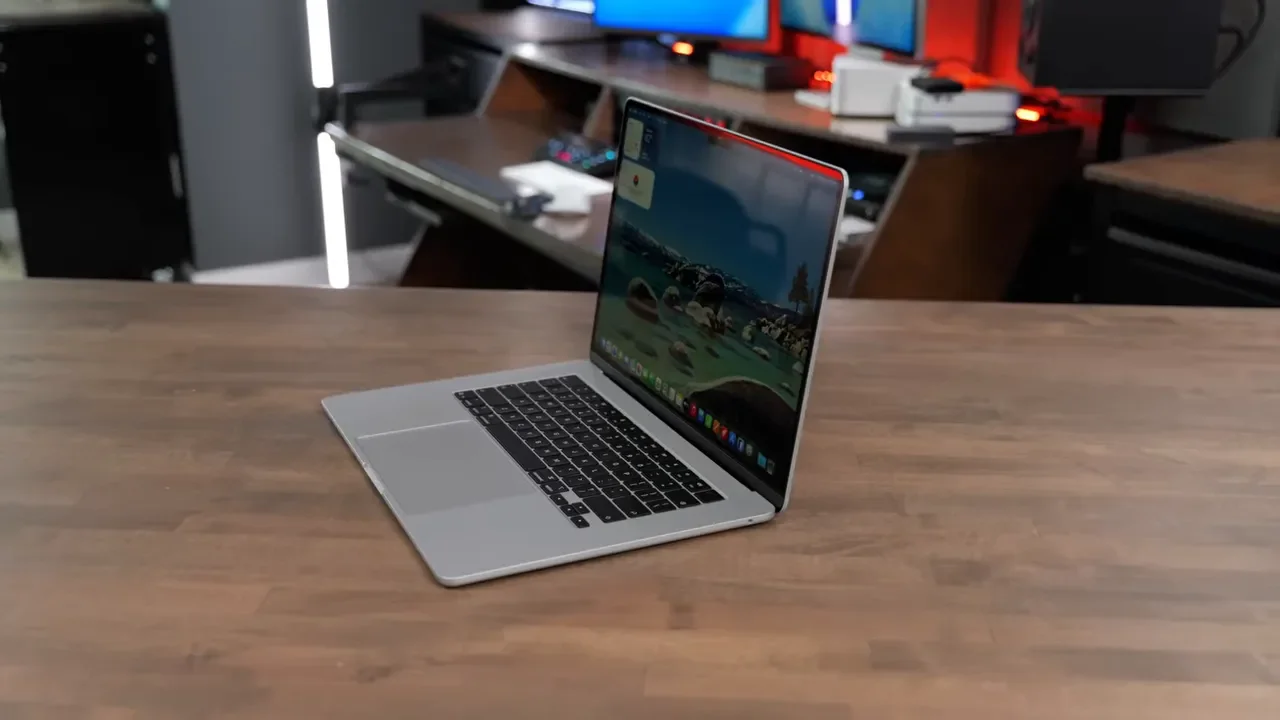
In day-to-day use, the 24GB MacBook Air just feels a little faster and a little smoother. Not in some dramatic, night-and-day way for every task, but in the kind of way you notice after using both for a while. Apps stay ready. Tabs are less likely to reload. The system feels more instant when you jump between tasks. And when you start pushing beyond basic web and office work, the gap gets more obvious.
Xcode And Development Work
In Xcode compilation benchmarks, the 24GB model posted faster scores. If your workflow involves coding, building apps, or bouncing between development tools and a browser full of documentation, extra RAM helps the machine stay more responsive under load.
Local AI Models
Running local AI models also showed an advantage for the 24GB machine, including faster time to first token. That matters because local AI is no longer some niche experiment. In 2026, it is becoming a practical part of real workflows.
Lightroom Classic
This was one of the most striking examples. With Lightroom Classic installed on both systems, the 24GB MacBook Air handled exporting RAW photos at almost double the speed compared to the 16GB model.
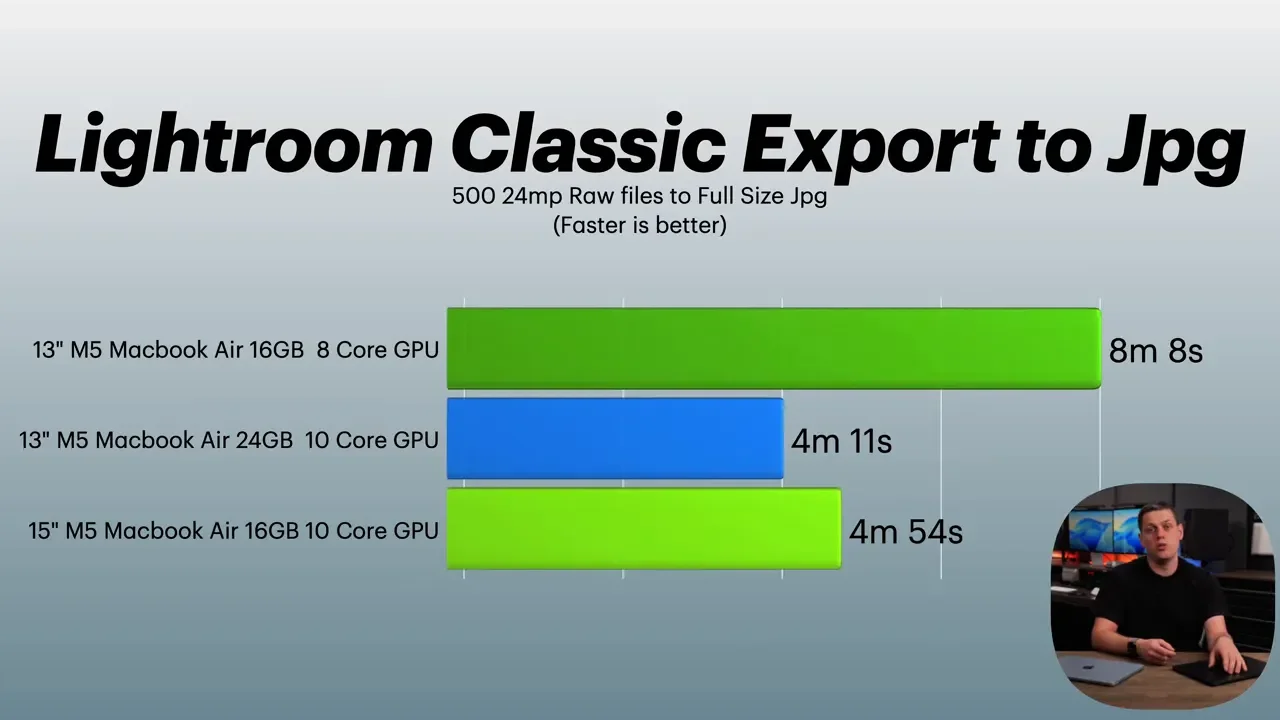
That is the kind of result that moves this discussion beyond “maybe you will notice it” and into “yes, certain workloads clearly benefit.”
Why Local AI Changes The RAM Conversation
This is a big one. AI is not just a chatbot in a browser anymore. A lot of people now want to run local models directly on their own machine for privacy, speed, and offline use. On a MacBook Air, that matters because memory is unified. A local AI model pulls from the same pool of system memory the rest of the machine uses.
A fairly standard 7B parameter model can take roughly 5GB to 8GB of VRAM. On a MacBook Air, that comes straight out of system memory. So if you have a 16GB machine and your local model eats, say, 8GB, then the rest of macOS is trying to function on the remaining 8GB. That gets tight very quickly.
This is where 24GB starts to make a lot of sense. It gives you enough room for:
The operating system and normal everyday apps
A local AI assistant running in the background
Fast response times without the machine constantly juggling memory
If local AI is even remotely part of your plans, 24GB is not overkill. It is the practical option.
Who Can Still Buy 16GB And Be Totally Fine?
Not everyone needs the upgrade. If you are a student or office worker and your workflow is pretty simple, 16GB is probably fine. If you close apps when you are done using them, mostly work in cloud-based tools, and are not trying to do heavy multitasking, you may never feel limited by it. That kind of user can save the money and be perfectly happy.
Where 16GB starts feeling cramped is when your real-world workflow looks more like this:
Multiple browser tabs open at once
Music playing in the background
Discord or Slack running all day
Frequent video calls
A tendency to leave apps open instead of constantly cleaning everything up
If that sounds familiar, 24GB does more than improve benchmark numbers. It helps stop the annoying tab-reloading dance and keeps the machine feeling instant even when life is messy.
Swap Memory: What It Is And What It Is Not
When your Mac runs out of RAM, macOS has to compensate. It does that in a couple of ways. One is swap memory, where the system moves less-active data out of RAM and into the SSD to free up space. Another is memory compression, where it squeezes background data down so more can fit in available memory. Both techniques help the machine keep going, and modern Macs are very good at hiding this from you. But there is still a cost.
The cost is latency. RAM is much faster than even a very fast SSD. So when something has been swapped out and you jump back to it, you may feel a tiny delay. A tab might stutter. An app might take a beat to become responsive. A page might refresh. That is the real reason more RAM matters. It is not really about protecting your SSD from wear. The old fear that swap memory is going to kill your drive is largely outdated for modern hardware. Today, the issue is not durability. The issue is smoothness. 24GB is not about saving the SSD. It is about avoiding those little microstutters that make a new computer feel older than it should.
Resale Value Matters More Than People Think
There is also a long-term ownership angle here. If you plan to sell your MacBook Air in four or five years, the upgraded RAM option tends to hold value better than a storage upgrade. That makes sense when you think about it:
You can always add external storage later
You cannot add external RAM to fix a memory bottleneck
A 16GB MacBook Air will eventually be seen as the old base spec. A 24GB MacBook Air will stand out as the nicer configuration. So the extra $200 is not just a present-day usability upgrade. It can also be a smarter move for future resale value.
My Recommendation: Buy Based On How Long You Will Keep It
If you are trying to decide between the 16GB and 24GB M5 MacBook Air, this is how I would break it down.
Buy The 16GB Model If:
You plan to upgrade again in about two years
Your work is mostly cloud-based
Your app usage is fairly light and organized
You want to spend as little as possible and stay in the MacBook Air lineup
Buy The 24GB Model If:
You multitask heavily
You keep many apps open at once
You want to run local AI tools
You do creative work in apps like Adobe software or Blender
You want to keep the MacBook Air for five years or more
That last category is where 24GB really becomes the new sweet spot.
The Bottom Line
The 16GB M5 MacBook Air is not a bad machine. Far from it. For a lot of people, it is still enough. But “enough” and “ideal” are not the same thing. If your workload is even moderately demanding, if you multitask like a normal human instead of a perfectly disciplined benchmark robot, or if local AI is on your radar at all, 24GB is the configuration that makes the M5 MacBook Air feel properly future-ready.
At only $200 more, especially considering it also brings the better GPU in the tested configuration, it is the upgrade I would make for most people who want to keep their Mac for the long haul. 16GB is the minimum. 24GB is the comfortable choice.
