M5 Pro MacBook Pro Vs M5 MacBook Pro: Which One Should You Actually Buy?
Some of the links in this post are affiliate links, which means I may earn a small commission if you choose to make a purchase at no extra cost to you. As an Amazon Associate, I earn from qualifying purchases. Read my full Ethics & Affiliate Relationship Disclaimer.
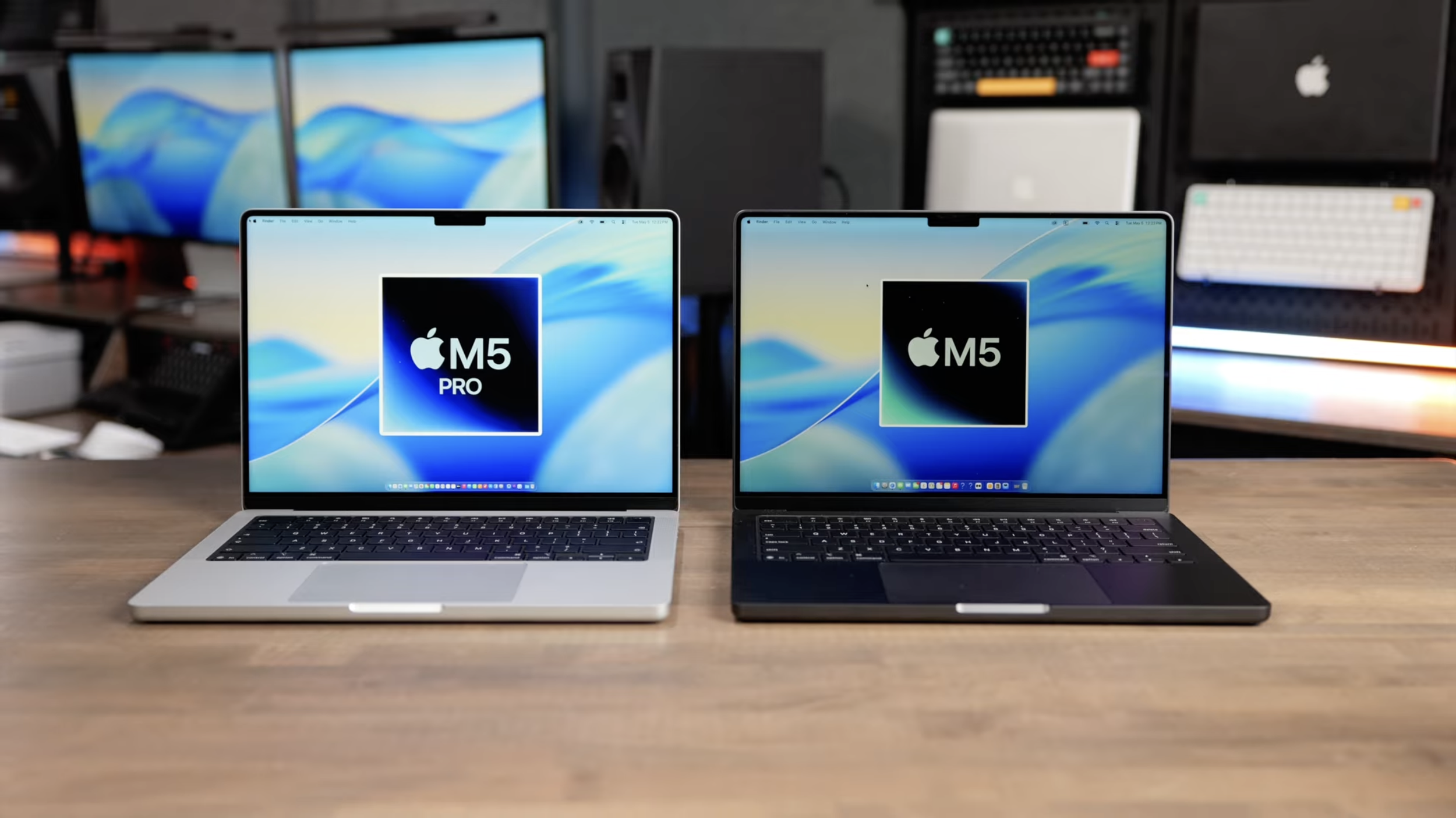
Apple made this comparison a little confusing because at a glance, the 14-inch M5 MacBook Pro and the 14-inch M5 Pro MacBook Pro look basically identical. Same size, same excellent build, same great display, same speakers. But once you get past the outside, these are very different machines.
If you're trying to decide between the standard M5 MacBook Pro and the M5 Pro MacBook Pro, the real question is not whether one is better than the other. It is whether the extra money for the M5 Pro gets you enough extra utility to be worth it for the way you actually work.
I tested both machines across a wide range of real-world tasks, including local AI, Xcode, Blender, Logic Pro, Final Cut Pro, and Lightroom Classic. After running all of those tests, the short version is this: for everyday use, they feel very similar. Once you move into heavier creative work, the M5 Pro starts separating itself in some pretty meaningful ways.
What Is Actually Different Between The M5 And M5 Pro MacBook Pro?
From the outside, these two laptops are almost the same. Both use the 14-inch MacBook Pro chassis, both have excellent built-in speakers, both have very good microphones, and both have a high-quality display.
The biggest differences are in four places:
Cooling
Ports
Chip Performance
Memory Bandwidth And RAM
Cooling: One Fan Vs Two
Inside the standard M5 MacBook Pro, Apple uses a single fan. The M5 Pro model has two fans. That matters because the base M5 can start throttling sooner under sustained workloads. If you're doing short bursts of work, you may never notice. But if you're exporting, rendering, compiling, or processing large batches for longer periods, the dual-fan cooling system in the M5 Pro helps it hold performance more consistently.
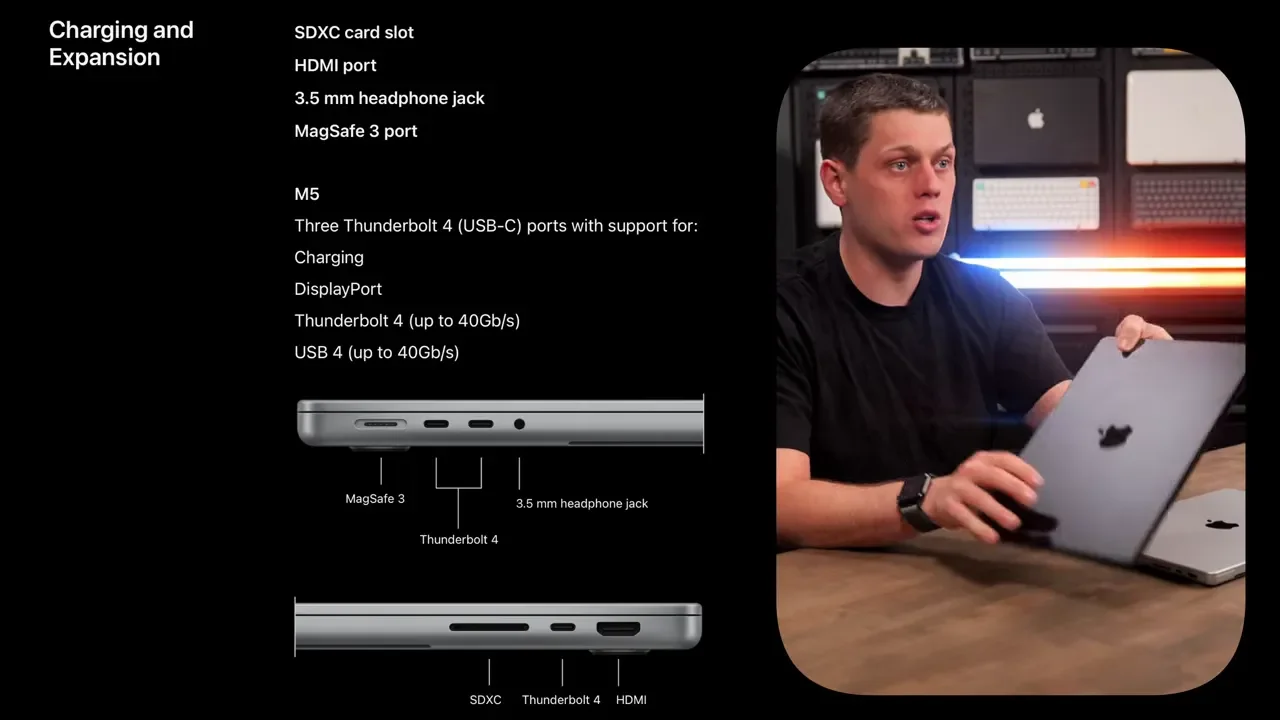
Ports: Thunderbolt 4 Vs Thunderbolt 5
This is one of the biggest practical differences. The standard M5 MacBook Pro has Thunderbolt 4 ports with up to 40Gb/s of bandwidth. The M5 Pro MacBook Pro gets Thunderbolt 5 ports, starting at 80Gb/s and boosting up to 120Gb/s in certain display-focused scenarios.
That makes the M5 Pro the better choice if you want:
Newer high-end docking stations
More high-resolution external displays
Faster external SSD performance
More demanding peripheral setups
If you plan to keep a desk setup with multiple displays and lots of gear connected, this alone may push you toward the M5 Pro.
Chip Specs
The standard M5 MacBook Pro comes with:
10-core CPU
10-core GPU
The M5 Pro starts with:
15-core CPU
16-core GPU
There is also an option to spend an extra $200 on the M5 Pro model to get the full, higher-core version of the chip.
Memory Bandwidth And RAM
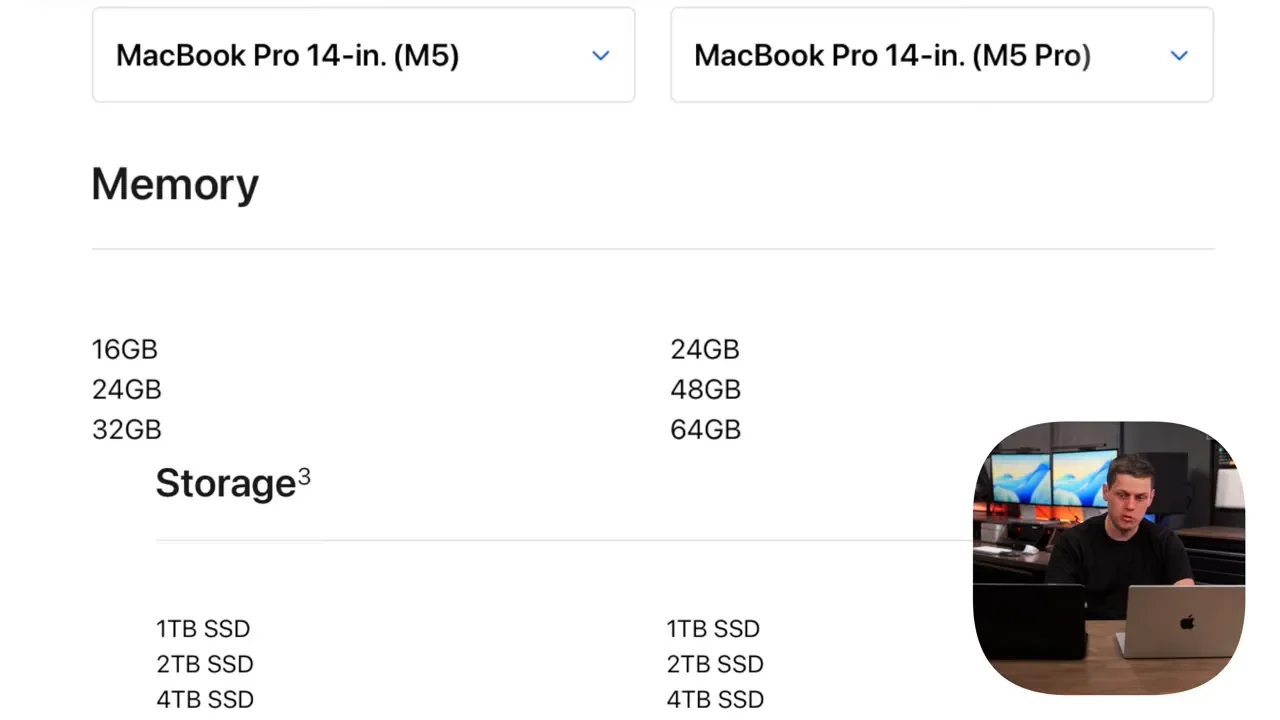
The M5 has 153GB/s of memory bandwidth. The M5 Pro doubles that to 307GB/s. Memory bandwidth is basically how quickly the RAM can talk to the processor. Higher memory bandwidth helps with heavier pro workflows, especially when moving lots of data through the system.
As for memory and storage:
M5 MacBook Pro: 16GB RAM, 1TB SSD
M5 Pro MacBook Pro: 24GB RAM, 1TB SSD
The M5 Pro model also gets extremely fast SSD performance, with read and write speeds around 11,500MB/s.
Display, Speakers, And Size Options
Outside of the chip, ports, and cooling, the hardware experience is very similar.
Both laptops have:
Excellent speakers
Very good built-in microphones
Really nice displays
One thing to note is that the standard M5 chip is only available in the 14-inch MacBook Pro. If you want a 16-inch MacBook Pro, you have to move up to the M5 Pro. So if larger screen real estate matters to you, that immediately narrows the decision.
How Similar Do They Feel In Everyday Use?
For basic daily tasks, these machines feel a lot alike. Web browsing, email, office apps, messaging, and standard productivity work are all going to feel very fast on either one. If that is mostly what you do, you are not going to unlock some dramatic day-to-day experience by stepping up to the M5 Pro. The gap opens up when the workload is sustained and demanding.
That includes things like:
Video exports
3D rendering
Compiling code
Large audio sessions
Batch photo exports
Running local AI models
That is where the M5 Pro starts making a much stronger case for itself.
Real-World Performance Tests
I ran a wide range of tests on both machines to see how the differences showed up in actual software. Some apps showed only modest gains. Others showed huge improvements.
Local AI Performance
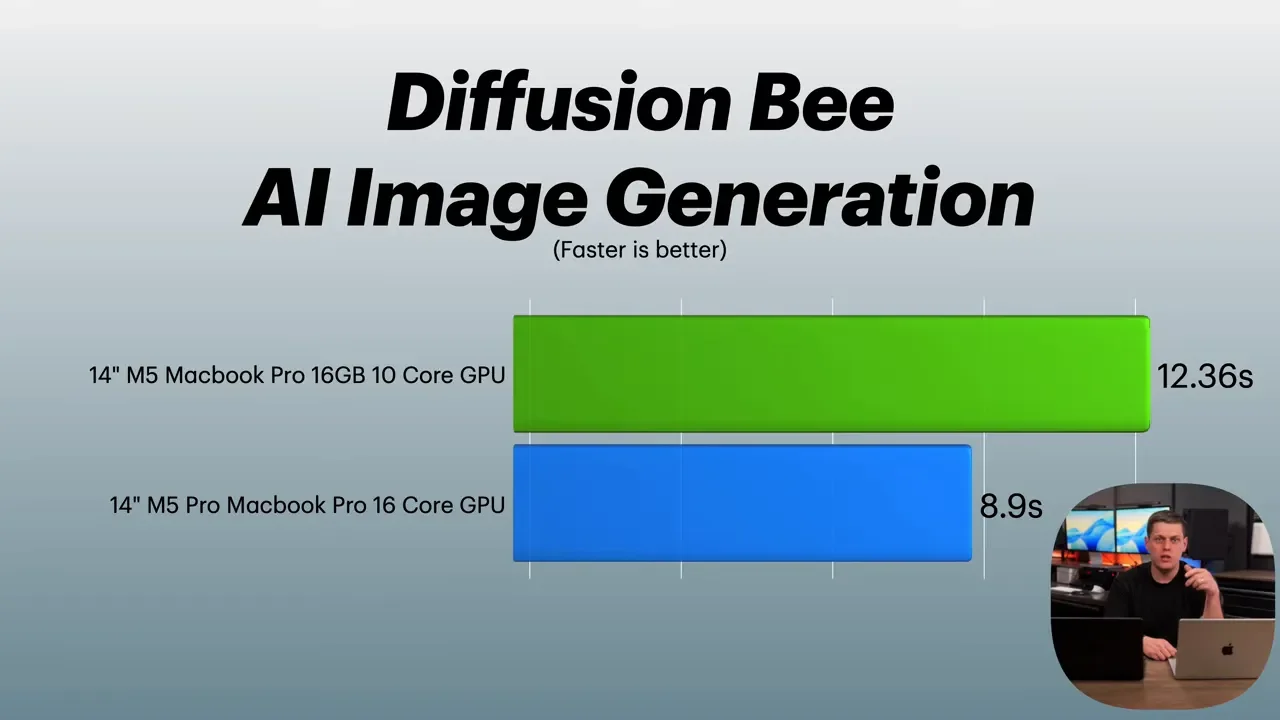
For image generation, I used DiffusionBee and generated the same prompt: a cat eating nachos while working on a laptop.
M5: 12.36 seconds
M5 Pro: 8.9 seconds
So yes, the M5 Pro was faster, but not in a way that completely changes the experience. I also tested LM Studio with Gemma 3 4B. The time to first token was a little inconsistent depending on the run, but token generation speed showed a clearer difference:
M5: 48 tokens per second
M5 Pro: 97 tokens per second
That is a much more noticeable gain if local AI is part of your workflow.
Xcode Benchmark
For developers, Xcode was one of the cleaner demonstrations of the M5 Pro advantage.
M5: 160 seconds
M5 Pro: 104 seconds
If you're compiling regularly, that difference adds up pretty quickly over time.
Blender
Blender ran well on both machines, but the M5 Pro was consistently quicker.
Classroom Scene:
M5: 29.76 seconds
M5 Pro: 19.47 seconds
Barbershop Scene:
M5: 3 minutes 30 seconds
M5 Pro: 3 minutes 11 seconds
The gains are real, but they are not night-and-day in every 3D test.
Logic Pro
This was one of the biggest differences in the entire comparison.
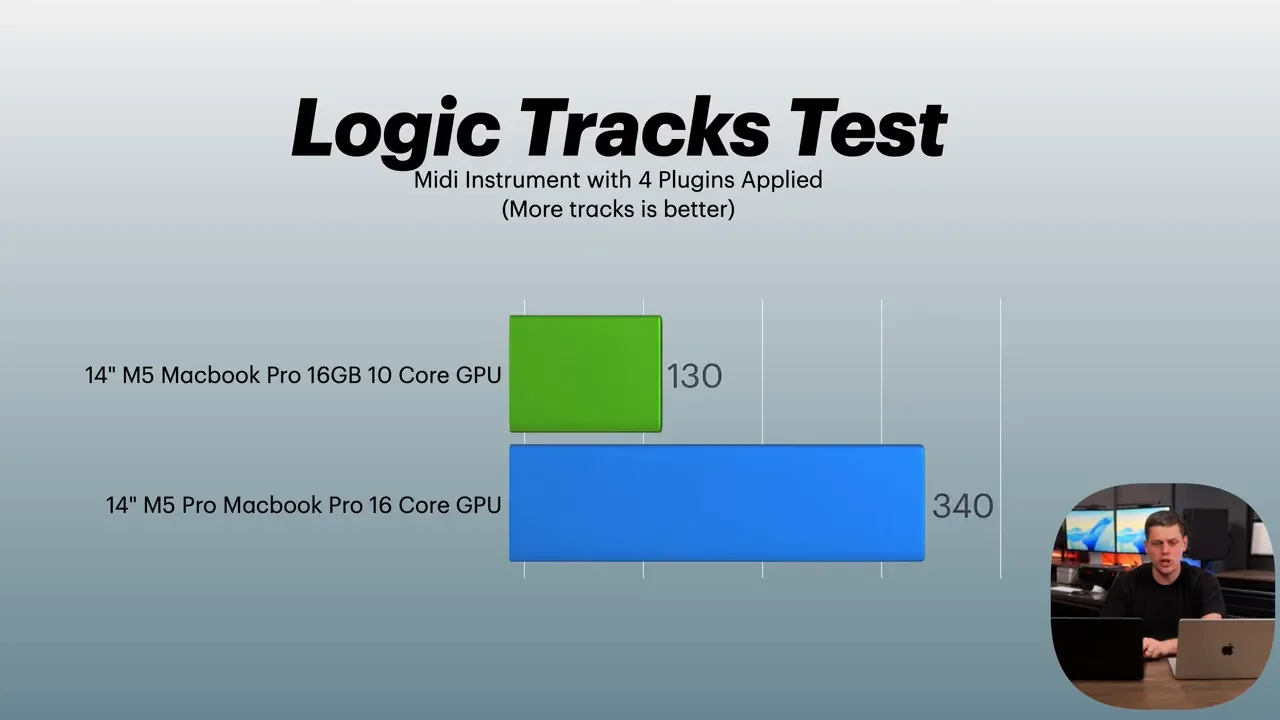
Running MIDI tracks simultaneously:
M5: 130 MIDI tracks
M5 Pro: 340 MIDI tracks
That is a huge jump.
I also tested offline bounces:
64-Track Bounce
M5: 30 seconds
M5 Pro: 13 seconds
512-Track Bounce
M5: 3 minutes 51 seconds
M5 Pro: 1 minute 35 seconds
If your work is audio-heavy, especially larger Logic Pro sessions, the M5 Pro is on a completely different level.
Final Cut Pro
Final Cut Pro was interesting because the smaller jobs were pretty close.
Magnetic Mask On An 18-Second Clip
M5: 26 seconds
M5 Pro: 23 seconds
3-Minute 4K Export
M5: 1 minute 31 seconds
M5 Pro: 1 minute 20 seconds
That is faster, but not massively faster. On a longer export, the gap widened a little more:
30-Minute 4K Project Export
M5: 14 minutes 53 seconds
M5 Pro: 12 minutes 40 seconds
Still, if your main concern is dramatically faster video export performance, the bigger jump is not from M5 to M5 Pro. It is from these machines up to an M5 Max.
Lightroom Classic
I also wanted to test some non-Apple-optimized software, so I used Lightroom Classic and imported 500 RAW photos.
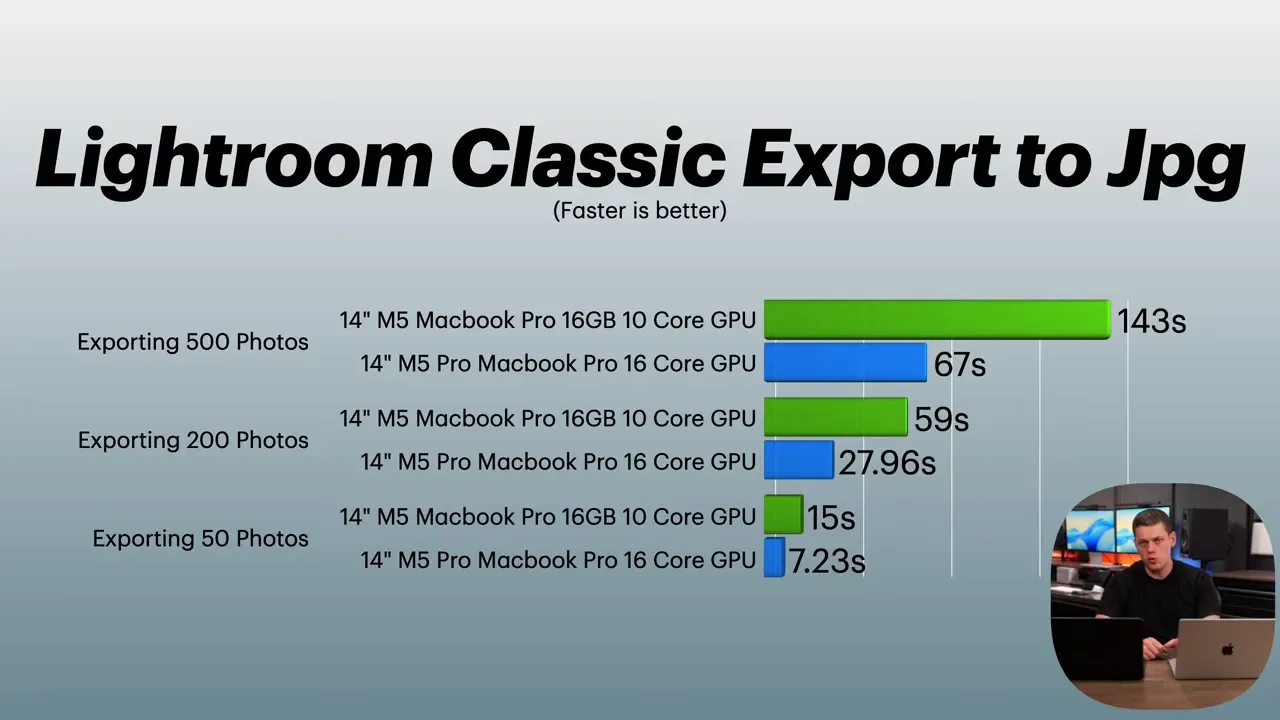
Export 50 RAW Photos To JPEG
M5: 15 seconds
M5 Pro: 7.23 seconds
Export 200 RAW Photos To JPEG
M5: 59 seconds
M5 Pro: 27.96 seconds
Export 500 RAW Photos To JPEG
M5: 2 minutes 23 seconds
M5 Pro: 1 minute 7 seconds
That is a very strong win for the M5 Pro, especially if batch photo work is part of your routine.
Benchmark Results At A Glance
Beyond the real-world tests, I also ran standard benchmarks including Geekbench 6, Geekbench AI, and Cinebench 2026.
Geekbench 6 CPU: single-core scores were fairly close, with a healthier lead for the M5 Pro in multi-core
Geekbench 6 Metal GPU: about 1.5x the GPU performance on the M5 Pro
Geekbench AI: CPU performance was fairly close, with a lighter gain on GPU for the M5 Pro
Cinebench 2026: about 1.8x GPU performance on the M5 Pro
The overall pattern is pretty consistent: CPU differences can be moderate in lighter work, but GPU-heavy and sustained pro workloads tend to favor the M5 Pro more clearly.
Price Difference: Is The M5 Pro Worth $500 More?
Here is where the decision gets really interesting. The pricing in this comparison was:
M5 MacBook Pro: about $1,700
M5 Pro MacBook Pro: about $2,200
There was also mention of a sale price bringing the M5 Pro down to around $1,950, which makes it even more compelling. At standard pricing, the M5 Pro costs about $500 more. For that extra money, you get:
More CPU and GPU performance
Dual fans for better sustained performance
Thunderbolt 5 instead of Thunderbolt 4
Double the memory bandwidth
24GB of RAM instead of 16GB
Better support for external displays
Better long-term flexibility
That is why the M5 Pro is such a strong value in Apple's current MacBook lineup. You get a lot more useful headroom without having to make the much more expensive jump to an M5 Max system.
Who Should Buy The M5 MacBook Pro?
The standard M5 MacBook Pro still makes sense. If your goal is simply to get the least expensive MacBook Pro, it is a solid option. It still gives you advantages over the MacBook Air, including:
A better screen
Better speakers
Active cooling
Better sustained performance than the Air
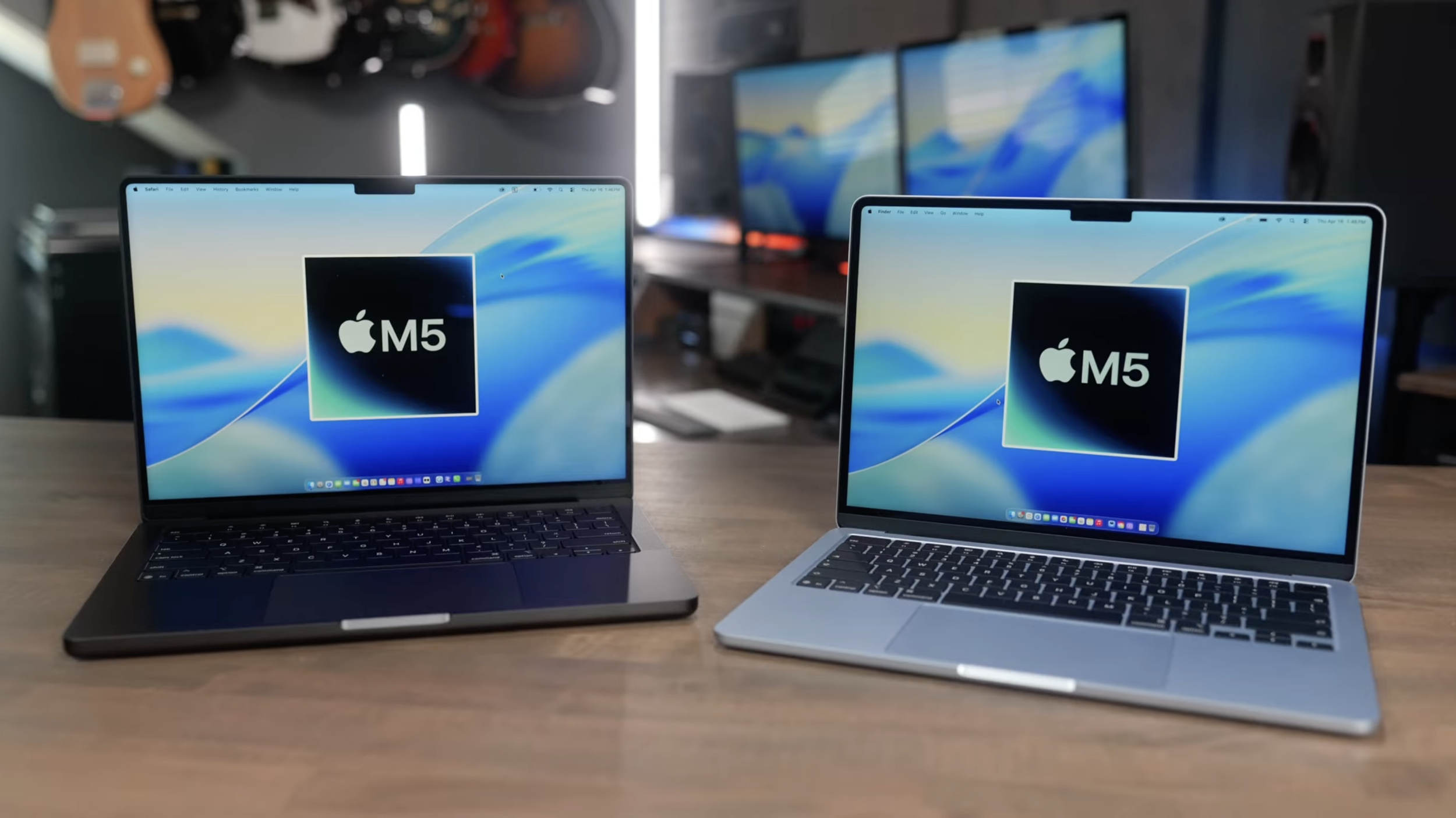
If your workload is mostly everyday productivity with occasional creative work, the M5 is probably enough.
Who Should Buy The M5 Pro MacBook Pro?
For most people running serious creative applications, the M5 Pro is the smarter buy. That is especially true if you work in:
Logic Pro
Xcode
Lightroom Classic
Blender
Local AI tools
Multi-display desk setups
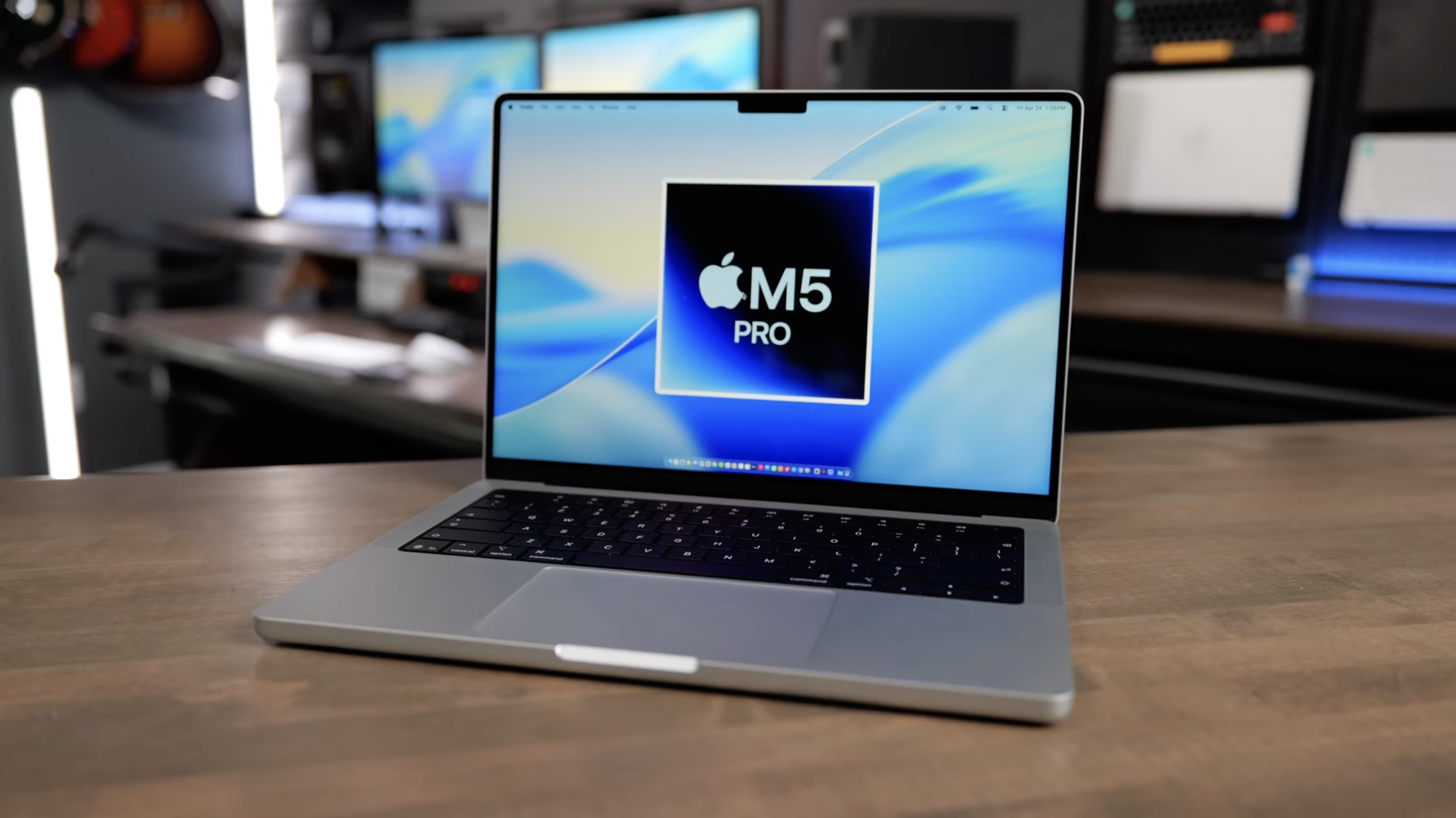
It was faster in every application tested. Not always double the speed, but always faster. And the added RAM, memory bandwidth, cooling, and Thunderbolt 5 support make it feel like a machine with more room to grow. That extra $500 is not just paying for benchmark numbers. It is paying for flexibility, better multitasking, stronger sustained performance, and a machine that is more likely to hold up well over a longer ownership period.
The Bottom Line
If you just want a MacBook Pro at the lowest possible price, the M5 MacBook Pro is perfectly good. If you want the best balance of performance, ports, RAM, and long-term value, the M5 Pro MacBook Pro is the better buy. That is really the key takeaway. The M5 is capable. The M5 Pro is the one that makes more sense for a lot more people, especially once creative work enters the picture. And if video exports are your main concern, it is worth knowing that the real leap comes when you move beyond the Pro tier and up to the Max. For everything else, the M5 Pro hits a really sweet spot in the MacBook lineup.
