Apple MacBook Pro Comparison: M4 Pro vs M5 Pro
Some of the links in this post are affiliate links, which means I may earn a small commission if you choose to make a purchase at no extra cost to you. As an Amazon Associate, I earn from qualifying purchases. Read my full Ethics & Affiliate Relationship Disclaimer.
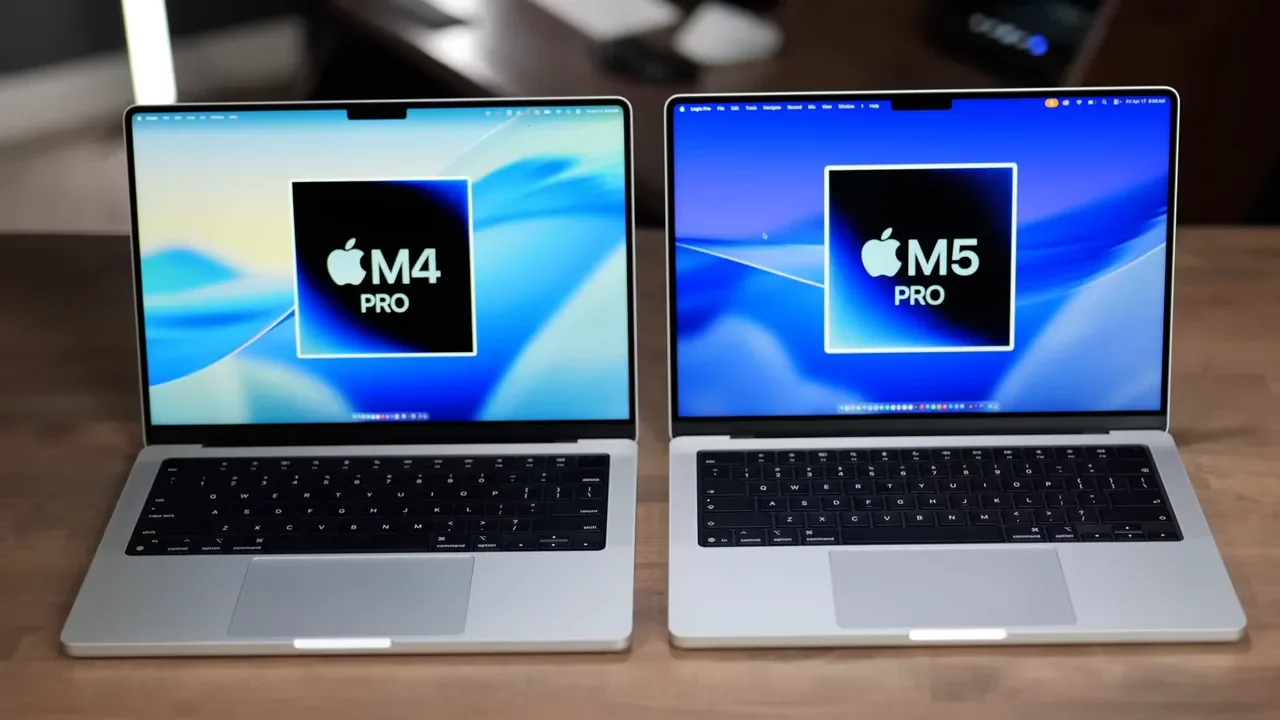
If you put the M4 Pro MacBook Pro and the M5 Pro MacBook Pro side by side, they look basically identical. Same chassis, same keyboard, same speakers, same excellent display, and the same choice of 14-inch or 16-inch sizes.
So the real question is not whether Apple redesigned the MacBook Pro. It didn’t. The question is whether the M5 Pro actually delivers meaningful performance improvements over the M4 Pro, and if those improvements matter in real work.
After comparing the stock configurations of both machines across AI, Xcode, Blender, Logic Pro, video editing, Lightroom, and synthetic benchmarks, the answer is pretty clear: the M5 Pro is better, but mostly in the way a good iterative upgrade is better. It is faster across the board, dramatically better for some AI tasks, and stronger in music production. But if you already own an M4 Pro, this is not the kind of generational leap that makes upgrading feel necessary.
The Hardware Differences Between M4 Pro and M5 Pro
At a physical level, not much changed. Apple kept the same overall MacBook Pro formula intact.
Same design
Same display quality
Same speaker system
Same keyboard and port layout
Available in both 14-inch and 16-inch models
If you are deciding between the 14-inch and 16-inch versions, the main difference is still size. The 16-inch also typically has better thermals, which can matter during long sustained workloads. But outside of that, this comparison is really about the chips and internal performance.
CPU and GPU Changes
The stock M4 Pro configuration tested here has a 12-core CPU. The stock M5 Pro bumps that up to a 15-core CPU. Both machines have 16 GPU cores.
The more interesting change is on the AI side. With the M5 generation, Apple added neural accelerators on every GPU core. The goal is to improve AI performance substantially, with Apple aiming for up to 4x improvement in some workloads.
That full 4x jump did not show up in every AI test, but this part is not just marketing. The M5 Pro clearly performs much better than the M4 Pro in local AI work.
SSD Speed Is One Of The Biggest Upgrades
This was one of the most dramatic hardware differences in the comparison.
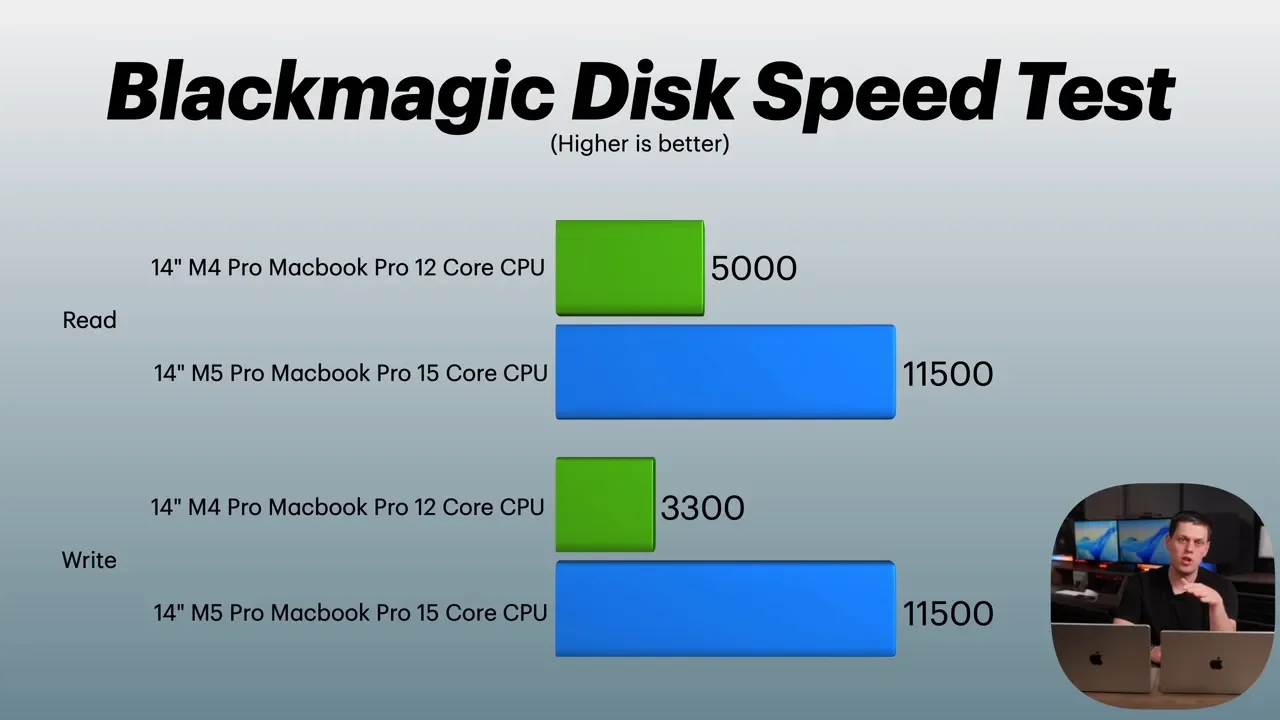
On the M4 Pro, SSD performance came in at roughly:
5,000 MB/s read
3,300 MB/s write
On the M5 Pro, that jumped to about:
11,500 MB/s read
11,500 MB/s write
That is a huge leap. For workflows that constantly hit storage, especially loading large media libraries, moving project files, or working with local models and cached assets, that extra SSD speed is a real quality-of-life improvement.
Storage and Pricing Changed Too
Apple also changed the base storage configuration with the M5 lineup. The M4 Pro MacBook Pro started with a 512GB SSD. The M5 Pro MacBook Pro now starts with a 1TB SSD.
That is a welcome upgrade, but it also changes the starting price. The M5 Pro starts at $2,200, while the M4 Pro started at $2,000 with the smaller SSD. So yes, you are paying more. But you are also getting double the storage at the base tier, along with the faster drive.
Memory Bandwidth and RAM Limits
Apple also increased the memory bandwidth on the M5 Pro.
M4 Pro: 273 GB/s
M5 Pro: 307 GB/s
That means the unified memory can move data faster between the CPU and GPU, which helps in workloads that rely on both. Both machines start with 24GB of RAM, but the maximums have changed:
M4 Pro max RAM: 48GB
M5 Pro max RAM: 64GB
If you are buying new and know you need more headroom for larger creative projects or heavier local AI work, that higher memory ceiling does make the M5 Pro more flexible.
Ports Stay The Same, Wireless Gets Better
The port selection is unchanged, which is a good thing. Both machines include:
Three Thunderbolt 5 ports
MagSafe charging
Headphone jack
HDMI
SD card slot
Where Apple did make a meaningful update is wireless connectivity. The M5 Pro includes Apple’s new N1 chip, which adds:
Wi-Fi 7
Bluetooth 6
That should translate to faster wireless speeds, better range, and lower energy use for Bluetooth connections.
Local AI Performance Is Where The M5 Pro Stands Out Most
If there was one area where the M5 Pro consistently separated itself from the M4 Pro, it was AI performance. That lines up with the new neural acceleration built into each GPU core, and the test results backed it up.
DiffusionBee Image Generation
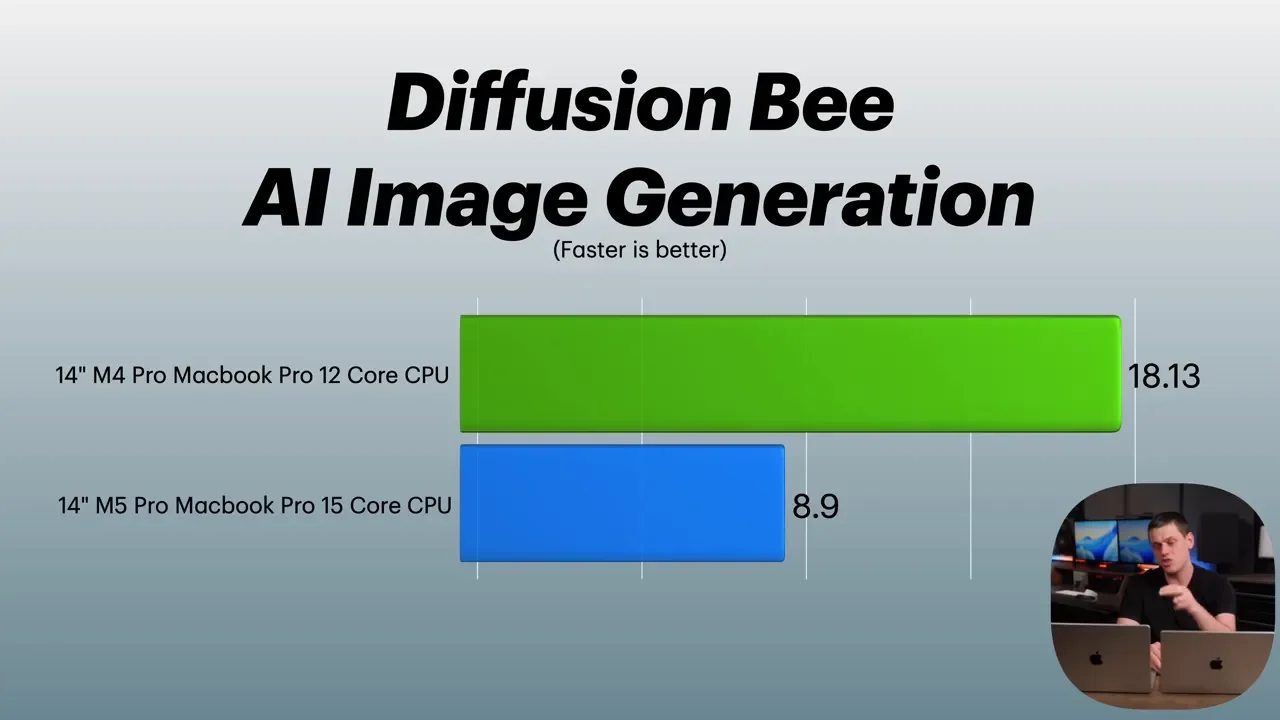
Using DiffusionBee to generate an image of a cat working on a laptop with nachos on the side, the time dropped from:
M4 Pro: 18.13 seconds
M5 Pro: 8.9 seconds
That is a major reduction in wait time and one of the clearest examples of the M5 Pro’s AI advantage.
LM Studio With Gemma
In LM Studio running Gemma, there were two key numbers to pay attention to: time to first token and tokens per second.
Time to first token improved from:
M4 Pro: 0.97 seconds
M5 Pro: 0.24 seconds
Tokens per second increased from:
M4 Pro: 84 tokens/second
M5 Pro: 96 tokens/second
The throughput gain is nice, but the time to first token improvement is the bigger deal in day-to-day use. It makes local AI feel more responsive because the system starts answering much faster.
Xcode and Blender Show Solid But Not Dramatic Gains
Outside of AI, the M5 Pro generally improved performance by the kind of margins you would expect from a one-generation chip update. Faster, yes. Revolutionary, no.
Xcode Benchmark
For the Xcode benchmark, compile time dropped from:
M4 Pro: 134 seconds
M5 Pro: 104 seconds
That is a very respectable improvement, especially for developers doing repeated builds every day.
Blender Rendering
Blender gains were more modest.
For the Classroom scene:
M4 Pro: 28 seconds
M5 Pro: 19.47 seconds
For the more intensive Barbershop scene:
M4 Pro: 3 minutes 41 seconds
M5 Pro: 3 minutes 11 seconds
That is better, but not game-changing. If 3D rendering is the center of your workflow, this is the kind of improvement you appreciate over time rather than instantly feel.
Logic Pro Is One Of The Strongest Reasons To Consider The M5 Pro
Music production was one of the most impressive parts of this comparison. In Logic Pro, the M5 Pro handled significantly more load before tapping out.
MIDI Channel Count
The number of simultaneous MIDI channels jumped from:
M4 Pro: 247 channels
M5 Pro: 340 channels
That is a substantial increase and a meaningful one for producers running big sessions with lots of instruments.
Project Exports
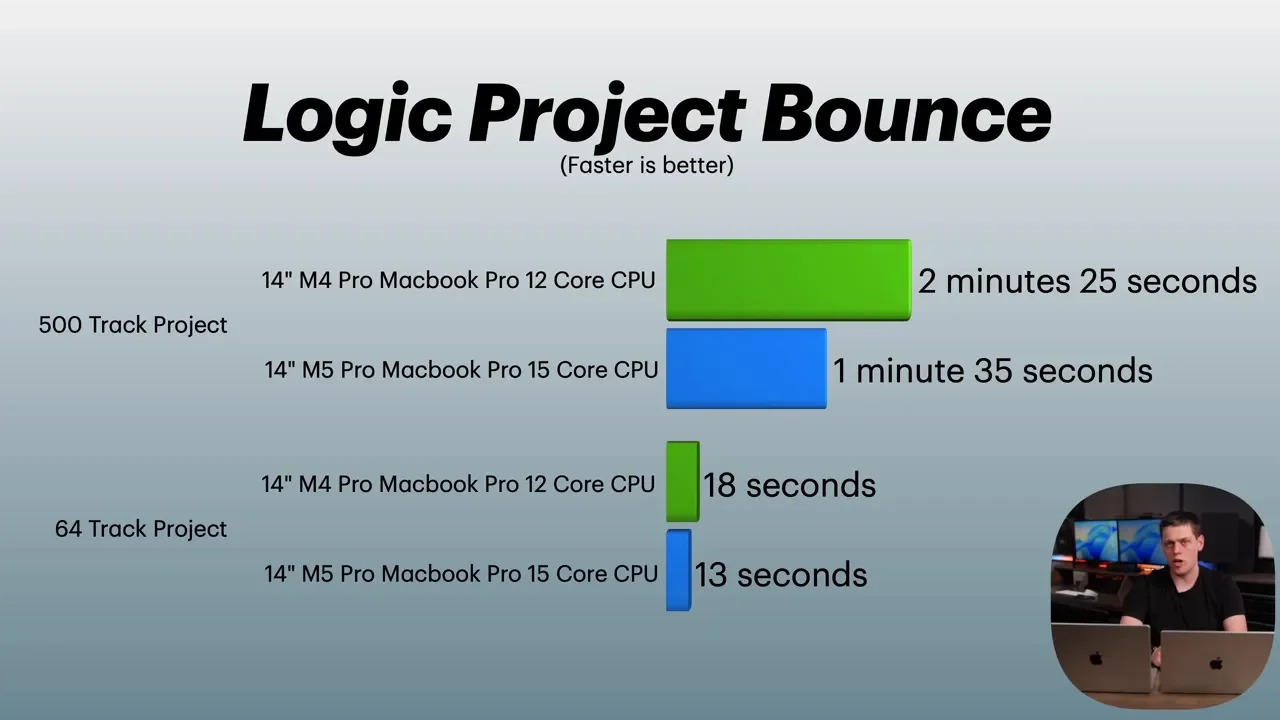
On a 64-track project, export time was fairly close:
M4 Pro: 18 seconds
M5 Pro: 13 seconds
But on a 512-track project, the gap widened more clearly:
M4 Pro: 2 minutes 25 seconds
M5 Pro: 1 minute 35 seconds
If your sessions are large and plugin-heavy, the M5 Pro offers a much more noticeable advantage than it does in some of the photo and video tasks.
Video Editing Feels Similar, With Better Export Times On The M5 Pro
For video editing, the day-to-day experience felt pretty close between the two machines. General editing, multicam work, and timeline responsiveness were solid on both. Neither machine felt like it was struggling. Where the M5 Pro pulled ahead was mostly in exports and certain accelerated effects.
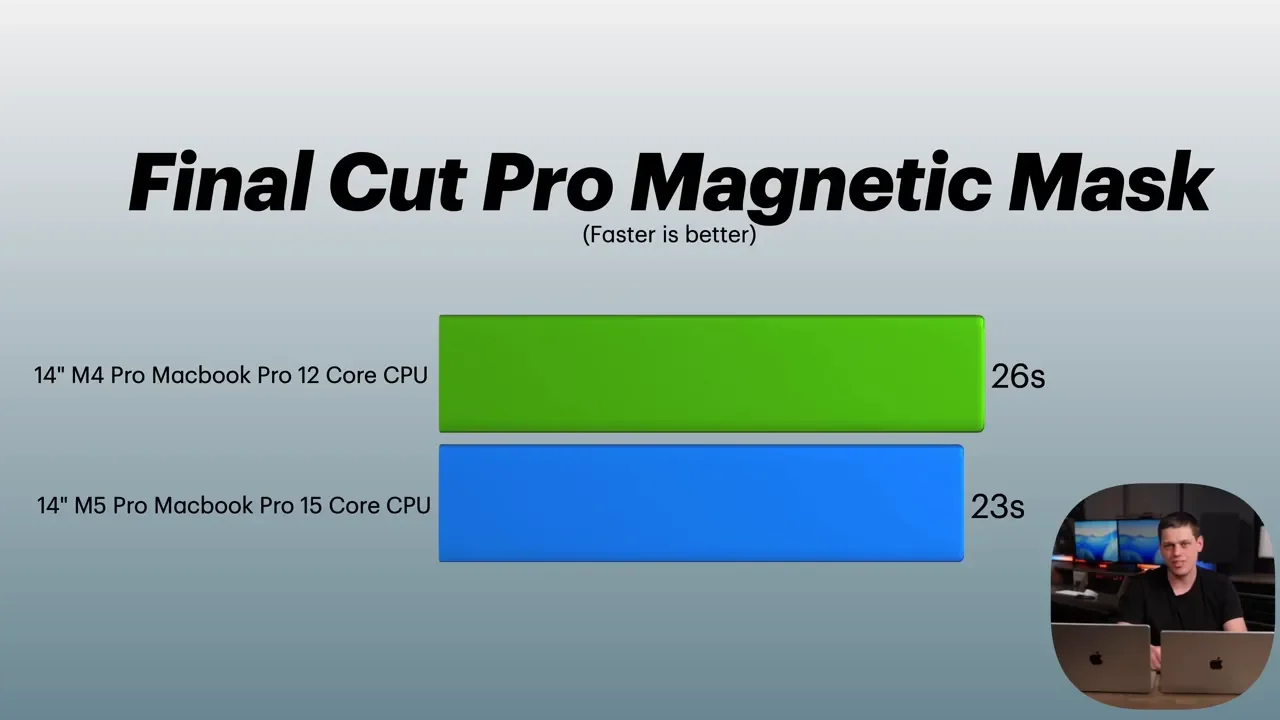
Magnetic Mask
Applying an 18-second Magnetic Mask took:
M4 Pro: 26 seconds
M5 Pro: 23 seconds
That is an improvement, but not a huge one.
4K Export and Longer Project Export
For a 3-minute 4K video export:
M4 Pro: 1 minute 35 seconds
M5 Pro: 1 minute 20 seconds
For a 30-minute project export:
M4 Pro: 15 minutes 4 seconds
M5 Pro: 12 minutes 40 seconds
That longer export starts to show the benefit more clearly. So if your workflow regularly involves delivering long-form edits, the M5 Pro does save real time. But for editing feel alone, these two are closer than the spec sheet might suggest.
Lightroom Classic Performance Is Very Close
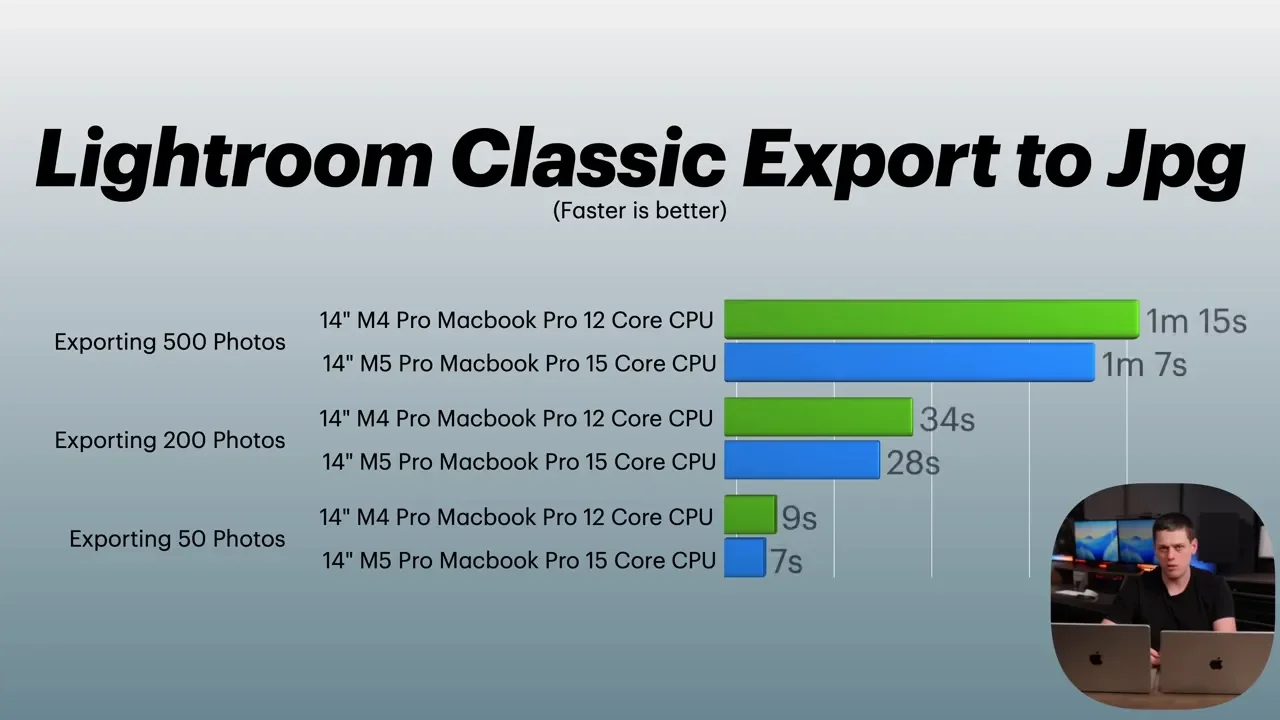
Photo editing was one of the least dramatic parts of the comparison. In Lightroom Classic, both machines felt about the same for normal interaction such as adjusting exposure and moving through the library.
Importing 500 RAW photos and creating initial previews took:
M4 Pro: 18 seconds
M5 Pro: 18 seconds
Exporting 50 photos to JPEG:
M4 Pro: 9 seconds
M5 Pro: 7.23 seconds
Exporting 200 photos to JPEG:
M4 Pro: 34 seconds
M5 Pro: 27 seconds
So yes, the M5 Pro is faster. But Lightroom is one of those applications where both machines are already so strong that the difference often feels minor.
Geekbench, Geekbench AI, and Cinebench Results
Synthetic benchmarks matched the broader pattern from the real-world testing.
Geekbench: very close overall
Geekbench AI GPU: significantly improved on the M5 Pro
Cinebench: marginally improved on the M5 Pro
That is exactly what this generation feels like in practice. The M5 Pro is not wildly faster at everything. It is simply better in targeted ways, with AI standing out the most.
Should You Upgrade From M4 Pro To M5 Pro?
If you already own an M4 Pro MacBook Pro, there is really no strong reason to upgrade to the M5 Pro. The M5 Pro is faster, and in some areas it is meaningfully faster. But this is still an iterative update, not a dramatic leap. The biggest benefits show up in:
Local AI tasks
Logic Pro and heavier music production workloads
SSD performance
Some longer exports and compile tasks
For most people already on M4 Pro, that is not enough to justify replacing a machine that is still extremely capable.
Why The M5 Pro May Be The Best Value In The Lineup
Even though it may not be worth upgrading from an M4 Pro, the M5 Pro still comes out looking very strong when compared with the rest of Apple’s Mac lineup. After testing the M5 Pro alongside machines like the M5 Max, M4 Max, and standard M4, the M5 Pro felt like the best balance of performance and price.
The Max chip is definitely more powerful, but it also costs quite a bit more. And in longer tests, throttling still showed up. In a lot of shorter tests, the M5 Pro and M5 Max were actually fairly close. That makes the extra cost of the Max harder to justify unless you truly need that additional headroom.
There was also an interesting point in the broader comparison: the M5 Max MacBook Pro was not doing dramatically better than an upgraded M4 Max Mac Studio in many cases. That makes the M5 Pro stand out even more as the smart buy for a lot of professional workflows.
Final Verdict
The M5 Pro MacBook Pro is a very good upgrade over the M4 Pro on paper and in real use. It brings:
More CPU cores
Much faster SSD performance
Better AI acceleration
Higher memory bandwidth
A higher RAM ceiling
Wi-Fi 7 and Bluetooth 6
And in testing, it delivered:
Big AI gains
Strong Logic Pro improvements
Better compile and export times
Modest gains in Blender, video editing, and Lightroom
But the upgrade story depends on where you are starting from. If you already have an M4 Pro, keep it and keep using it. It is still excellent. If you are buying a new MacBook Pro and want the best balance of price and real-world performance, the M5 Pro looks like the sweet spot in Apple’s current lineup.
