MacBook Neo Review (2026): Is Apple’s Cheapest Laptop Worth It?
Some of the links in this post are affiliate links, which means I may earn a small commission if you choose to make a purchase at no extra cost to you. As an Amazon Associate, I earn from qualifying purchases. Read my full Ethics & Affiliate Relationship Disclaimer.
For years, getting into the Mac world meant spending at least $1,000. That was just the reality. If you wanted macOS, the Apple ecosystem, and the polished hardware Apple is known for, you had to pay up.
The MacBook Neo changes that.
At $600, this is now the cheapest Apple laptop ever, and that makes it a really interesting product. It opens the door to iMessage on your laptop, Notes syncing instantly from iPhone to Mac, FaceTime, phone calls on your computer, AirPods handoff, and all the little ecosystem conveniences that make Apple devices work so well together.
But the big question is whether this is just a cheap Mac, or actually a good one.
The MacBook Neo’s Biggest Advantage: A Real Mac For $600
The most important thing about the MacBook Neo is that Apple did not turn this into some weird stripped-down pseudo-laptop. It runs full macOS. That matters a lot.
You are not dealing with the limitations of iPadOS. You are not stuck with mobile-first app compromises. You can use a real desktop browser, install Mac apps, manage files like a normal computer, and handle tasks that still feel awkward or impossible on an iPad.
If all you want is the cheapest way into Apple’s ecosystem without giving up the actual Mac experience, this is what makes the Neo compelling.
iMessage syncs with your phone
Notes move seamlessly across devices
Phone calls and FaceTime work right on the laptop
AirPods can switch between your phone and computer
macOS apps work the way they should
Design and Build Quality Feel Surprisingly Premium
The first thing that stands out with the MacBook Neo is that it does not feel cheap. Apple gave it a solid aluminum build, and in the hand it feels very close to a MacBook Air. It is also extremely light at 2.7 pounds, which is basically right in line with the Air.
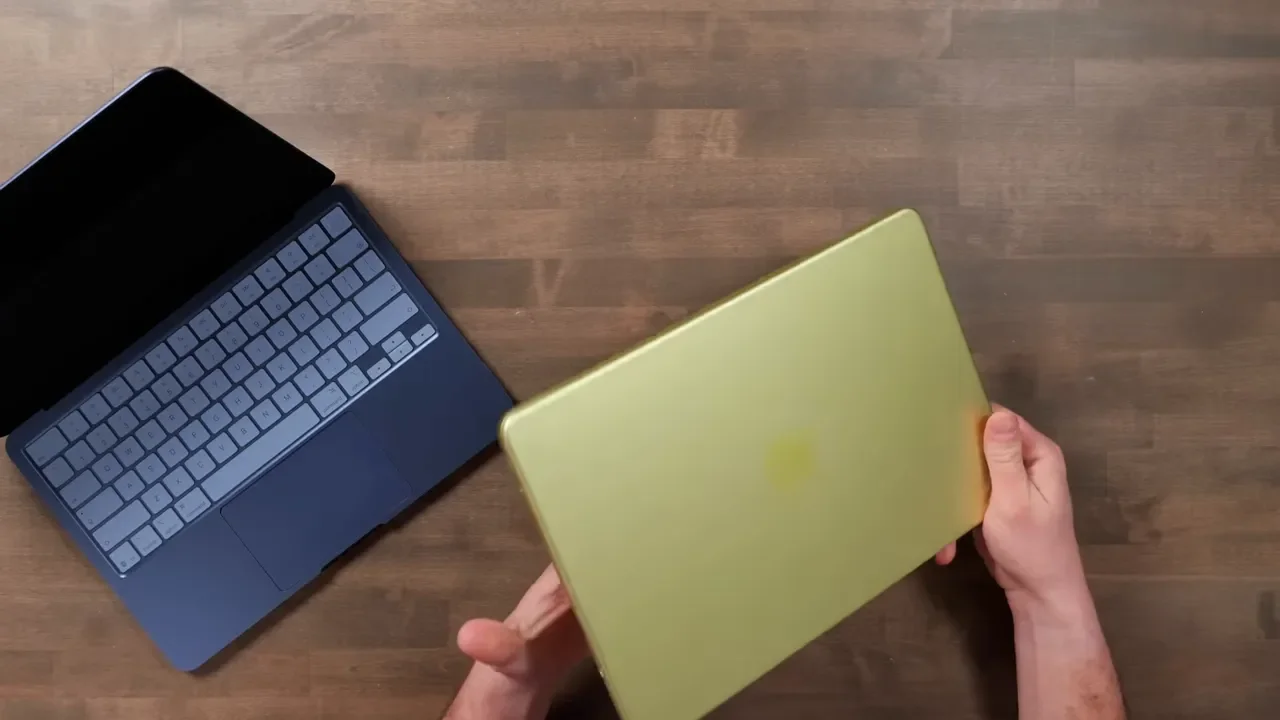
That matters because budget laptops often win on price and lose everywhere else. They feel plasticky, flex too much, or just do not have that solid, refined feel. The Neo does not have that problem.
Apple also made this lineup more fun than usual with the color options. Instead of only leaning on the usual silver and gray approach, you can get it in:
Silver
Indigo
Blush
Citrus
The silver gives you that classic Apple laptop look. The indigo looks especially sharp in person. And the citrus is one of those colors that shifts depending on the lighting. Sometimes it looks more yellow, sometimes green, and sometimes almost tan. It is a fun option if you want something that does not look like every other laptop in the coffee shop.
Display Quality: Good, But Not Quite Air Or Pro Level
The MacBook Neo has a 13-inch Retina display, and overall it is a pleasant screen to use. It is sharp, pixel-dense, and the colors still look accurate. That said, this is one of the areas where Apple clearly trimmed things to hit the lower price point.
The display is limited to sRGB rather than the wider P3 color gamut you get on other Macs. For many people, that will not matter much in day-to-day use. But if you do color-sensitive creative work, it is a difference worth knowing about.
Brightness tops out at 500 nits. That is perfectly usable, and in normal indoor use it should be totally fine. Even outside, it holds up better than you might expect. But if you are used to a MacBook Pro screen that can go much brighter, you will definitely notice the Neo looks dimmer side by side.
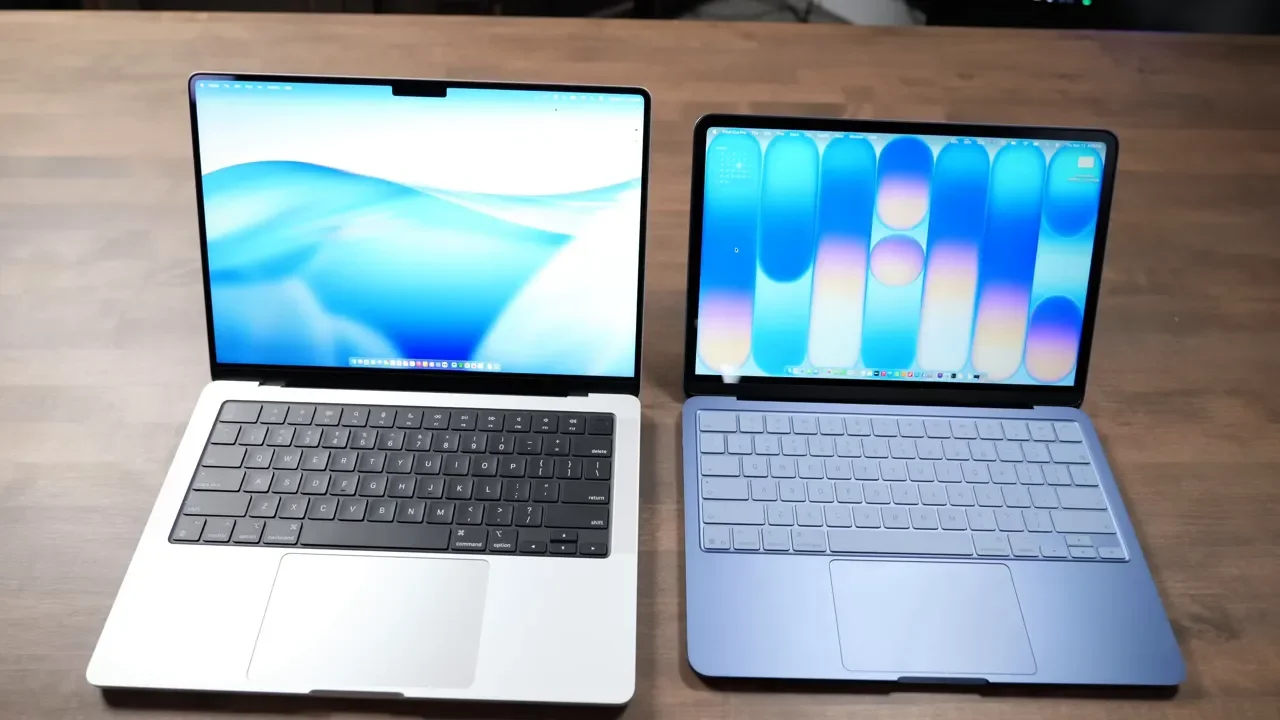
The display is also technically a bit smaller than the MacBook Air and noticeably smaller than a MacBook Pro, but in practical use it does not feel dramatically cramped. Apple did a good job keeping it comfortable for normal work.
Keyboard: Excellent Typing, A Few Odd Choices
The keyboard on the MacBook Neo feels very familiar if you have used a recent MacBook Air or MacBook Pro. It is fast, accurate, and easy to type on for long stretches. Apple also matched the lighter key colors well to the laptop body colors. That gives the keyboard a nice visual contrast and makes the keys stand out more while typing.
But, there are a few catches.
First, Apple removed keyboard backlighting. That was clearly a budget decision. Surprisingly, it is not as big of a problem as it sounds. In darker environments, the display provides enough spill light that the keys are still visible. Backlit keys are definitely nice to have, but this is not the feature most people are going to miss every day.
Second, Apple removed some of the word labels from certain keys. So instead of seeing words like Delete, Tab, Caps Lock, Shift, and Return, you mostly just get symbols. It gives the keyboard a more minimal look, and Apple has been moving in that direction on newer Macs anyway, but it is still an unusual design choice if you are used to traditional labeling.
The function row is well thought out, though. It gives quick access to things people actually use on macOS, including:
Screen brightness
App overview
Spotlight
Dictation
Do Not Disturb
Media controls
Touch ID Is Locked Behind The 512GB Model
This is one of the stranger product decisions with the MacBook Neo. If you buy the base 256GB version, you do not get Touch ID. If you want the Touch ID button, you have to buy the 512GB model.
That is a meaningful upgrade, because Touch ID makes the whole Mac experience faster. Logging in, unlocking saved passwords, and using Apple Pay all become much more convenient when you can just tap your finger instead of typing a password over and over.
For that reason alone, the upgraded version makes a lot of sense.
Trackpad: Mechanical Instead Of Force Touch
The MacBook Neo uses a mechanical trackpad rather than Apple’s Force Touch haptic trackpad found on more expensive MacBooks.
That means it physically clicks. You can feel the movement. It is a little louder than the haptic trackpads on the Air and Pro, and it takes a bit of adjustment if you are used to newer premium MacBooks.

Still, it works well. It is accurate, supports all the standard macOS gestures, and thankfully Apple still lets you turn on tap to click, which is important for a lot of people. So while it is not as refined as the trackpad on a MacBook Air or MacBook Pro, it is absolutely usable and still better than what you get on a lot of budget laptops.
Speakers Are Solid, Especially For The Price
Apple moved the speakers to the sides of the computer instead of placing them behind a front grille. You get one speaker on each side.
Audio quality is good overall. The speakers sound better than most iPads, though maybe not quite as good as an iPad Pro. They also sound fairly close to the MacBook Air.
The biggest thing missing compared to a MacBook Pro is bass depth. The Neo does not have that fuller, richer low end. But for music, calls, and casual media use, the speakers are more than acceptable.
Ports Are Limited, And One Of Them Is Much Slower Than The Other
All the MacBook Neo ports live on the left side. You get:
Two USB-C ports
3.5mm headphone jack

There is no MagSafe, no HDMI, no SD card slot, and no Thunderbolt. That is one of the main ways Apple differentiates this from the Air and Pro.
The port situation gets a little weirder when you look closer:
The top USB-C port supports USB 3 up to 10Gbps and works for DisplayPort output
The second USB-C port is limited to USB 2 speeds, around 480Mbps
So yes, technically the Neo has two USB-C ports, but they are not equally capable.
In testing, Thunderbolt docks still worked, but they simply throttled down to the slower speeds supported by the Neo. It can also connect to an external monitor, and although Apple does not position it as a 5K machine, it still worked with the Apple Studio Display by scaling output down to 4K.
For simple desk setups, that is honestly fine. For heavier workflows with fast SSDs, multiple displays, or high-bandwidth accessories, this is where the MacBook Air starts to justify its higher price.
RAM and Storage: The Biggest Compromises
If there is one area where Apple went too far in cutting costs, it is memory. The MacBook Neo comes with 8GB of RAM only. There is no RAM upgrade option. That feels especially odd because Apple has basically acknowledged in recent years that 16GB is the new normal for Macs. Even the MacBook Air now starts with 16GB. So locking the Neo to 8GB feels like a step backward.
In practice, the machine handles basic multitasking better than you might expect. macOS is still very good at memory compression, meaning it can shrink the footprint of inactive apps and keep things moving. During general multitasking with apps like Safari, Microsoft Teams, Final Cut Pro, and even Minecraft, memory use hovered around 80%.
But when workloads got heavier, the system started using swap memory, meaning it leaned on the SSD like extra RAM. That works, but it is slower and not ideal for sustained performance.
For casual use, it is manageable. For heavier use, you will feel the limit.
Storage Speed Is Also Slower Than Other Macs
The SSD in the MacBook Neo is noticeably slower than current MacBook Air and MacBook Pro models. Read and write speeds landed around 1300 to 1500MB/s, compared to roughly 5000MB/s on newer MacBook Air models.
In everyday use, that difference is not always dramatic. Apps still open quickly, and the machine reboots fast. But it is another reminder that this is not an Air replacement. It is a lower tier product.
One useful finding: the 512GB model was not meaningfully faster than the 256GB model. Performance between the two was basically the same in app launches and Final Cut exports.
Why The 512GB Model Is The Better Buy
The base 256GB MacBook Neo starts at $600. The 512GB version costs $700 and adds Touch ID. I think the extra $100 is worth it.
Here is why:
System data and stock apps already take up about 65GB
Messages and attachments start eating space quickly
Even cloud-heavy workflows still need local storage
Creative apps get large fast. Final Cut Pro alone is around 7GB
You also gain Touch ID, which meaningfully improves everyday usability
The A18 Pro Chip: Better Than Expected, But With Limits
The MacBook Neo runs on Apple’s A18 Pro chip, the same family of chip originally designed for the iPhone 16 Pro. At first glance, that might sound like Apple stuffed a phone chip into a laptop. And yes, in a sense, that is exactly what happened. But modern A-series chips have been wildly powerful for years, often more powerful than phones actually need.
The A18 Pro in the Neo includes:
6 CPU cores
6 GPU cores
16-core Neural Engine
That Neural Engine is there for Apple Intelligence features, even if Apple’s AI story still feels unfinished right now. Long term, it is likely going to matter more and more across the entire Mac lineup.
As for raw performance, the A18 Pro is not on the level of newer M4 or M5 chips. But it is still surprisingly capable. In fact, compared to the old M1 era, it holds up better than many people would expect.
The biggest compliment I can give it is this: in day-to-day use, I regularly forgot it was using an A-series chip at all.
Real-World Performance: Where The Neo Works And Where It Struggles
For normal productivity work, the MacBook Neo feels a lot like a MacBook Air.
That includes tasks like:
Editing a Squarespace site
Working in spreadsheets
Sending email
Using Microsoft Teams
Managing iMessage conversations
General web browsing

This is where the Neo makes the most sense. It is snappy, responsive, and fully capable for productivity work.
Light Gaming Is Possible
Minecraft ran well at stock settings, and the Neo could handle some casual gaming. Pushing settings higher increased CPU and RAM usage, so you are not buying this as a gaming machine, but it is capable of more than basic office tasks.
Video Editing Is Possible, But Only To A Point
The Neo can run Final Cut Pro, which is genuinely impressive for a $600 Mac laptop. In testing with a project containing multicam 6K clips, video effects, audio effects, and graphic overlays, a three-minute export took about 3 minutes and 45 seconds. That is not terrible at all.
But long-form export work is where things start falling apart. Because the MacBook Neo is fanless, it has limited thermal headroom. During long exports, the chip heats up, the system throttles performance, and everything slows down to stay cool.
A 30-minute 4K export was still only around 30% complete after 45 minutes, which tells you exactly who this machine is not for.
If you create:
Short-form clips
TikTok videos
Social media edits
Light creator content
the MacBook Neo can work.
If you edit:
Long podcast episodes
Long YouTube videos
Heavier professional productions
you should be looking at a MacBook Air, MacBook Pro, or a desktop Mac instead.
Battery Life and Charging
Apple rates the MacBook Neo for up to 16 hours of battery life. Realistically, that number feels optimistic.
In use, battery drain seemed a bit faster than on a MacBook Air. Still, battery life appears good enough for normal mobile work, and there is one upside to the smaller battery: it is easier to top off with external battery packs. With a larger 99Wh Anker battery, you can charge the Neo about three times, which makes it pretty appealing for travel or remote work.
Apple includes a 20W charger and a 1.5-meter USB-C cable in the box. The Neo can charge at up to 30W if you use a higher-wattage third-party charger, so there is room to speed charging up a bit if you want.
Webcam Quality Is Surprisingly Strong
One thing the MacBook Neo does really well is video calls. The built-in webcam is better than you might expect for a lower-cost laptop, and that matters because so many people still rely on web calls every day. A lot of people are using laptops with terrible microphones and muddy cameras, so good call quality is actually a meaningful advantage.
You also get Apple’s built-in camera effects, including:
Portrait mode for background blur
Studio lighting
Apple background effects
Solid color backgrounds
If your work revolves around Zoom, Teams, FaceTime, or similar tools, this is a nice benefit.
You Can Use It As A Simple Desktop Setup Too
The MacBook Neo is clearly designed first as a laptop, but it can still function as a basic desktop machine.
You can pair:
Bluetooth keyboard and mouse
One external monitor
A dock for power and display output through a single port
It officially supports up to 4K external resolution, and even the Studio Display worked fine as long as you are okay with it not running at full 5K. That means the Neo can absolutely be a simple desk computer for email, web apps, meetings, and writing.
MacBook Neo vs iPad: Which One Makes More Sense?
This is one of the most interesting comparisons. Over the last few years, iPads with keyboard cases have gotten closer and closer to replacing laptops for some people. But they still run into software limitations that can be frustrating, especially if you want a true desktop workflow. That is where the MacBook Neo gets really appealing.
Consider the pricing:
An iPad A16 plus keyboard case gets you surprisingly close to Neo pricing
An iPad Air plus Magic Keyboard puts you closer to $900
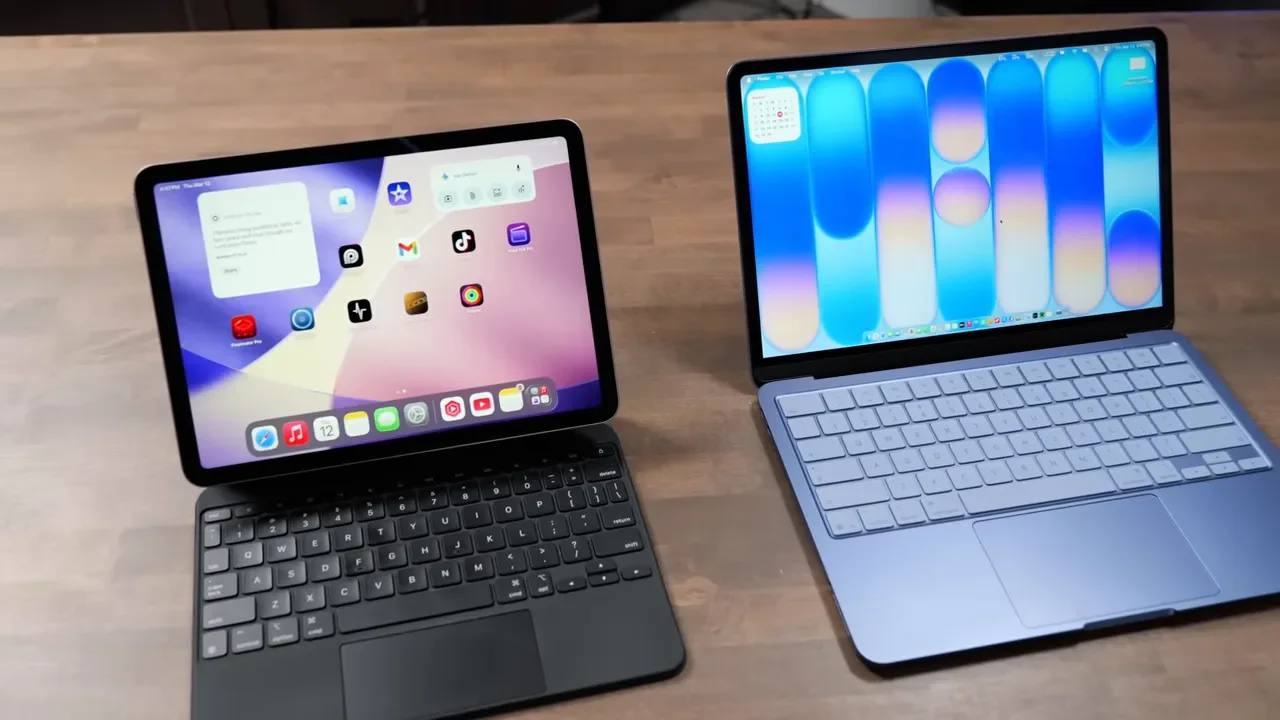
Yes, the iPad Air and iPad Pro give you a touchscreen, and their displays are technically better. If you are an illustrator or you rely on Apple Pencil for handwritten notes, the iPad still makes a lot of sense. But for everyone else, I still think macOS is the bigger win.
The MacBook Neo avoids the strange software limitations that still show up on iPadOS. If you need to use desktop-style apps, manage more serious workflows, or edit websites and web tools that simply work better on a Mac, the Neo is the better value.
MacBook Neo vs MacBook Air and MacBook Pro
The MacBook Neo is not meant to replace the Air or Pro. It is meant to create a cheaper entry point beneath them.
What You Miss Compared To The MacBook Air
No Thunderbolt ports
No MagSafe charging
Less RAM
Slower SSD
Less capable sustained performance
Slightly weaker display
Slightly shorter battery life
Thunderbolt is especially useful if you want fast external SSDs, more display bandwidth, or more capable docking setups. MagSafe also matters more than it sounds if you work plugged in at a desk and do not want your laptop yanked to the floor by a charging cable.
What You Miss Compared To The MacBook Pro
No HDMI
No SD card slot
One fewer USB port
Far less sustained performance
Weaker speakers and display
Apple’s battery estimates also reflect the difference:
MacBook Neo: up to 16 hours
MacBook Air: up to 18 hours
MacBook Pro: up to 20 hours
The bigger distinction, though, is not just hardware. It is workload. The Neo can run Mac apps for casual use. The Pro is built to run Mac apps for professional use under sustained load. That is the real dividing line.
Who Should Actually Buy The MacBook Neo?
This laptop has a very clear audience, and if you fit into one of these categories, it honestly makes a lot of sense.
1. Students
This is one of the best use cases for the Neo.
It is lightweight, reasonably capable, runs all the standard Apple and web-based tools, and works well for school portals, papers, note-taking, browsing, and light creative apps. It can even handle tools like Logic Pro, Final Cut Pro, and Photoshop at a basic level if you are still learning.
2. Writers And Productivity-Focused Users
If your day revolves around email, notes, Word, Pages, Excel, spreadsheets, and browser-based work, the MacBook Neo is a great fit. For office work and productivity, this machine is right in its comfort zone.
3. People Who Want The Cheapest Way Into macOS
If you have never owned a Mac and want to learn macOS without spending a fortune, this is a very approachable entry point. You get the real Mac experience, and if your needs grow later, you can always trade up to a MacBook Air or Pro.
4. Casual Creators
If your creative work is mostly Canva, CapCut, short-form videos, simple edits, or web-based creation tools, the Neo can absolutely handle that. Just do not buy it expecting heavy professional production performance.
5. People Who Need A Backup Or Secondary Mac
This is one of the smartest reasons to buy the Neo. If your main machine is a MacBook Pro, MacBook Air, Mac Studio, or another desktop Mac, the Neo makes a great backup. It can handle most tasks if your primary computer goes down, and it is also useful as a lightweight second machine for email, messaging, notes, and remote work.
6. Frequent Travelers And Coffee Shop Workers
Because it costs less, the MacBook Neo is the kind of laptop you can toss in a bag and worry about a little less. That is not to say you should be careless with it. But if you have ever used a $3,000 laptop in public and constantly worried about spills, drops, or theft, there is something refreshing about having a more affordable mobile machine.
7. People Doing Lots Of Online Meetings
Between the lightweight design, decent battery life, good webcam, and built-in Apple camera features, the Neo is a strong option for Zoom and Teams-heavy workflows.
Who Should Skip It?
The MacBook Neo is easy to recommend for the right person, but there are also clear cases where it is the wrong tool.
You should probably skip it if you:
Do heavy video editing
Need sustained professional performance
Regularly work with large creative projects
Need more than 8GB of RAM
Rely on Thunderbolt accessories
Need multiple high-resolution displays
Want maximum battery life and port flexibility
If that sounds like you, spending more on a MacBook Air or MacBook Pro will save frustration later.
Final Verdict: A Great Budget Mac, Not A MacBook Air Killer
The MacBook Neo is not trying to be the best Mac. It is trying to be the most accessible Mac, and on that front, it succeeds.
For $600, you get:
A real Mac running full macOS
A premium-feeling aluminum build
Great Apple ecosystem integration
A solid keyboard and usable trackpad
A good display
Strong basic productivity performance
A genuinely useful option for students, office users, and secondary-machine buyers
The compromises are real though.
Only 8GB of RAM
Slower SSD
Limited ports
No MagSafe
No Thunderbolt
Weak sustained performance for longer heavy tasks
Touch ID locked behind the higher storage model
So no, this is not a MacBook Air replacement. It is a new lower tier in the Mac lineup. And honestly, that is fine. If your workload is basic to moderate, the MacBook Neo is one of the most interesting Apple products in a long time. It lowers the barrier to entry for macOS in a way Apple has not really done before, and for a lot of people, that will be more important than having the fastest chip or the brightest display. If your work is mostly writing, school, meetings, email, web apps, cloud tools, and general productivity, this little machine could be a home run.
