M5 Pro Vs M5 Max for Video Editing: Which MacBook Pro Is Better for Final Cut Pro?
Some of the links in this post are affiliate links, which means I may earn a small commission if you choose to make a purchase at no extra cost to you. As an Amazon Associate, I earn from qualifying purchases. Read my full Ethics & Affiliate Relationship Disclaimer.
The M5 Pro and M5 Max MacBook Pros are both seriously good video editing machines. If all you want is a simple answer, here it is: both are excellent in Final Cut Pro, but the M5 Max mainly earns its higher price through faster exports, not a dramatically better editing experience.
That distinction matters a lot, because for many people these two machines will feel almost identical most of the time. The real question is whether your workflow actually benefits from what the M5 Max does better.
What Actually Separates the M5 Pro and M5 Max?
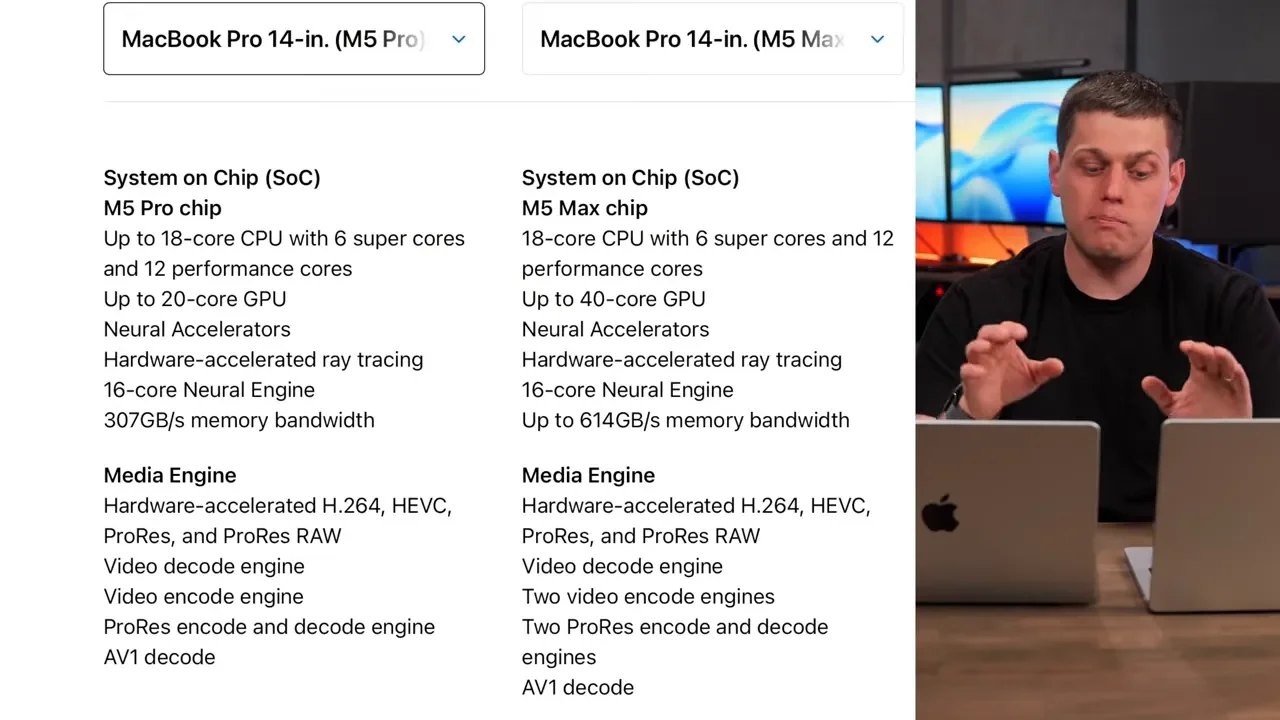
For normal day-to-day use outside of video editing, these computers are very close. CPU performance is similar enough that general tasks are not where the difference shows up. The bigger split is on the GPU side, and more importantly for video editors, in the dedicated media engines built into the chips.
M5 Pro: 1 video encode engine and 1 ProRes encode/decode engine
M5 Max: 2 video encode engines and 2 ProRes encode/decode engines
On paper, that means the M5 Max can deliver export speeds up to twice as fast in the right workflows, especially if you are working with ProRes or HEVC footage. Both chip families also have different binning options. The base configurations use the lower-tier chip versions, while more expensive configurations unlock more GPU cores. That matters, but for Final Cut Pro the media engine advantage is the bigger story.
How They Feel in Real Final Cut Pro Editing
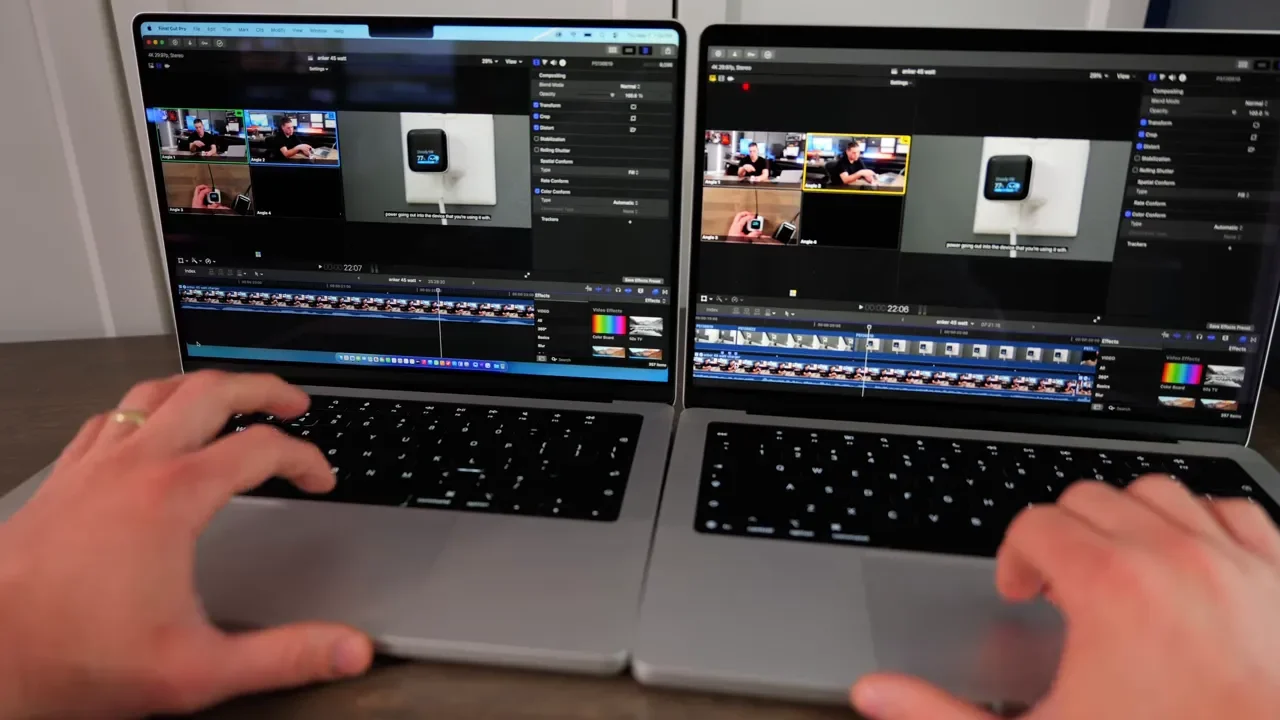
The first thing that really matters is not benchmarks. It is whether editing actually feels faster. Testing with multicam projects using three Open Gate 6K clips from Lumix S1 II cameras in Final Cut Pro, both machines handled timeline skimming and editing extremely similarly. This was with better quality enabled, the multicam clip viewer open, and the main viewer open as well.
That is a demanding setup, and the result was pretty clear: both machines felt nearly the same while editing. Even the little moments that can expose a slower machine, like pausing after a cut and waiting for audio waveforms and video thumbnails to reappear, were almost identical. The M5 Max may have rendered those clips a tiny bit faster, but not by enough to change the overall experience. If your biggest concern is timeline responsiveness, multicam editing, or the basic feel of cutting footage in Final Cut Pro, the M5 Pro holds up extremely well.
Other Final Cut Tasks Were Basically The Same
This same pattern showed up in other common Final Cut tasks too. For example, running the Magnetic Mask on an 18-second clip took the exact same amount of time on both the M5 Pro and the M5 Max. That is a good reminder that the more expensive chip does not automatically make every editing task feel faster. In a lot of practical use, Final Cut Pro performance is more balanced than the pricing might suggest.
If your editing process is mostly:
cutting timelines
working with multicam footage
adding titles and effects
doing occasional masking or cleanup
Then the M5 Pro does not feel like a compromised machine.
Where The M5 Max Pulls Ahead: Export Speeds
The area where the difference becomes obvious is exporting. One test used a 3-minute project with a mix of titles, audio effects, and adjustment clips.
M5 Pro: 1 minute 20 seconds
M5 Max: 52 seconds
That is a meaningful improvement, even if it is not quite double. A longer 30-minute 4K export made the gap even more noticeable:
M5 Pro: 12 minutes 40 seconds
M5 Max: 8 minutes 16 seconds
The pattern here is important. The longer the export, the more valuable the M5 Max becomes. That extra hardware for video encoding and ProRes processing starts paying off more and more when export times stack up throughout the day.
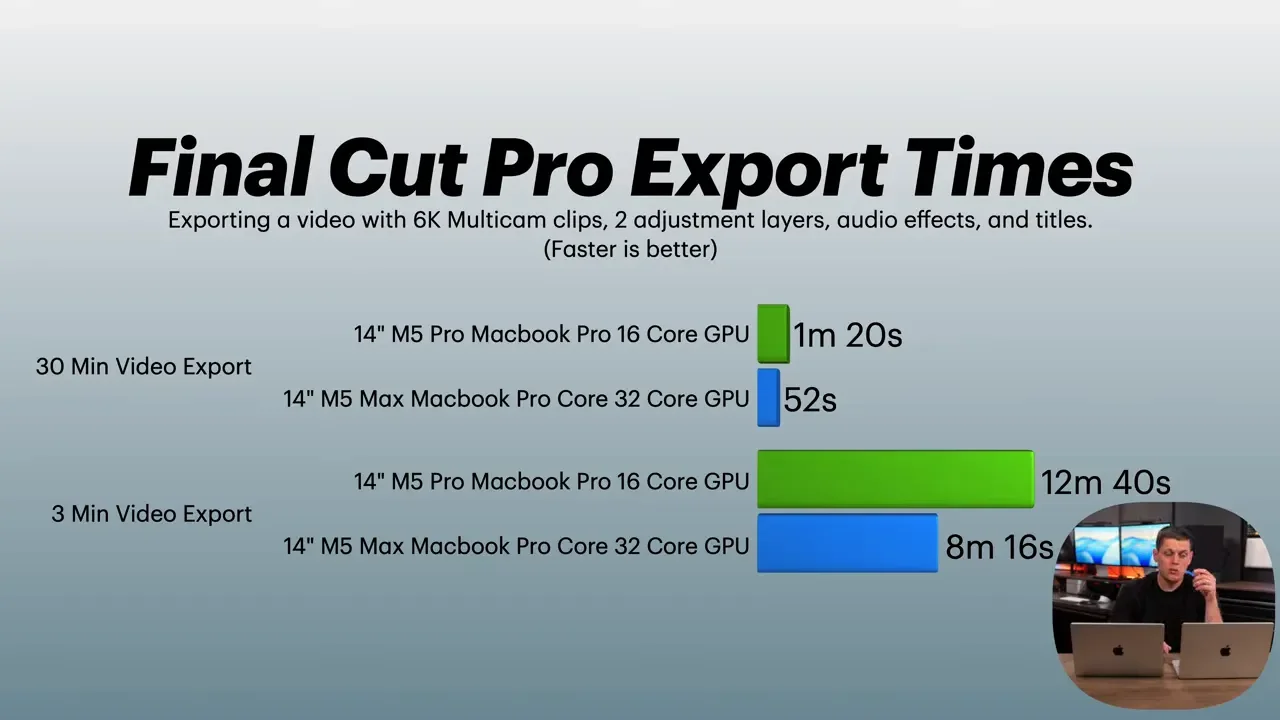
So yes, the M5 Max is faster for exports, but it is not automatically giving 2x speed across every project. That kind of scaling is most likely when your workflow leans heavily on ProRes or HEVC.
Storage and SSD Speed Differences
Storage is one of the most practical differences between these machines.
M5 Pro starts with: 1TB SSD
M5 Max starts with: 2TB SSD
For video editing, that matters more than it might seem at first. Having 2TB internally makes it much easier to keep active projects, libraries, cache files, and footage on the laptop without constantly juggling an external drive.
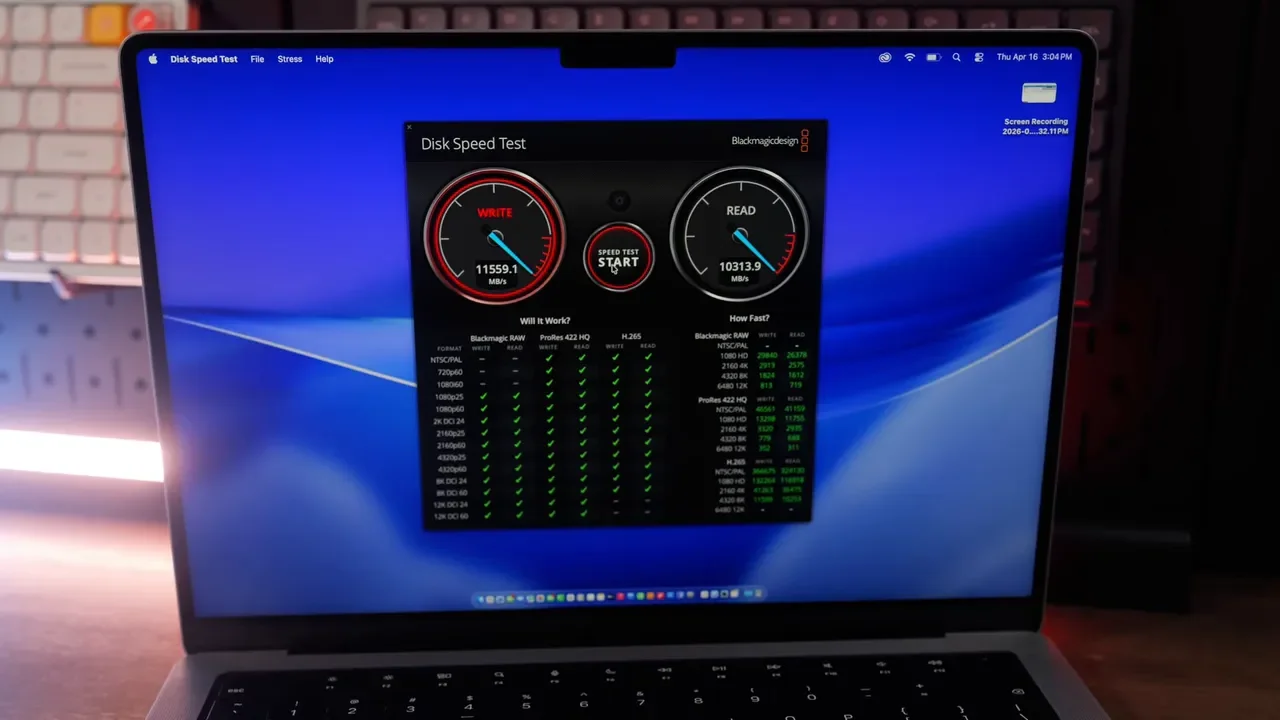
That convenience is even better because both machines have incredibly fast internal storage, with SSD speeds around 11,500 MB/s. That is among the fastest internal storage ever offered in a Mac, and it helps keep footage import, cache generation, and general project handling feeling snappy. If you know from the start that you want a 2TB internal drive, the M5 Max becomes more tempting simply because it already includes it.
RAM: Good Starting Points, But Upgrades Get Expensive Fast
Memory is another area where the base configurations differ:
M5 Pro starts with: 24GB unified memory
M5 Max starts with: 36GB unified memory
That said, 36GB on the M5 Max may feel a little underwhelming considering the price jump. It is usable, but it is not a huge leap for a machine positioned as the higher-end option.
Upgrading RAM can make a real difference when you:
multitask heavily between apps
keep lots of browser tabs and background tools open
work with more layers and heavier timelines in Final Cut Pro
More memory helps prevent slowdowns when your system is under pressure. The catch is that increasing RAM also pushes you into more expensive configurations, and in these models that can force you into a higher-tier unbinned chip as well. That can be nice for performance, but it also means the upgrade path gets expensive quickly.
Pricing Changes The Conversation
This is where the buying decision gets tricky. The pricing discussed for these configurations breaks down like this:
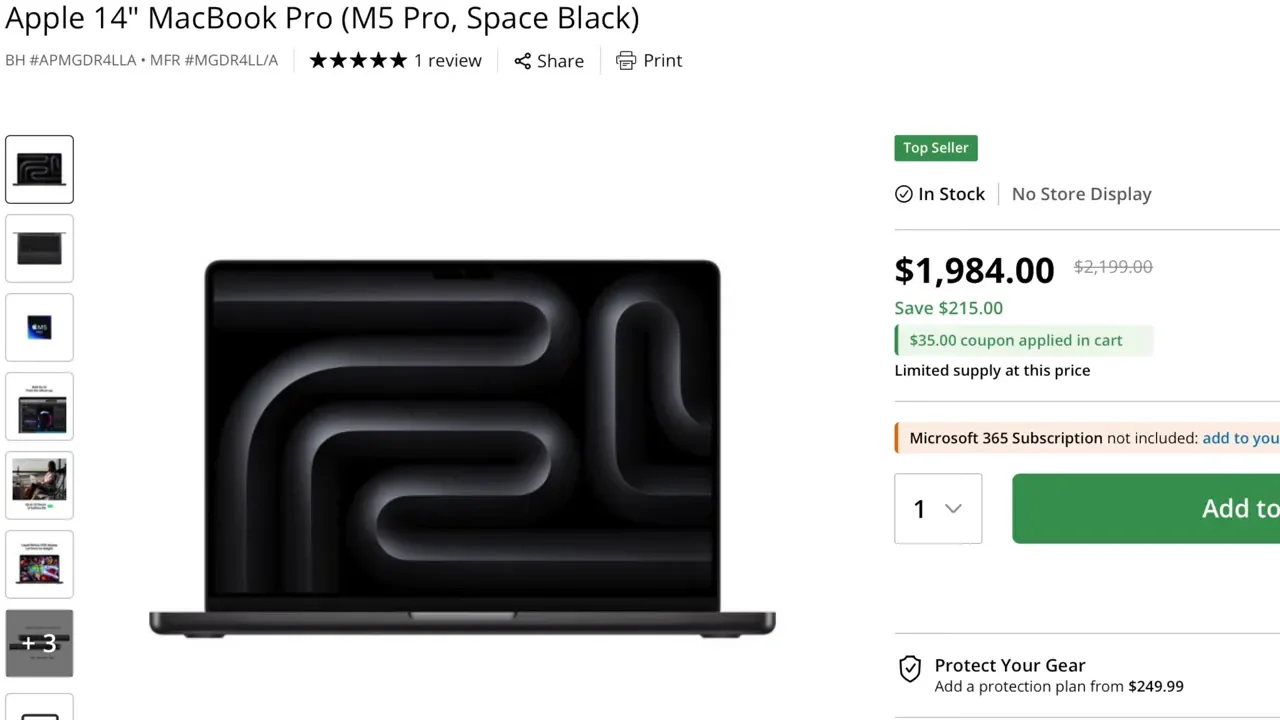
M5 Pro starts at: $2,200
M5 Pro sale pricing at B&H: about $1,950
M5 Max starts at: about $3,850
At around $1,950 on sale, the M5 Pro looks like an incredible value. Honestly, it is hard not to see that as one of the best MacBook Pro deals available for video editing. But once you start customizing the M5 Pro, the picture changes.
If you upgrade the M5 Pro to a better chip and 48GB of RAM, the price climbs to around $2,800. If you go to 64GB of RAM, you are closer to $3,000. At that point, you are only about $850 below the M5 Max, and then the natural question becomes: should you just buy the M5 Max instead? That is why the M5 Pro is easiest to recommend in its lower-priced configurations. Once you heavily upgrade it, the value advantage starts shrinking.
Who Should Buy The M5 Pro?
The M5 Pro makes the most sense if you want a machine that is:
excellent in Final Cut Pro
very close to the M5 Max in everyday editing feel
far more affordable, especially on sale
ideal for people not constantly exporting huge batches of content
If you edit a few videos per day, or even a few per week, and you are not spending all day exporting, the M5 Pro is probably the smarter buy. It still handles multicam editing, 6K footage, masking tasks, and general Final Cut work extremely well. For a lot of editors, that is all that really matters.
Who Should Buy The M5 Max?
The M5 Max is easier to justify if your workflow is built around volume. It makes more sense if you:
export a lot of videos every day
batch content regularly
re-export projects often after review changes
work heavily in ProRes or HEVC
want the built-in 2TB SSD
When you are exporting constantly, those time savings stop feeling small. Shaving seconds or minutes off every export adds up over the course of a day, then a week, then a year. That is really the best argument for the M5 Max. It is not necessarily about making editing feel radically different. It is about reducing the waiting.
A Note About The 14-Inch M5 Max
There is one more practical detail worth considering: thermals. Testing was done on the 14-inch versions, and there have been reports of thermal throttling on the 14-inch M5 Max. That suggests the chip may be powerful enough that the smaller chassis cannot always cool it as effectively as it should.
The larger 16-inch MacBook Pro has advantages here:
larger fans
more surface area
better heat dissipation
If you are set on getting the M5 Max, it is worth seriously considering the 16-inch model so you can get more consistent sustained performance and potentially better export times.
The Real Buying Decision
After using both side by side, the biggest takeaway is pretty simple: For most editing work, the M5 Pro and M5 Max feel almost the same. The M5 Max does not suddenly make Final Cut Pro feel like a different class of machine for normal timeline work. Its real advantage shows up when you hit export, especially on longer or more codec-intensive projects.
So the decision comes down to two questions:
Do you want 1TB or 2TB of internal storage?
How much time do you spend exporting every day?
If you need the bigger SSD and you export a lot, the M5 Max is easier to justify. If you want the best value and you care more about editing performance than shaving every possible minute off exports, the M5 Pro is the better buy.
Final Verdict
If I were buying strictly based on value, the M5 Pro would be the easy recommendation. At under $2,000 on sale, it delivers an impressive amount of performance for Final Cut Pro. If I were buying based on my own workflow and I knew I would be editing and exporting a high volume of content constantly, I would probably spend more for the M5 Max, mainly because all those export time savings add up. That is really what this comparison comes down to. The M5 Pro is the better value. The M5 Max is the better time-saver.
