ESR Shift Review: The iPad Keyboard Case That Keeps Your iPad an iPad
Some of the links in this post are affiliate links, which means I may earn a small commission if you choose to make a purchase at no extra cost to you. As an Amazon Associate, I earn from qualifying purchases. Read my full Ethics & Affiliate Relationship Disclaimer.
The ESR Shift is one of the more interesting iPad keyboard cases I’ve used because it solves a problem a lot of keyboard cases create. Most of them turn your iPad into a laptop style setup, which is great until you want to take the iPad off and actually use it like an iPad again. This one takes a different approach.
You still get protection, a keyboard, a trackpad, and a pretty solid typing experience, but you also get a detachable design that makes the whole setup much more flexible. If you want an iPad case that can handle typing, drawing, portable use, and even the occasional presentation setup, this is a strong option. It is not perfect, but it does a few things better than almost anything else in this category.
Table of Contents
What Makes The ESR Shift Different
The biggest thing that sets the ESR Shift apart is how much freedom it gives you. The case wraps fully around the iPad, so you are getting real protection instead of just a keyboard that happens to hold the tablet. Then, when it is time to work, you open it up, flip out the kickstand, and you are ready to go. That sounds normal so far, but the keyboard is detachable. That changes the whole experience.
With a lot of iPad keyboard cases, if you remove the iPad from the keyboard, you are just left holding the bare tablet. Here, the iPad stays protected in its case even when the keyboard is off to the side. That means you can:
Use the iPad handheld without removing the case
Set the keyboard aside and keep typing from a distance
Use the stand by itself for drawing or reference
Switch between tablet mode and keyboard mode much more easily
That one design decision gives this case way more versatility than the usual all-in-one keyboard case.
Protection And Everyday Usability
One of the first things I like about this case is that it actually feels protective. Since it surrounds the iPad instead of just attaching magnetically like some premium keyboard accessories, it does a better job of covering the device when you toss it in a bag or carry it around.
It is also easy to set up. Open the cover, unfold the kickstand, and snap the keyboard into place if you want it attached. The magnets on the keyboard are strong enough that it stays put when you need it to, but it is still simple to pull off intentionally. That balance matters. A detachable keyboard is only useful if it is secure when attached and easy when detached. ESR got that right here.
Portrait Mode Is Genuinely Useful
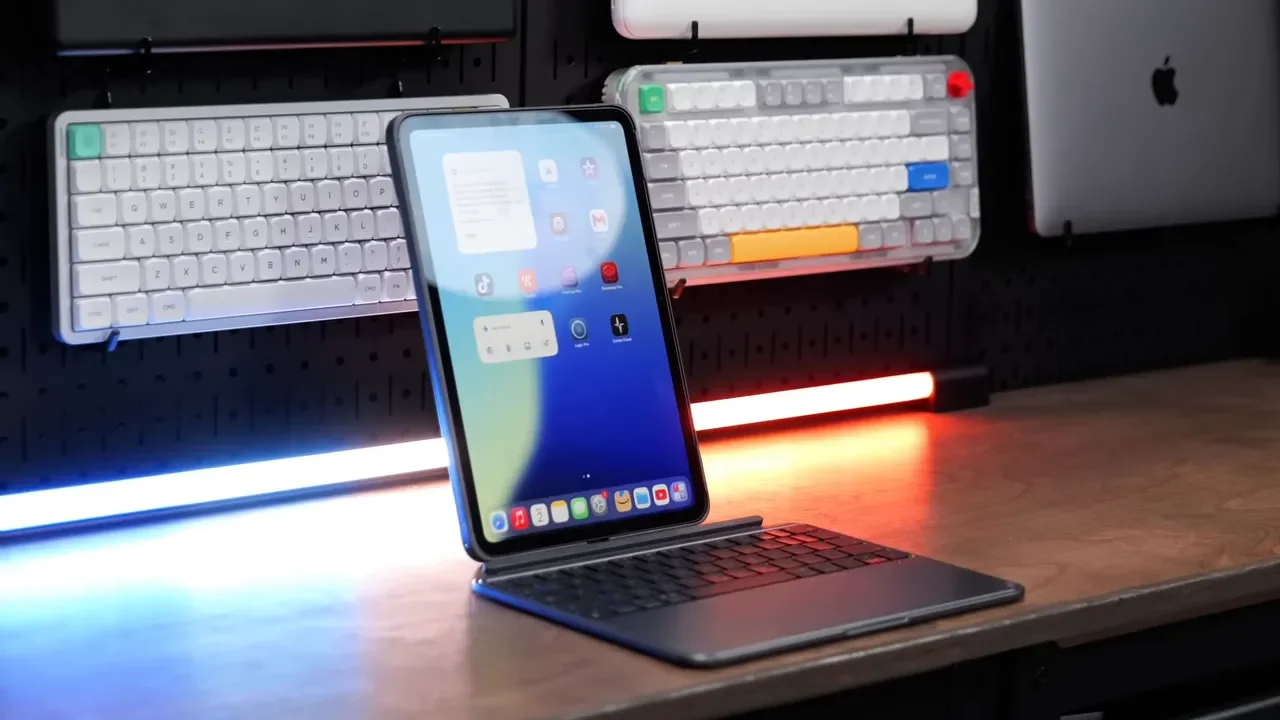
There is a small detail in the stand design that turns out to be one of the coolest features of this case. The back has a notch cut into the stand, and at first it seems a little odd. Once you use it, the reason becomes obvious. It lets you stand the iPad up in portrait orientation.
That opens up some useful workflows. Portrait mode works great for:
Writing and editing documents
Reading longer webpages or PDFs
Using apps that feel more natural vertically
Keeping the iPad farther away while the keyboard stays close
Because the keyboard is Bluetooth and detachable, you are not forced into a cramped layout just to use portrait mode. You can place the iPad where it makes sense and keep the keyboard where it is comfortable.
A Kickstand I Actually Like
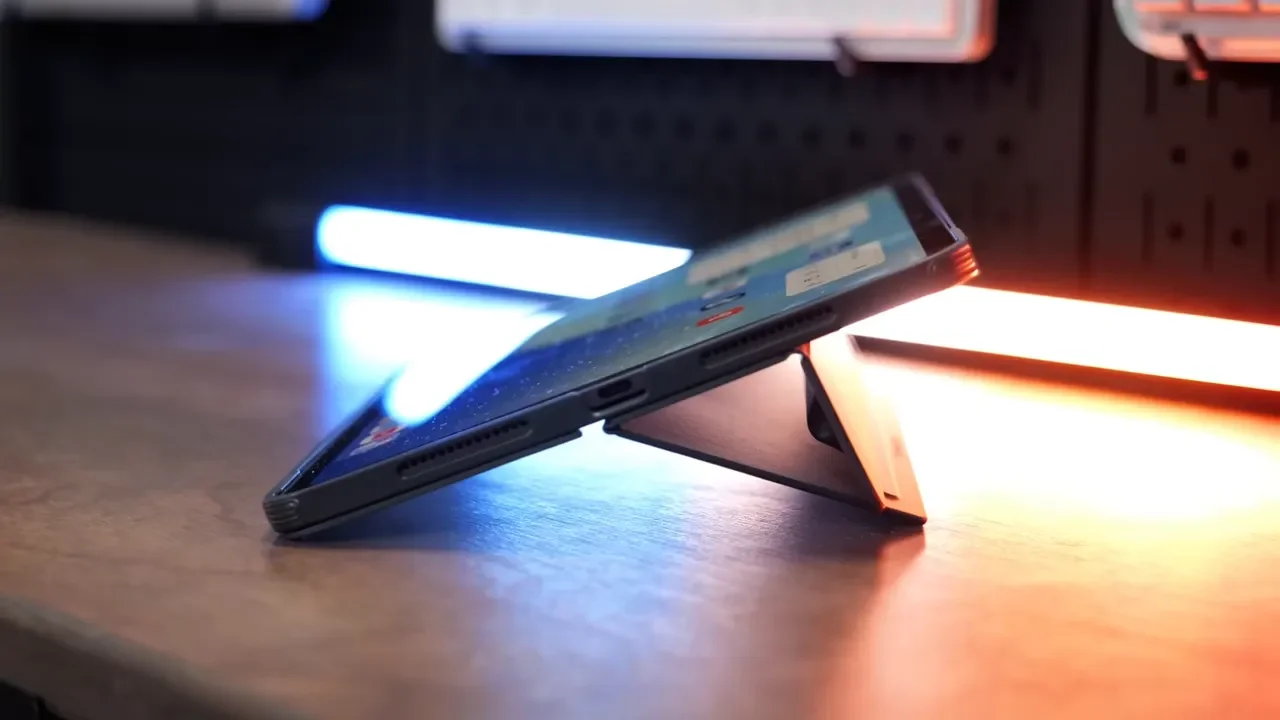
I usually do not love kickstand cases on iPads. They often feel awkward, unstable, or too limiting in how they can be positioned. The ESR Shift is one of the better implementations I’ve seen. The stand feels stable in regular laptop style use, and it also works well in a lower angle for drawing or note taking. There is even a stabilizer section that magnetically attaches in low mode to make the setup sturdier. That is a smart touch because low-angle tablet setups can get wobbly fast. Here, it feels much more planted, which makes it better suited for Apple Pencil use.
Apple Pencil Support Done Right
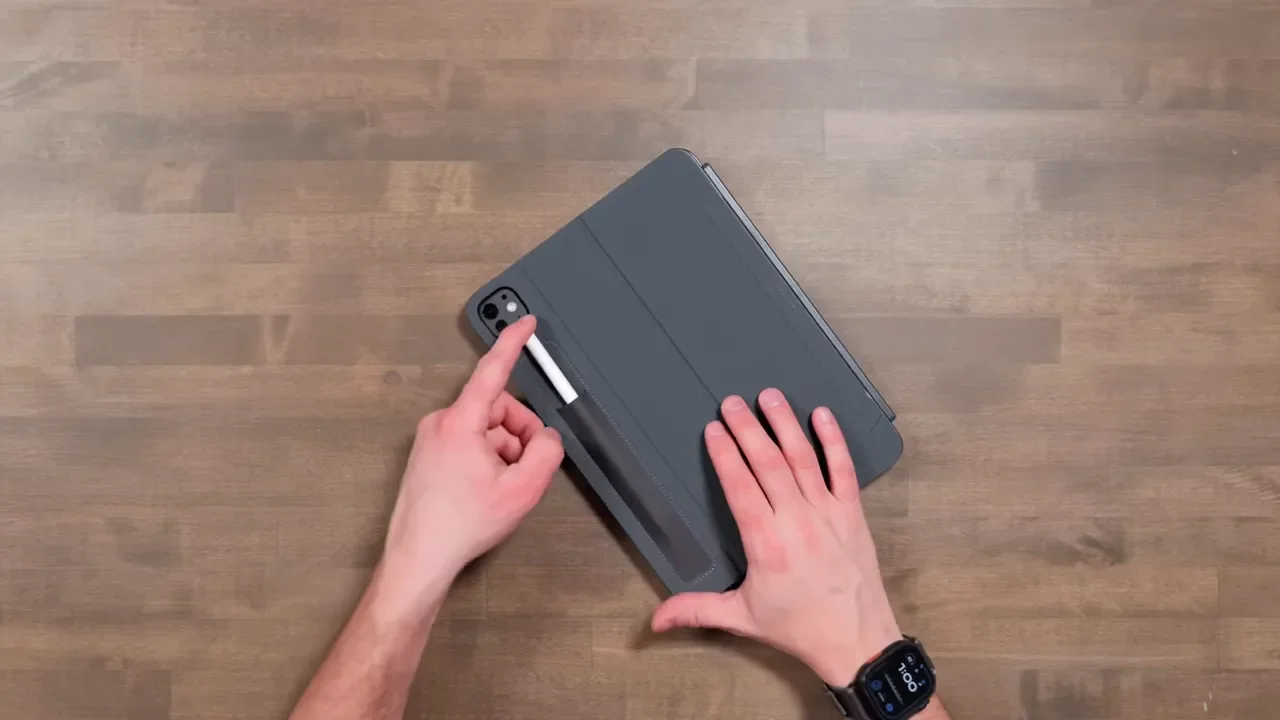
Apple Pencil support is another area where this case is thought through well. You can still pair and charge the Pencil using the magnetic area at the top of the iPad, which is important. But ESR also added a dedicated storage pouch on the back. That means you are not relying only on the Pencil staying magnetically attached while the iPad is in a backpack or being carried around. Instead, you have a more secure place to keep it when you are not actively using it. That may sound minor, but if you have ever had an Apple Pencil get knocked loose in transit, you know how nice this is.
Typing Experience: Better Than You Might Expect
On the typing side, the ESR Shift performs well. If you go with the 11 inch version, the keyboard does feel compact. That is pretty normal for this size class, so it is not really a surprise. The bigger thing to know is that there is no full function row across the top. The keyboard uses a more compressed layout, and some shortcut controls require function key combinations instead of dedicated keys. That is worth knowing if you are used to Apple’s newer iPad keyboards.
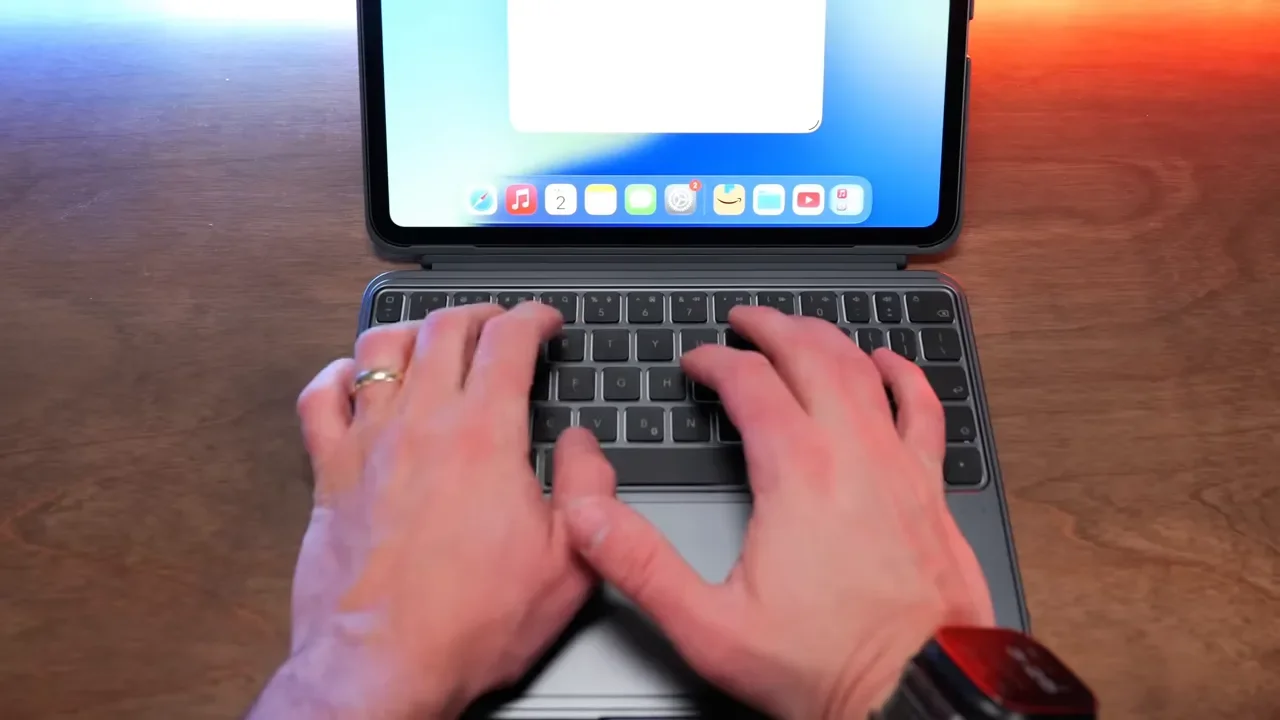
Even with that, the actual key feel is solid. The keys are accurate and comfortable enough for real work. The overall feel is somewhat similar to Apple’s Magic Keyboard, although the keys are a bit looser and less refined. There is also a little movement in the keyboard deck because of how the iPad portion attaches behind it, but in practice it does not ruin the experience. For everyday writing, email, and note taking, it gets the job done well.
Backlighting Is A Nice Bonus
One advantage here is the backlit keyboard. Not every iPad keyboard case gives you that, especially in this price range. You can adjust the backlight brightness, and it makes the keyboard much easier to use in dim rooms or at night. That helps this feel more like a complete productivity accessory rather than a basic budget case.
How Bluetooth Pairing Works
Since this does not use Apple’s Smart Connector, it connects over Bluetooth and has its own battery.
Pairing is simple:
Press and hold Function + B
Wait for the power light to blink blue
Open Bluetooth settings on the iPad
Select the ESR Shift keyboard from the device list
Confirm the pairing prompt
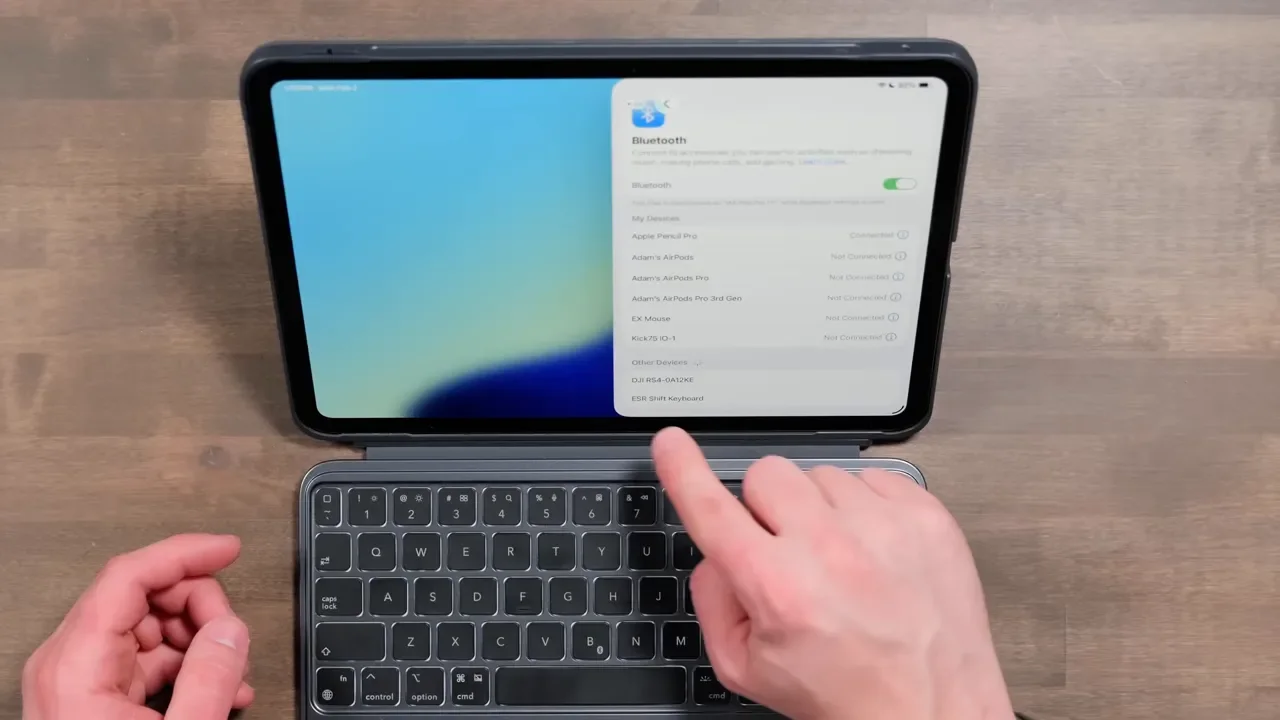
Once connected, it behaves the way you would expect from a Bluetooth keyboard. If you need alternate top-row functions, you use the function key in combination with the labeled controls. The keyboard recharges over USB-C, which is the right choice here. There is a USB-C port on the side, and it is nice not to deal with an older charging standard.
Trackpad Performance On iPad
I really like using a trackpad with the iPad, and this one makes the ESR Shift much more useful as a laptop replacement. You get the standard cursor support, gesture controls, and tap to click. On modern iPadOS, that matters more than ever because the trackpad adds a lot to navigation and multitasking. Swipes and gestures work, and overall tracking accuracy is good.
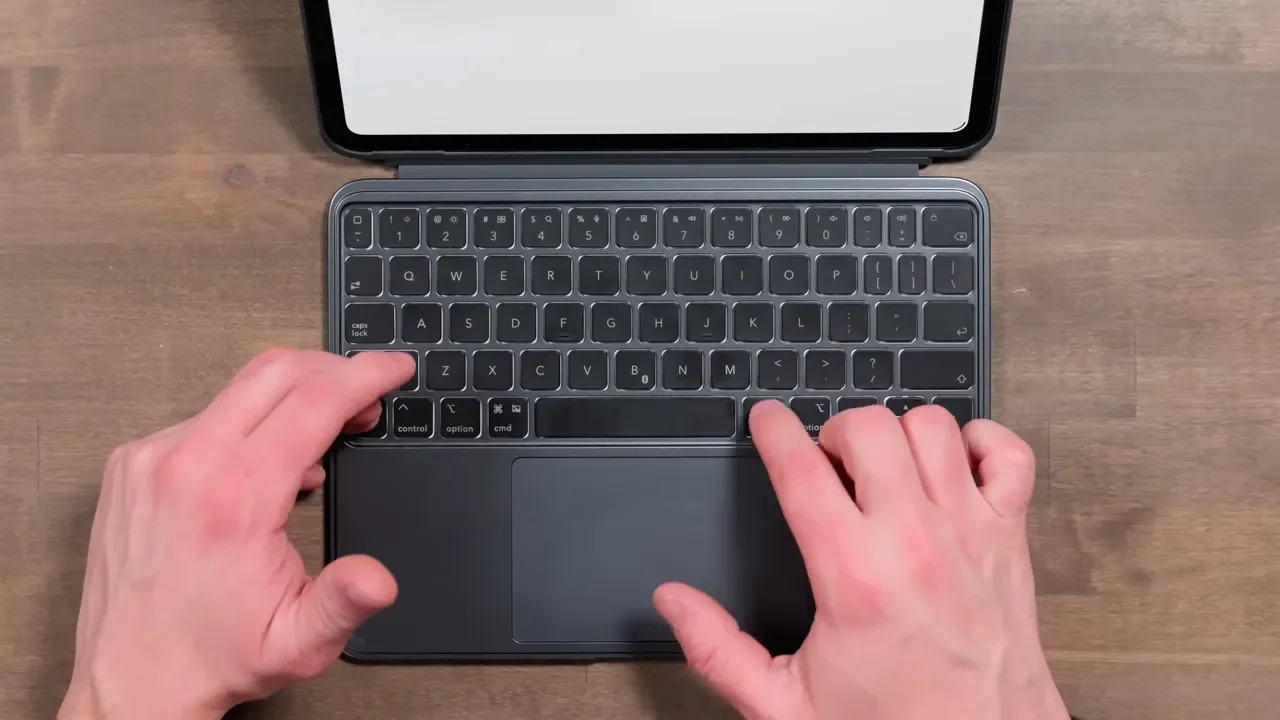
That said, this is one area where the ESR Shift does not quite match Apple’s own keyboard accessories. The trackpad works well, but it does not feel quite as premium. There is a little more looseness to it, and it performs best when the keyboard is supported properly underneath. It is usable and helpful, just not best-in-class.
So the honest summary is this:
Functionally: good
Gesture support: good
Tap to click: good
Premium feel compared to Apple: not quite there
Why The Detachable Keyboard Matters More Than It Sounds
The detachable keyboard is not just a gimmick. It changes how you can actually use the iPad in real life. If you want the screen farther away, you can do that. If you want to keep the iPad upright in portrait while typing, you can do that too. If you want to use the iPad as a presentation display connected to a TV and still control it from where you are sitting, the Bluetooth keyboard makes that possible. That flexibility is the real reason this case stands out. It is not trying to mimic a laptop at all costs. It is trying to make the iPad adaptable.
Battery Life And Charging
The tradeoff for using Bluetooth instead of the Smart Connector is simple. You have to remember to charge the keyboard. If you use it without the backlight, battery life can stretch up to 130 days. If you run the backlight at maximum brightness, battery life drops dramatically to around 11 hours. A full recharge takes about two and a half hours through USB-C.
So if you are the kind of person who hates charging another accessory, this is one of the main downsides. On the other hand, the battery life is still pretty reasonable, especially if you are not running the backlight constantly. If you need a good USB-C charger for your setup, a favorite charger option and a reliable portable power bank can make keeping accessories topped off a lot easier.
Compatibility And Pricing
ESR offers the Shift for a wide range of iPads, which is another big plus. There are versions for:
iPad A16
Older standard iPad models
iPad Air
iPad Air M2 and M3
iPad Pro
Both 11 inch and 13 inch sizes where applicable
If you are trying to match the case to a specific iPad, here are the relevant options:
Pricing tends to land around $80 to $100, depending on the model. That puts it far below Apple’s Magic Keyboard, which starts much higher. And at that lower price, you are still getting backlighting, a trackpad, a detachable layout, portrait support, and full case protection. That is a compelling value.
What Could Be Better
For all the things the ESR Shift gets right, there are still a couple of compromises.
You need to keep the keyboard charged
The trackpad is good, but not on Apple’s level
The 11 inch keyboard feels a bit compact
There is no dedicated function row
The keyboard has a little play when typing
None of those are dealbreakers for me, but they are worth considering depending on how picky you are about keyboard and trackpad feel.
Who The ESR Shift Is Best For
This case makes the most sense for someone who wants their iPad to stay an iPad. If all you want is the most laptop-like experience possible, Apple’s Magic Keyboard still has advantages in fit and finish. But if you care about flexibility, the ESR Shift is arguably more useful.
It is especially good for people who:
Switch often between typing and handheld tablet use
Use portrait mode regularly
Draw or take notes with Apple Pencil
Want better protection than minimalist keyboard accessories provide
Need a keyboard case without spending Apple Magic Keyboard money
Final Verdict
The ESR Shift is a really good iPad keyboard case, and its biggest strength is exactly what the name suggests: it can shift with the way you want to use your iPad. The detachable keyboard is genuinely useful. Portrait mode support is more practical than it first sounds. The stand works well, the typing experience is solid, and the Apple Pencil storage is one of those small quality-of-life features that quickly becomes a favorite.
The main compromises are the Bluetooth charging requirement and a trackpad that is not quite as polished as Apple’s. But considering the price and everything this case does, those are pretty easy tradeoffs to accept. If versatility is the priority, this is one of the best iPad keyboard cases to look at.
iPad Pro ESR Shift: https://geni.us/G2l7ZW
iPad Air ESR Shift: https://geni.us/pmfy
iPad A16 ESR Shift: https://geni.us/7SX9w
Additional Resources
If you want to compare desk accessories and other gear that pairs well with an iPad setup, check out this desk setup walkthrough, browse the full gear list, or visit the main site for more recommendations.
