M5 MacBook Air vs MacBook Neo: Real-World Tests and Which One Is Actually Worth It
Some of the links in this post are affiliate links, which means I may earn a small commission if you choose to make a purchase at no extra cost to you. As an Amazon Associate, I earn from qualifying purchases. Read my full Ethics & Affiliate Relationship Disclaimer.
The MacBook Neo is the new value champion for anyone looking for a laptop in 2026. That much is easy to see. It gives you the same premium aluminum feel as the MacBook Air, runs macOS, and comes in at a much lower starting price.
But the real question is whether the savings are worth the trade-offs, or if spending more for the M5 MacBook Air is the smarter move. After comparing both side by side, the short version is this: the MacBook Neo is good for basic use, but the M5 MacBook Air is better in almost every way that matters once you move beyond light tasks. And in some workloads, it is not even close.
Design and Build Quality
From a materials and build perspective, these two feel surprisingly similar. Both have a durable all-aluminum construction and both come in at around 2.7 pounds. In hand, they feel premium.
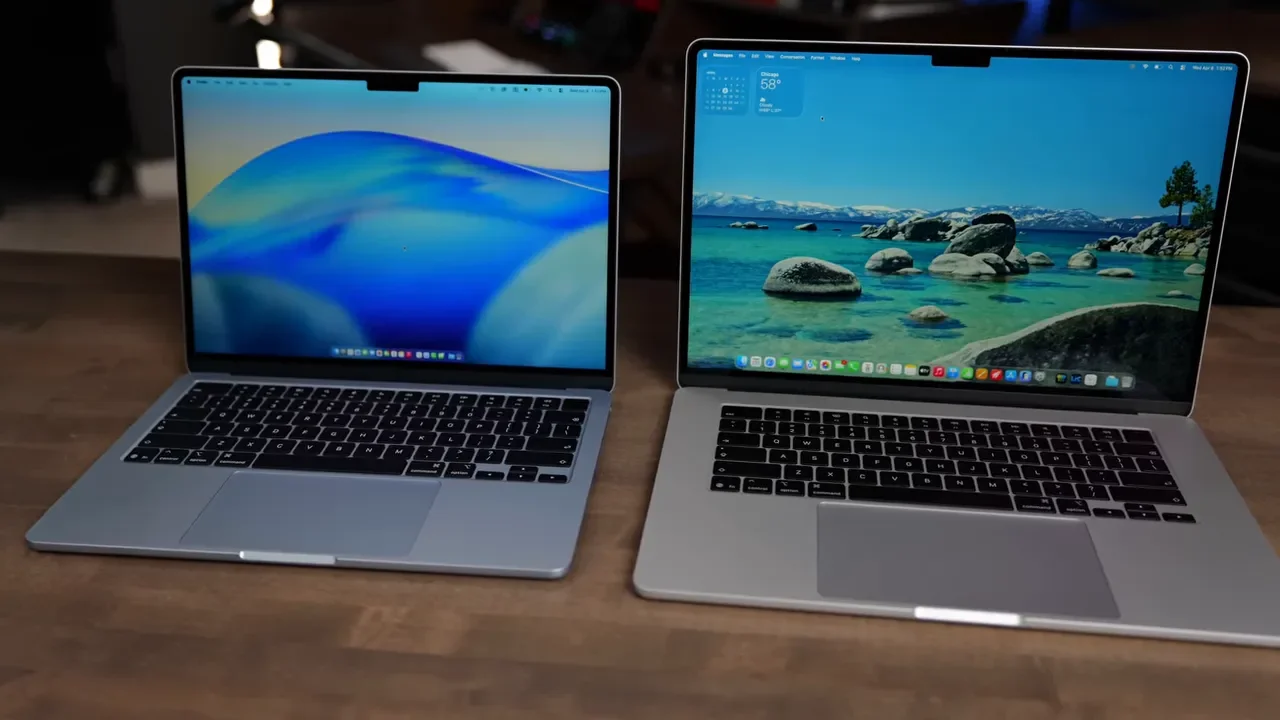
The main physical difference is size. The MacBook Neo is only available in a 13-inch size, while the MacBook Air comes in both 13-inch and 15-inch versions. If you want extra screen space for multitasking, editing, or just a less cramped layout, that 15-inch Air is a real advantage. If you are just looking at build quality alone, there is no big winner here. Both feel solid. The Air just gives you more options.
Display Differences Are Bigger Than They First Appear
At first glance, the displays look pretty similar. Both are sharp Retina panels and both can hit 500 nits of brightness. But once you dig deeper, the MacBook Air has the better screen. The Air has a notch for the webcam, while the Neo skips the notch entirely. Whether that matters comes down to preference. Some people will like the cleaner look of the Neo.
Where the Air clearly pulls ahead is display quality:
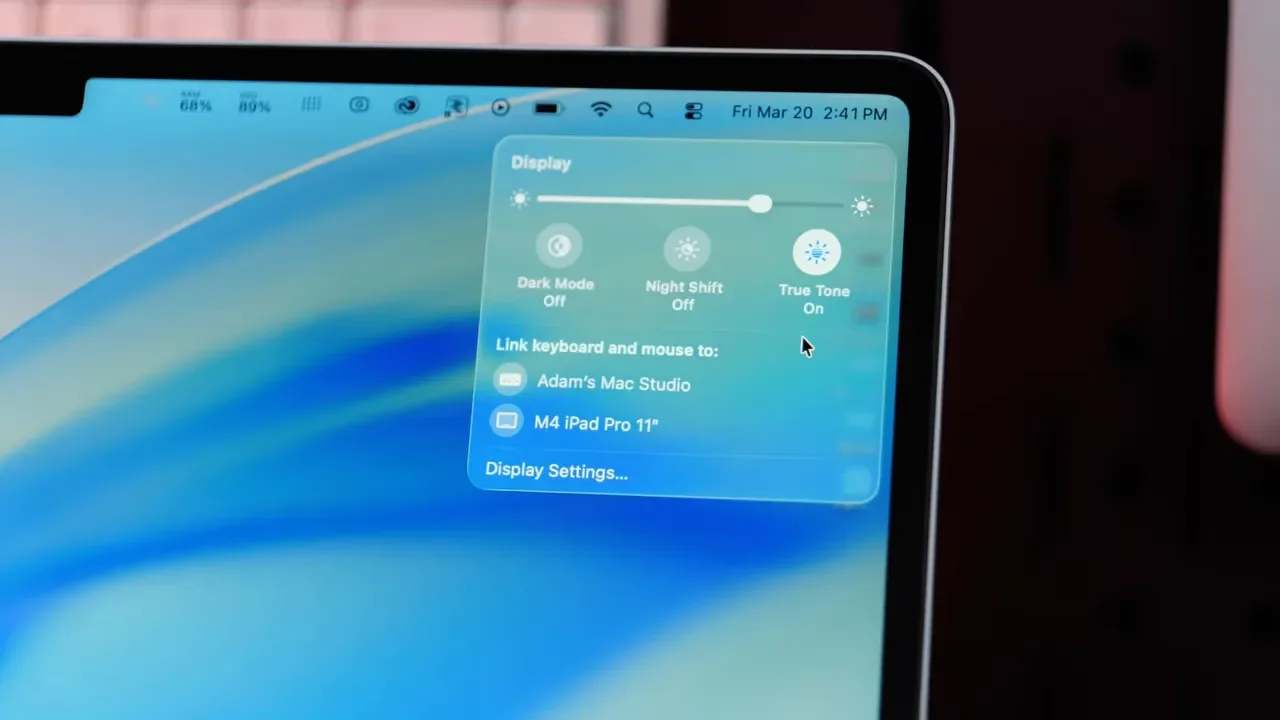
True Tone support, which adjusts color temperature based on your environment
P3 wide color gamut, which gives you more vivid and accurate color
Better overall color accuracy across different lighting conditions
The Neo uses a standard sRGB display. That does not mean it looks bad. In fact, it still looks very nice. But side by side, the Air's display is more color rich and more accurate. If you are mostly browsing, writing, emailing, or streaming content, the Neo's screen is perfectly usable. If you care about color work, photo editing, or just want the nicer panel, the Air wins.
A18 Pro vs M5: This Is Where The Gap Really Starts
The biggest difference between these two machines is the chip. Both laptops are fanless, which means they run silently, but they can also throttle under heavy workloads because there is no active cooling. The MacBook Neo uses the A18 Pro, a chip originally designed for the iPhone. The MacBook Air uses the M5, Apple’s laptop-class silicon.
That difference shows up everywhere.
MacBook Neo: 6-core CPU, 5-core GPU, 8GB RAM only
M5 MacBook Air: 10-core CPU, 8-core GPU standard, up to 10-core GPU on higher configs, 16GB RAM standard, up to 32GB RAM
The RAM situation is especially important. The Neo is limited to 8GB, which is enough for basic tasks, but much easier to outgrow. The Air starts with 16GB, which gives it a lot more breathing room.
Then there is memory bandwidth:
MacBook Air: 153 GB/s
MacBook Neo: 60 GB/s
That matters for responsiveness, multitasking, and how quickly the system can move data around during heavier tasks.
SSD Speed and Storage Options
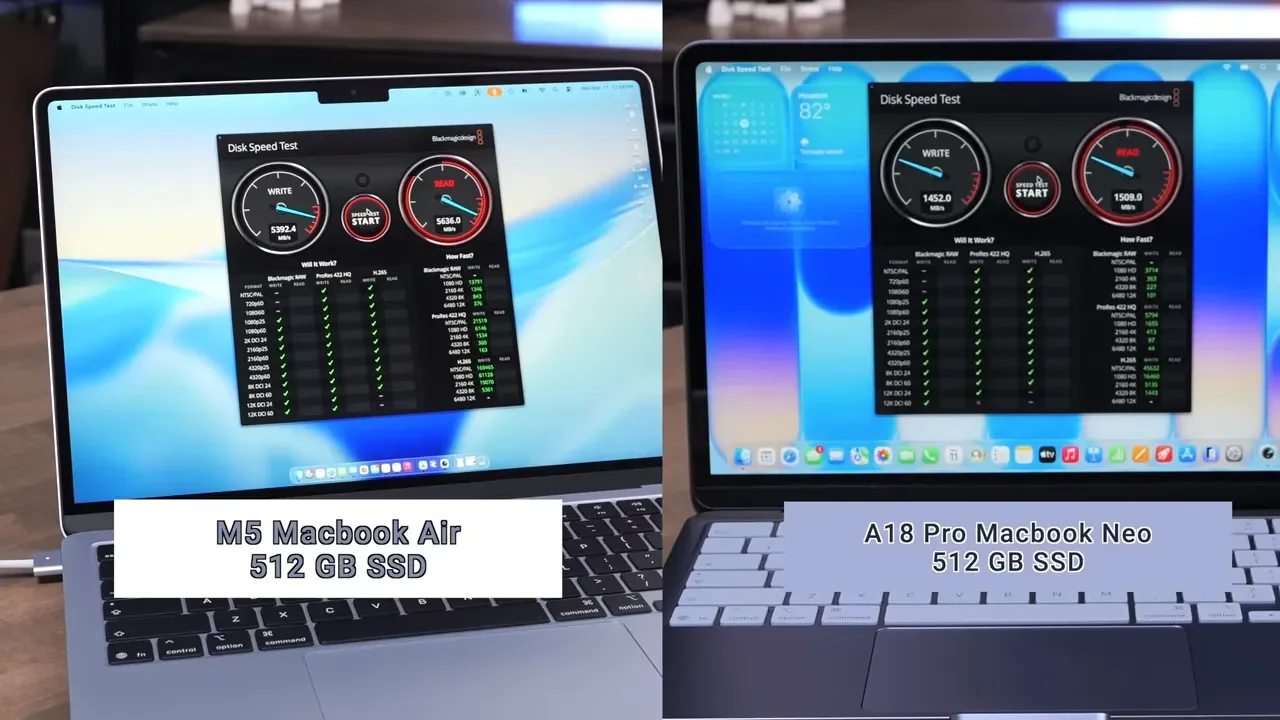
The SSD gap is massive. On the MacBook Neo, read and write speeds are around 1,500 MB/s. On the M5 MacBook Air, SSD speeds are closer to 5,300 to 6,000 MB/s.
That affects a lot more than file transfers. Faster storage helps with:
Booting and restarting faster
Launching apps quicker
Smoother multitasking
Faster project loads and exports
Storage options also differ a lot.
MacBook Air: 512GB to 4TB
There is also an odd catch with the Neo. The 256GB model has a lock button, while the 512GB model gets Touch ID. On macOS, Touch ID is one of those features that quickly feels essential, so that makes the 256GB Neo a much harder sell.
Honestly, I do not think the 256GB Neo is a good buy. That amount of storage will fill up fast, especially once you add applications, media, and everyday things like Messages syncing locally.
Speakers, Webcam, Microphones, and Ports
The MacBook Air has a more polished media setup overall.
Speakers:
MacBook Air: 4 speakers
MacBook Neo: 2 side-firing speakers
The Neo sounds fine, but the Air sounds better. Also, because the Neo's speakers sit on the sides, it is easier to accidentally block them with your hands. Microphone and webcam quality felt very similar on both, and both are good enough for web calls. The ports are where these two diverge quite a bit.
MacBook Neo Ports
2 USB-C ports
One port supports faster USB 3.1 speeds
One port is limited to older USB 2 speeds
Headphone jack on the left
Supports only 1 external display
Must use the top port for the external display
Slower charging
M5 MacBook Air Ports
2 Thunderbolt 4 ports
MagSafe charging
Headphone jack on the right
Can also charge through Thunderbolt
Supports up to 2 external displays
If you use docks, fast drives, or multiple monitors, the Air is much more flexible.
Keyboard and Trackpad
Both keyboards feel similar and were accurate to type on. There is not a huge difference in key feel. But there are still a few important quality-of-life features that push the Air ahead:
MacBook Air includes Touch ID by default
MacBook Air has keyboard backlighting
MacBook Neo does not have keyboard backlighting
The lack of backlighting on the Neo was not a total dealbreaker because the screen does cast enough light to make the keys usable in many situations, but it is still a noticeable omission. The bigger difference is the trackpad.
MacBook Air: Force Touch trackpad with haptic feedback
MacBook Neo: mechanical trackpad with a physical click
The Neo’s trackpad is fine. The Air’s is just nicer and more refined to use.
Everyday Performance: Close On Paper, Not Really In Use
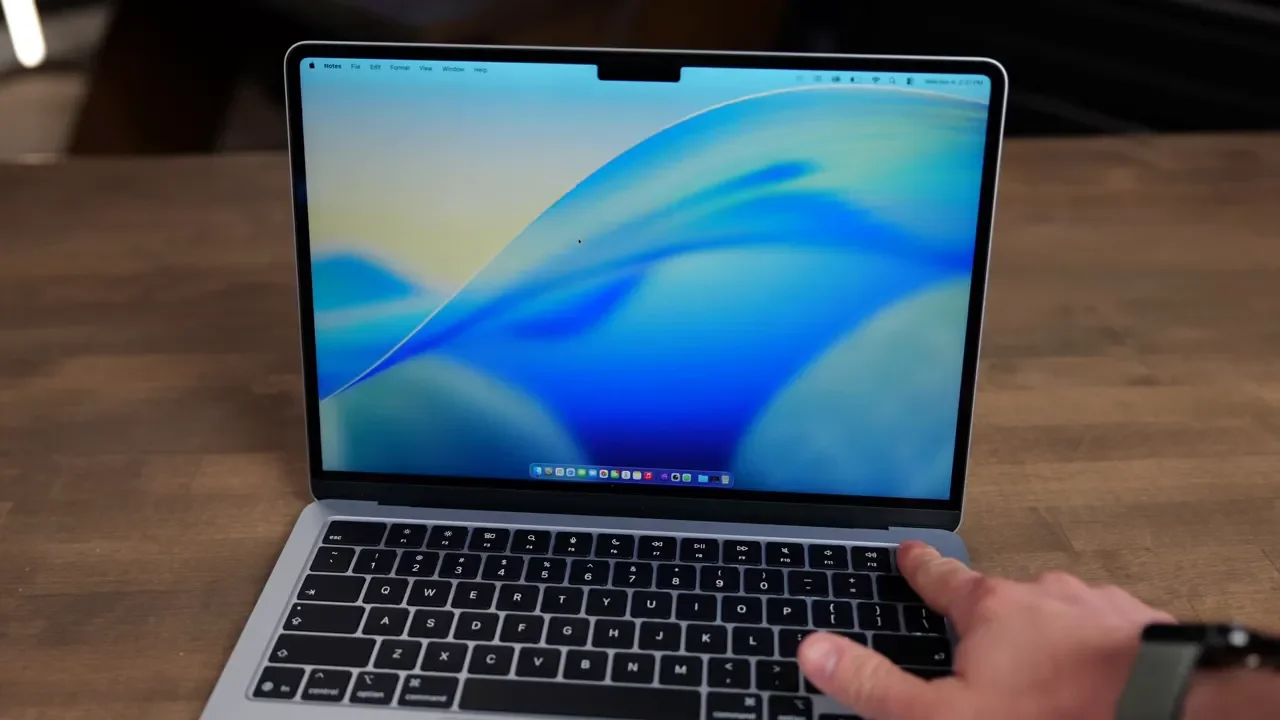
For basic tasks like email, writing documents, browsing, and spreadsheets, both machines can get the job done. You can run regular macOS apps on either one. But using them side by side, the Neo often feels a step slower. It is not always something a benchmark captures perfectly. It is more about the little pauses, the slightly delayed reactions, and the way the system starts to feel constrained sooner.
That comes back to the Neo’s limitations:
8GB of RAM
Lower memory bandwidth
Much slower SSD
There were also more inconsistent results during repeated testing on the Neo. Restarting between tests helped, but the system still produced less reliable performance. The Air was much more consistent across repeated runs. So even in normal day-to-day use, the Air feels snappier. Not a little. Noticeably.
Xcode and Local AI Performance
If you are doing any kind of pro-level work, the gap gets very wide very quickly.
Xcode Benchmark
MacBook Neo: 516 seconds
M5 MacBook Air: 195 seconds
That is a huge difference for compiling code.
DiffusionBee Image Generation
Using the prompt of a cat working on a laptop with nachos on the side:
MacBook Neo: 49 seconds
M5 MacBook Air: 16.24 seconds
LM Studio With Gemma 3 4B
For summarizing a long article:
First token on Air: 2 seconds
First token on Neo: 10.15 seconds
Air throughput: about 50 tokens/sec
Neo throughput: about 20 tokens/sec
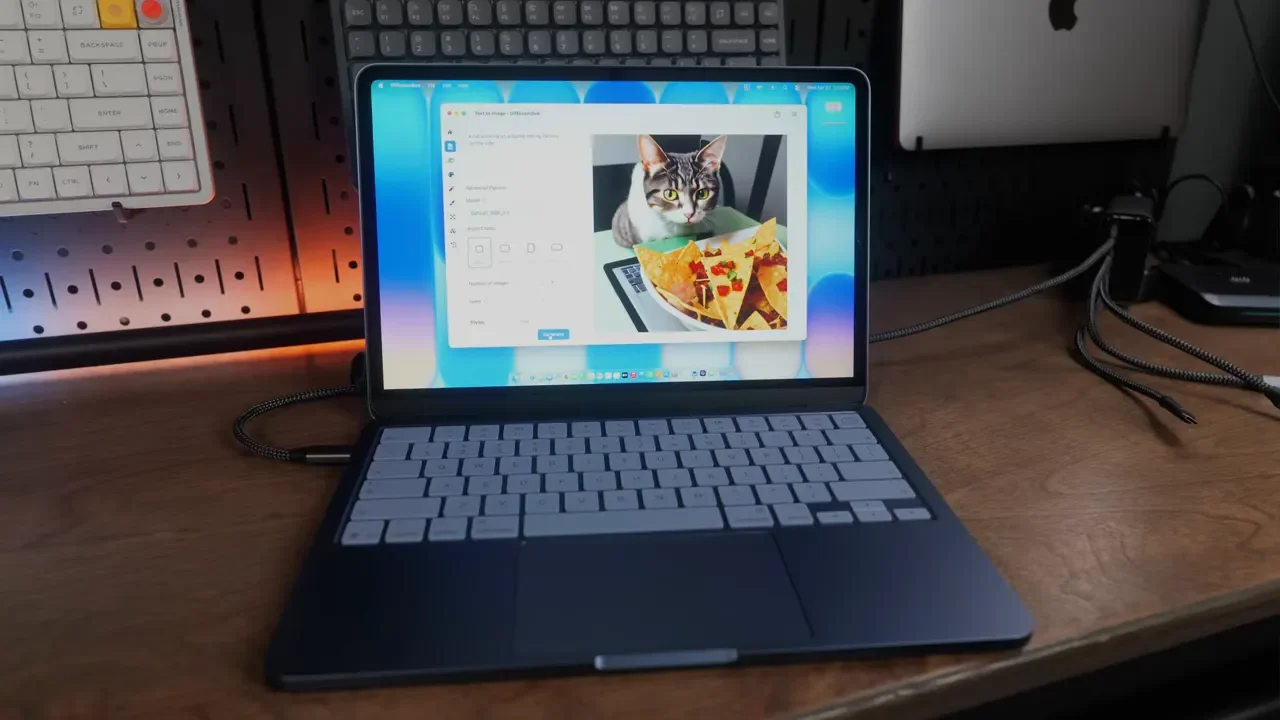
Most people are not buying a MacBook Neo specifically for local AI, and cloud AI will matter more for a lot of people. Still, these tests make the bigger point clearly: the Air has a lot more headroom.
Logic Pro and Audio Production
Both machines were able to run most Logic projects, but once the workload got heavier, the Air pulled away.
MIDI Track Stress Test
MacBook Neo: 56 tracks without audio drops
M5 MacBook Air: 120 tracks without audio drops
Offline Track Bounces
64-track bounce:
Air: 30 seconds
Neo: 1 minute 10 seconds
500-track bounce:
Air: 4 minutes 30 seconds
Neo: 11 minutes
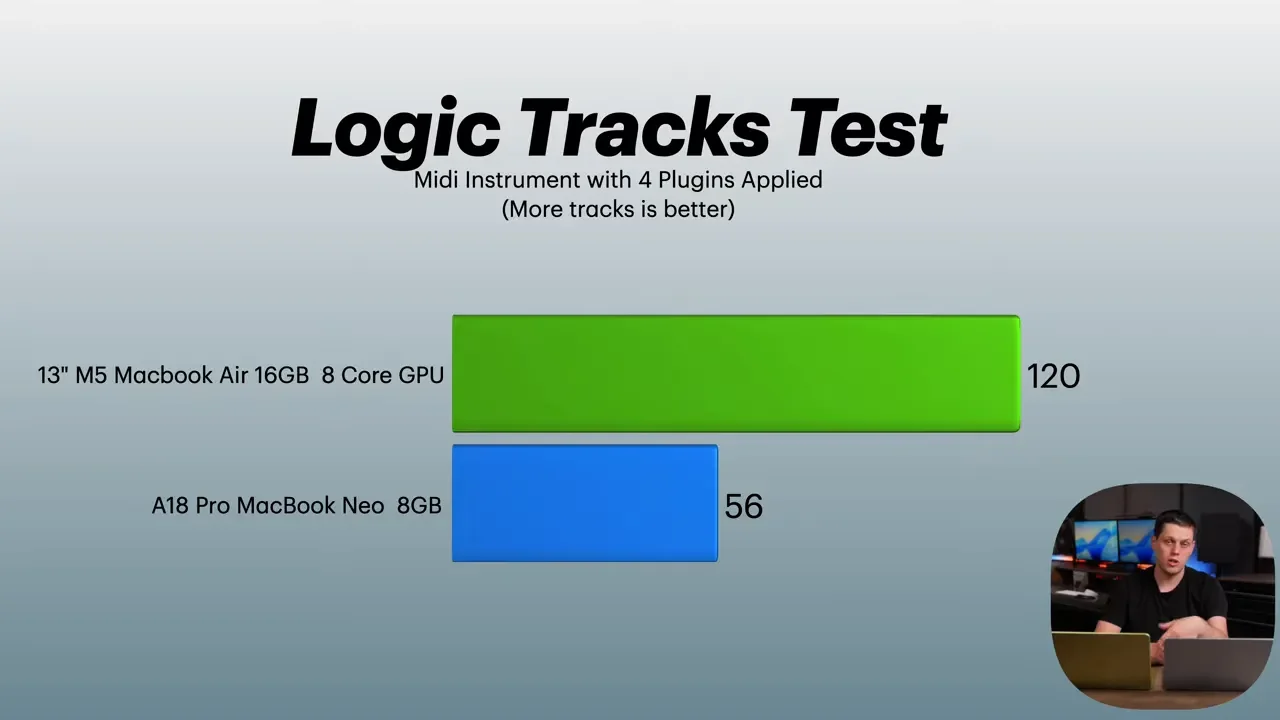
For musicians or podcasters doing light work, the Neo can still function. But if your sessions grow in complexity, the Air is a much safer long-term option.
Blender and 3D Rendering
Blender was another place where the Neo struggled.
Classroom Scene Render
MacBook Neo: 1 minute 51 seconds
M5 MacBook Air: 51 seconds
Barbershop Scene Render
M5 MacBook Air: 5 minutes 53 seconds
MacBook Neo: failed repeatedly with “GPU is full”
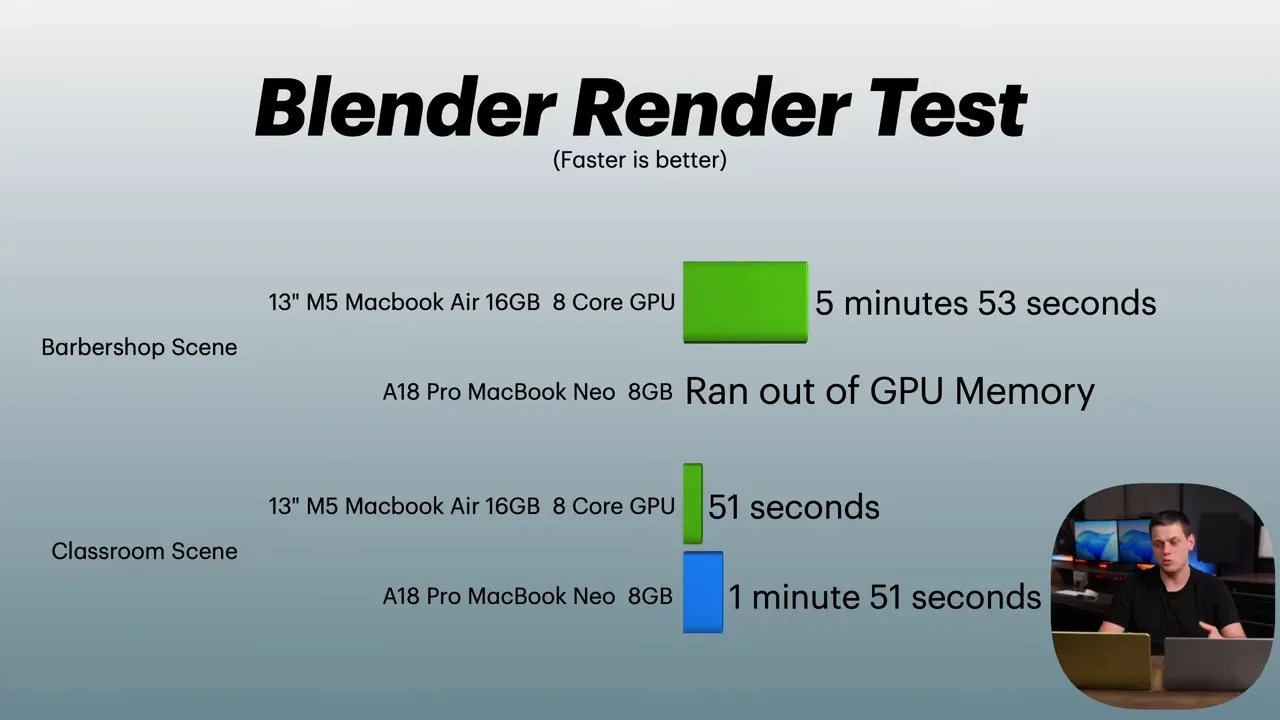
That tells you a lot. The Neo can handle some lighter 3D work, but once the scene becomes demanding, it starts running into hard limits rather than just slower times.
Final Cut Pro and 4K Video Editing
Video editing is one of the most debated use cases for the MacBook Neo. Yes, you can edit video on it. But there is a big difference between being able to open a project and actually having a good experience with exports and longer-form work.
On lighter editing tasks, the Neo could still cut angles, handle multicam clips, and work through some projects. It just felt slower than the Air. Performance mode helped, but it did not change the broader story.
Final Cut Pro Magnetic Mask On An 18-Second Clip
MacBook Neo: 42 seconds
M5 MacBook Air: 28 seconds
3-Minute 4K Project Export With Lots Of Effects, Titles, and Audio Processing
Air: about 1 minute 30 seconds
Neo: 3 minutes 42 seconds
The bigger issue showed up when exporting longer projects. The Neo started slowing down heavily on exports over roughly 8 to 10 minutes in length.
30-Minute Long-Form Video Export
M5 MacBook Air: about 15.5 minutes
MacBook Neo: 3 hours 45 minutes
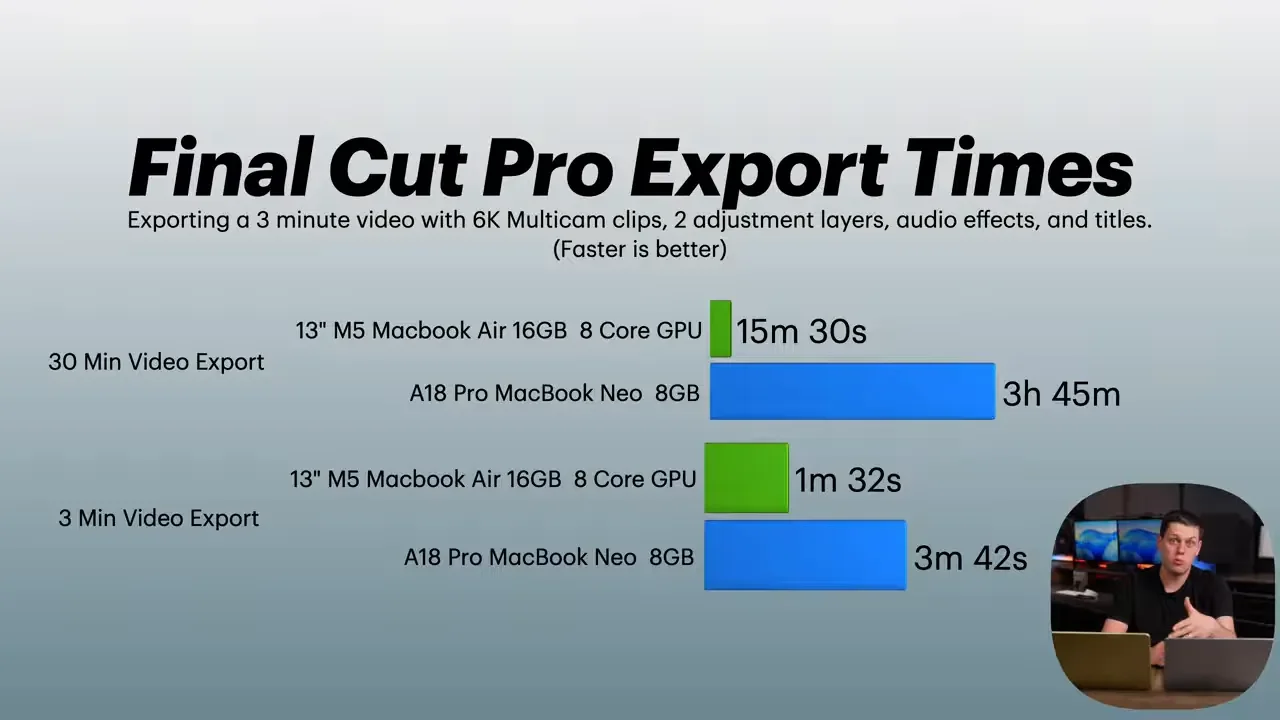
That is the kind of result that changes the buying recommendation immediately. If you want to export longer videos, podcasts, or any substantial media projects, the MacBook Neo is not the right tool. You need to step up to the Air.
Lightroom Classic and Photo Editing
Photo workflows showed the same pattern. The Neo can do the work, but the Air is much faster and less frustrating.
Import 500 RAW Photos For Previews
Neo: 1 minute 30 seconds
Air: 26 seconds
Export 50 RAW Photos To JPEG
Neo: 1 minute 17 seconds
Air: 25 seconds
Export 200 Photos
Neo: 6 minutes 2 seconds
Air: 2 minutes 8 seconds
Export 500 Photos
Neo: 15 minutes 52 seconds
Air: 8 minutes 8 seconds
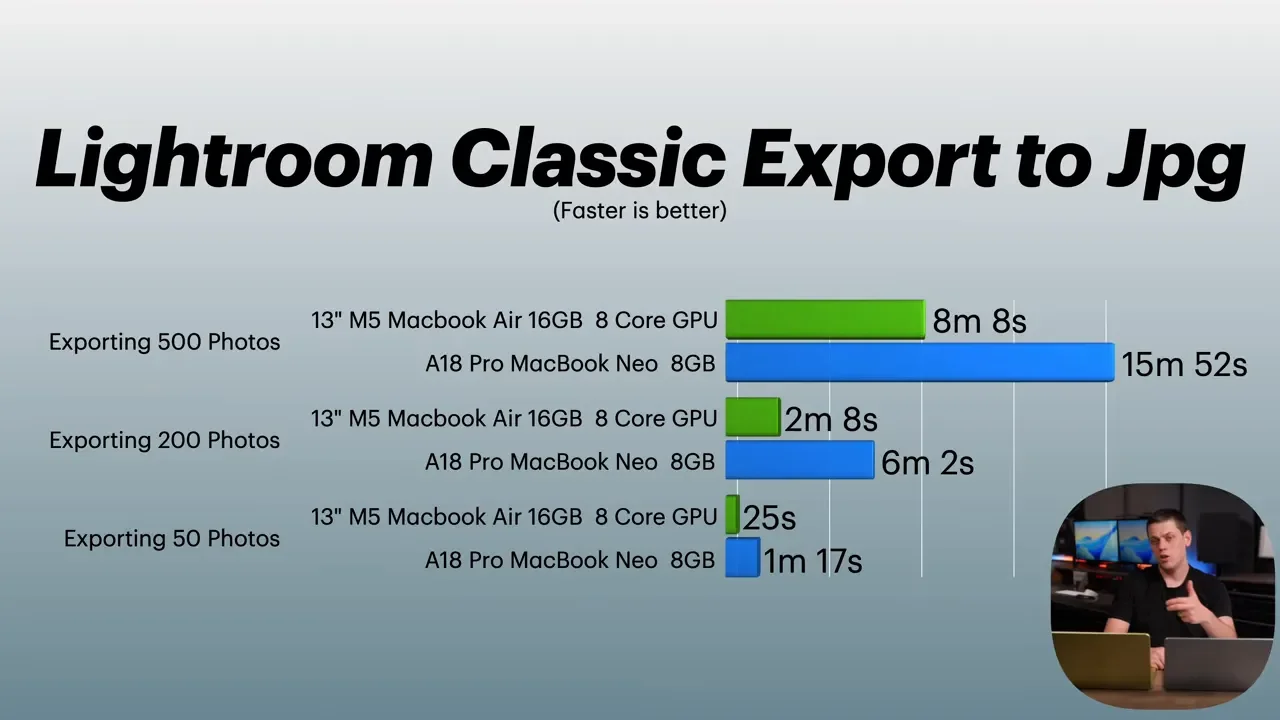
Even the Air slowed down here compared to something like a MacBook Pro, but it still performed dramatically better than the Neo.
Synthetic Benchmarks Back Up The Real-World Gap
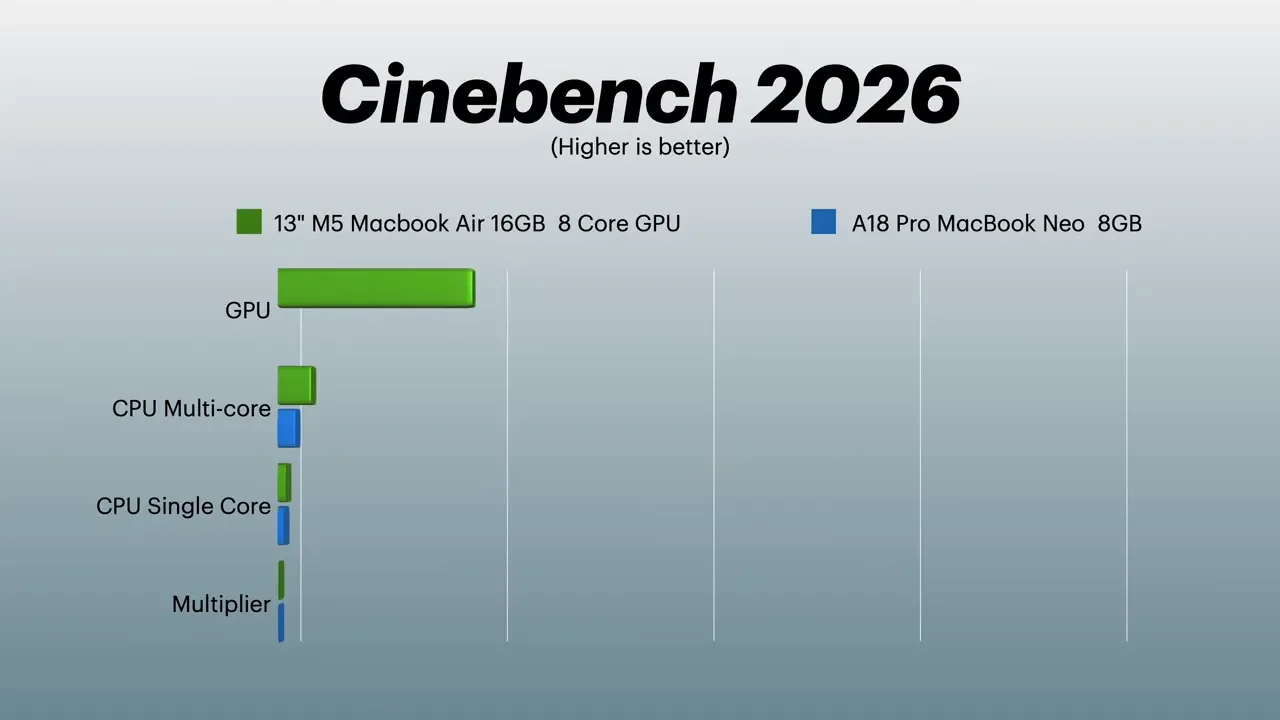
Beyond app-based tests, synthetic benchmarks told the same story. Across Geekbench, Geekbench AI, and Cinebench, the broad trend was clear:
Single-core performance was higher on the Air
Multi-core performance was roughly double
Graphics performance was roughly double
The Neo struggled enough in Cinebench that it was not even able to benchmark GPU performance there. So whether you care more about benchmarks or actual workflows, the conclusion is the same.
Price: The Neo Is Cheaper, But Not Always The Better Value
This is where things get interesting. The 512GB MacBook Neo starts at $700. The M5 MacBook Air starts at $1,100. So the Air costs about $400 more. That is a meaningful price difference. No question. But it also buys you a lot:
Far better performance
Twice the base RAM
Better display quality
Faster SSD
Better port selection
Support for two external displays
A nicer trackpad
Keyboard backlighting
Much more flexibility for demanding apps
In other words, the Air is more expensive, but it also feels much more complete.
Who Should Buy The MacBook Neo?
The MacBook Neo is still a good computer for the right person. It makes sense if you are:
A student with basic needs
Looking for a secondary Mac
Mostly typing, emailing, browsing, and streaming
Trying macOS without spending as much
If that is your use case, the Neo can absolutely work. It still feels premium, runs Mac apps, and handles everyday basics. Just make sure it is the 512GB version. The 256GB model is too limited and loses Touch ID, which makes it much harder to recommend.
Who Should Spend More On The M5 MacBook Air?
The M5 MacBook Air is the better choice for almost everyone else. You should strongly consider the Air if you:
Multitask heavily
Edit photos or video
Work in Xcode
Use Logic Pro
Want better AI performance
Need faster exports and imports
Use multiple external displays
Want a machine that will feel faster for longer
It is still not a MacBook Pro, and it can throttle under sustained heavy loads compared to actively cooled machines. But it is way faster than the MacBook Neo and punches well above what a thin, fanless laptop used to be able to do.
Final Verdict
The MacBook Neo is not bad. In fact, for the right person, it is a solid budget Mac. But side by side with the M5 MacBook Air, its limitations show up quickly. The Air feels faster in everyday use, handles professional apps far better, offers more RAM, much faster storage, a better display, and more flexibility overall.
If your workload is light and your budget is tight, the 512GB MacBook Neo is worth considering. If you can afford the extra $400, the M5 MacBook Air is the much easier recommendation. You really do get what you pay for here.
