Apple M5 MacBook Air Review: Why It’s the Best Choice for Most Users
Some of the links in this post are affiliate links, which means I may earn a small commission if you choose to make a purchase at no extra cost to you. As an Amazon Associate, I earn from qualifying purchases. Read my full Ethics & Affiliate Relationship Disclaimer.
The M5 MacBook Air is basically the perfect laptop, as long as you can ignore the display. That really is the whole story. Apple finally gives the base model 16GB of RAM and 512GB of storage, the performance is strong enough for real work, the design is still one of the best Apple has ever made, and it handles almost everything most people will throw at it.
But Apple is also still asking you to live with a 60Hz LCD panel in a world where the MacBook Pro has a much better 120Hz XDR display. So the big question is not whether the M5 MacBook Air is good. It is. The real question is who it’s for, especially now that there’s a cheaper MacBook Neo below it and a more premium MacBook Pro above it.
The M5 MacBook Air Finally Feels Like The Sweet Spot
The MacBook Air used to be the laptop you bought when you were willing to trade some performance for a lower price and a thinner, lighter design. That trade-off is a lot smaller now. The M5 MacBook Air weighs just 2.7 pounds, and Apple still absolutely nails the form factor. It is thin, easy to carry, and comfortable to toss into a backpack without thinking twice about it.
What makes this generation especially compelling is that it no longer feels like the “lightweight” option in a compromised way. It feels like a full Mac that just happens to be thin and light. For a lot of people, that matters more than benchmark charts. If a laptop is powerful enough for your work and is easier to carry every day, that can make it the better computer overall.
Real-World Performance: Yes, It Can Actually Do Serious Work
The biggest strength of the M5 MacBook Air is that it runs basically any normal Mac app without drama. macOS feels fast and polished on it, and the machine is capable of much more than casual web browsing or office tasks.
This is a laptop you can use for:
Video editing in Final Cut Pro
Photo editing in Lightroom Classic
Development work in Xcode
3D work in Blender
General multitasking and productivity apps
In Final Cut Pro, the M5 MacBook Air feels genuinely snappy. Exporting a three-minute 4K video with titles and effects took about 1 minute and 32 seconds, and even longer exports were totally manageable. A 30-minute video export was not a problem either.
That is exactly the kind of thing that separates the Air from a cheaper machine like the MacBook Neo. The Neo might be fine for simpler tasks, but longer media exports are where it starts to show its limits much faster.
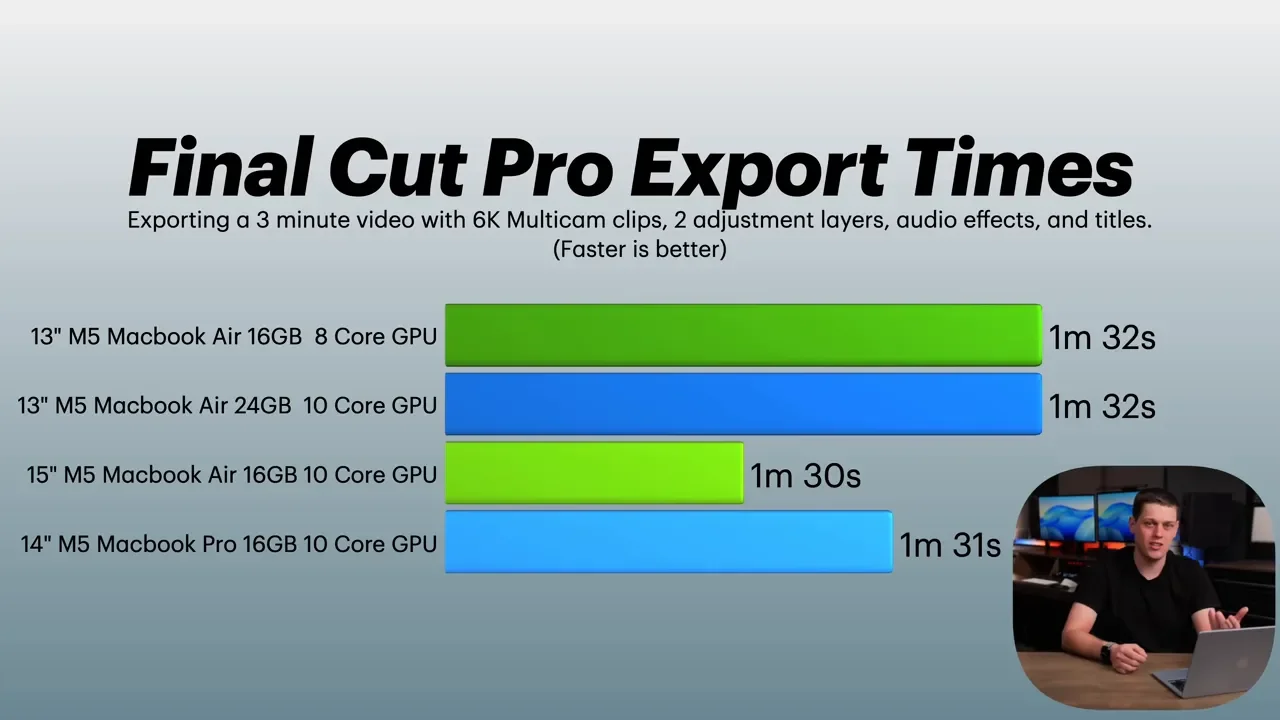
Photo Editing Is good, But The Pro Still Pulls Ahead
Lightroom Classic runs fine on the M5 MacBook Air for normal editing. Adjusting exposure, white balance, and making standard image tweaks feels smooth enough.
Where the difference shows up is batch exporting. If you export a large number of photos regularly, the MacBook Pro is still significantly faster. If you are exporting 200 photos or fewer, it probably is not going to matter much. If you are doing huge photo jobs all the time, the Pro starts making more sense.
That pattern shows up across the board with the Air. For short to moderate workloads, it is excellent. For long, sustained, heavy workloads, the Pro stretches its lead.
What’s New On The M5 MacBook Air
This is not a radical redesign year, but Apple did improve a few important pieces.
Better Wireless Connectivity
Apple added its new N1 chip, which brings:
Wi-Fi 7
Bluetooth 6
That means better wireless speed and range, plus lower energy use for Bluetooth accessories. It is not the kind of upgrade that changes how the laptop feels on day one, but it is the kind of thing that makes the machine more future-proof.
Faster SSD and More Memory Bandwidth
One of the more meaningful under-the-hood changes is SSD speed. The previous M4 MacBook Air was around 3,300 MB/s for read and write speeds. The M5 MacBook Air jumps to about 5,300 MB/s.
That helps the whole system feel a little snappier, especially when opening files, moving data around, or working across larger projects. Apple also raised memory bandwidth from 120GB/s to 153GB/s, which helps the processor, GPU, and unified memory communicate more efficiently.
AI Performance Gets A Boost Too
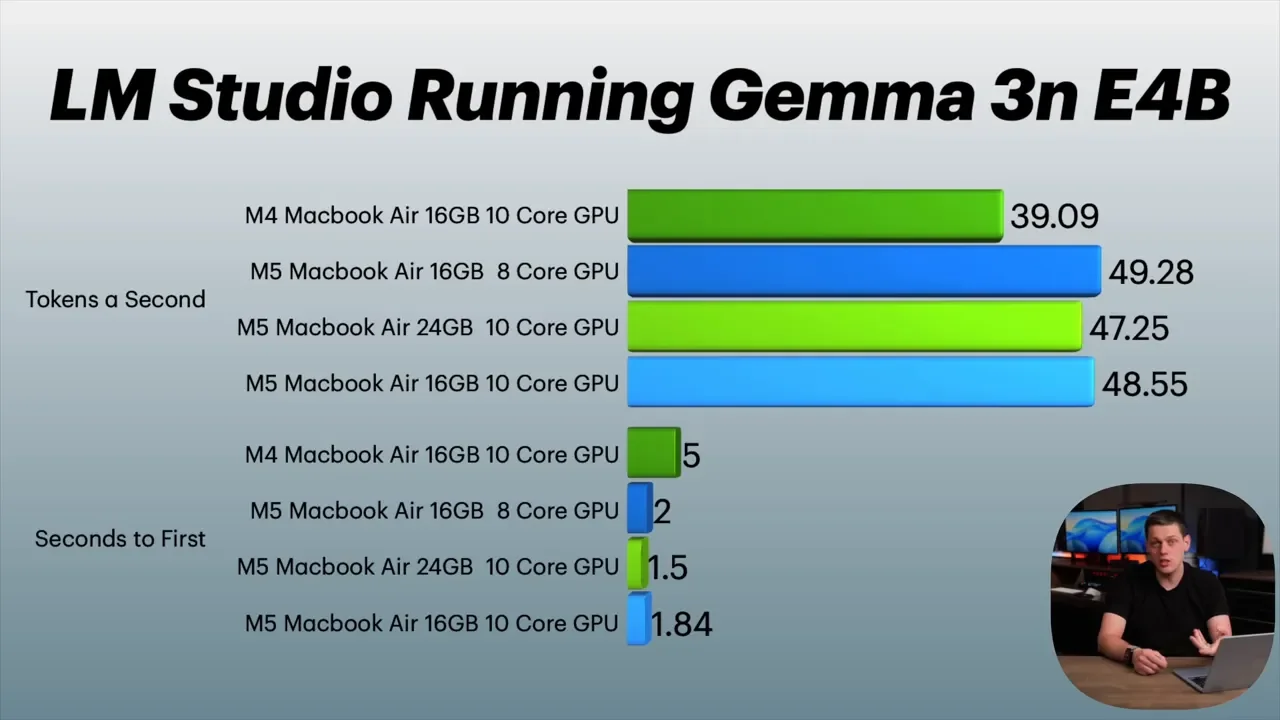
The M5 chip adds neural accelerators on every GPU core, and Apple positions this as a major jump for AI performance. In theory, local AI workloads can be up to four times faster than on M4.
In practice, local LLM-style tasks looked more like about 2x faster rather than 4x. That still is a meaningful improvement, and it may get better as software catches up and takes fuller advantage of the hardware.
Geekbench results were also modestly better than M4, and that lines up pretty well with how the system feels in everyday use. The M5 is faster, but it is not a giant leap over the last generation.
The Keyboard, Touch ID, and Why The Air Still Feels So Good To Use
One of the reasons the MacBook Air continues to be so easy to recommend is that the day-to-day experience is excellent.
The keyboard is comfortable, quiet, and accurate. It still has backlighting, and the Touch ID button remains one of those Apple features that quietly makes life easier. Unlocking the computer, accessing passwords, and using Apple Pay all work exactly the way they should.
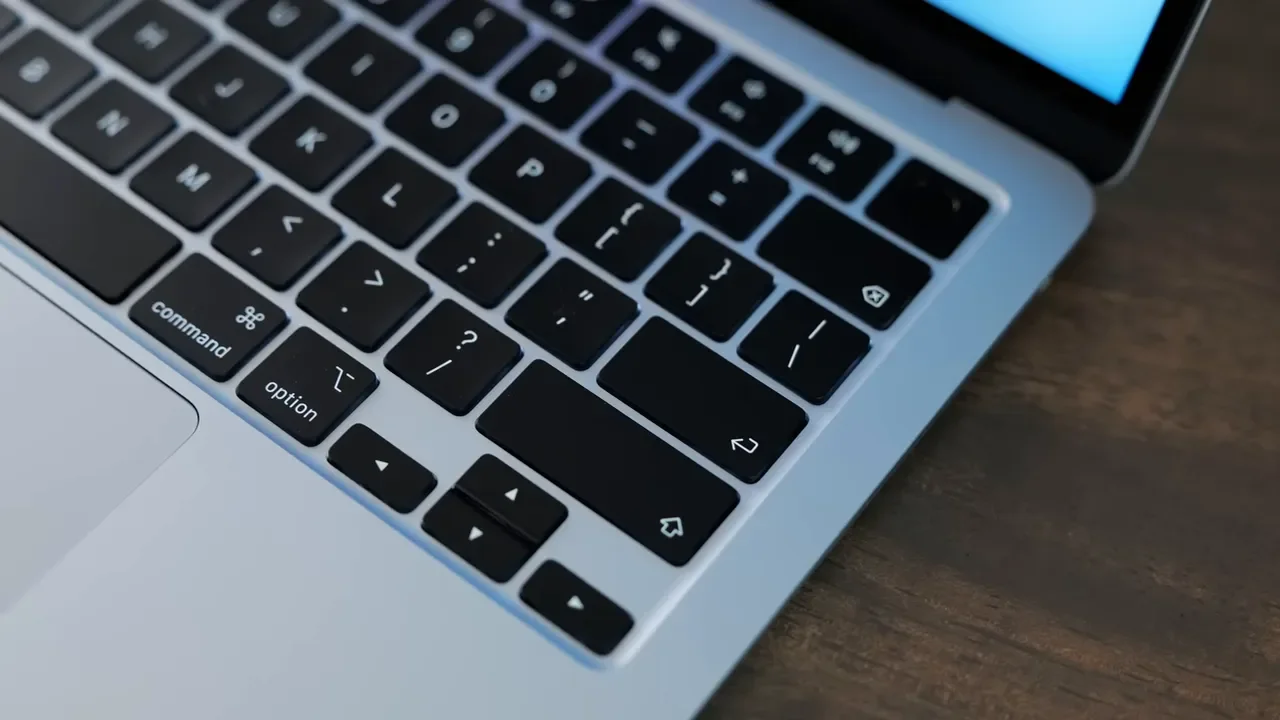
Apple also made a small design tweak by removing some of the text labels on keys like Caps Lock, Shift, Enter, and Delete. It gives the keyboard a slightly more minimal look. It is not a major change, but it does make the layout feel a little cleaner.
The Display Is Still The Biggest Compromise
This is where Apple keeps the MacBook Air from becoming too perfect. The display is still a Liquid Retina panel with a resolution of 2560 x 1664, and to be fair, it looks good. Text is sharp, colors are accurate, and videos look great. It supports the P3 color gamut and has True Tone, which adjusts the display’s color temperature to better match the lighting in the room.
On its own, this is still a nice display. But compared with the MacBook Pro, the compromises are obvious:
500 nits of brightness instead of 1000 nits
60Hz refresh rate instead of 120Hz ProMotion
No OLED
No mini-LED
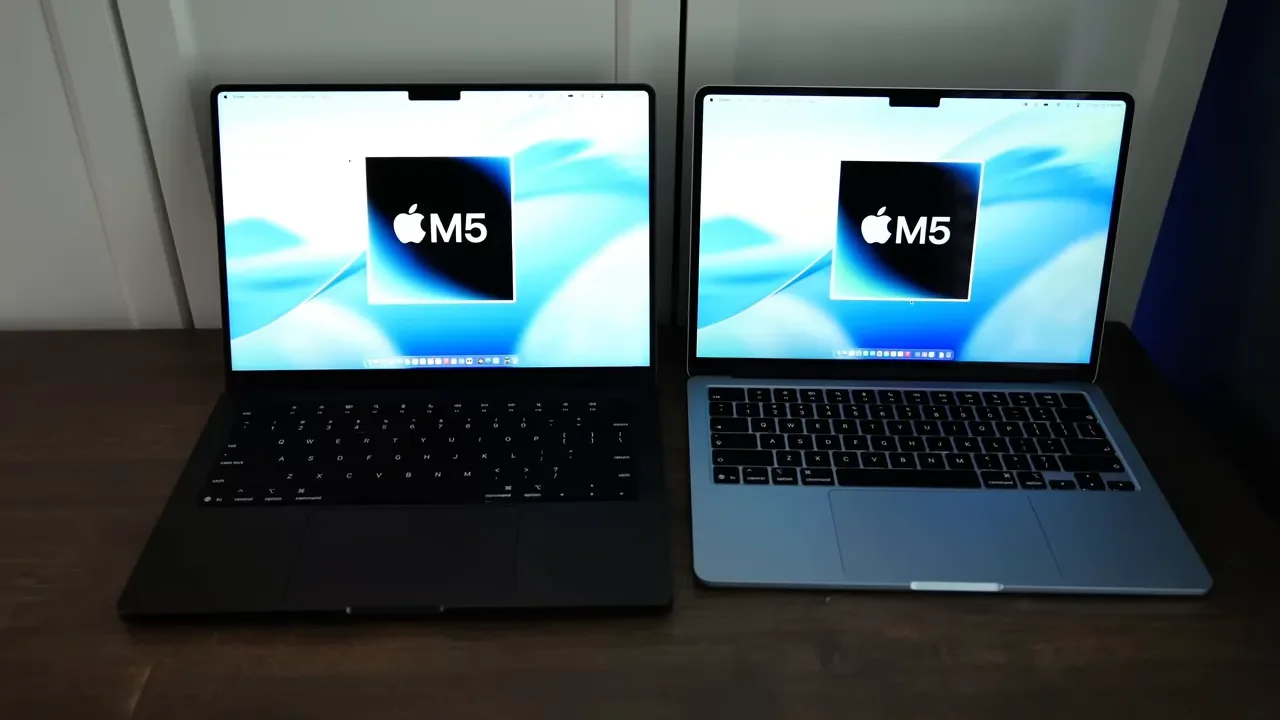
If you have never used one of Apple’s ProMotion displays, 60Hz may not bother you much. For plenty of people, it will be perfectly fine. But once you are used to 120Hz, going back to 60Hz absolutely feels slower. Cursor movement and scrolling are not as fluid, and the Pro’s display simply looks richer and more premium side by side. That is the biggest reason to step up to a MacBook Pro. Not raw computing power for most people. The display.
13-Inch vs. 15-Inch: The Better Deal Might Be The Bigger One
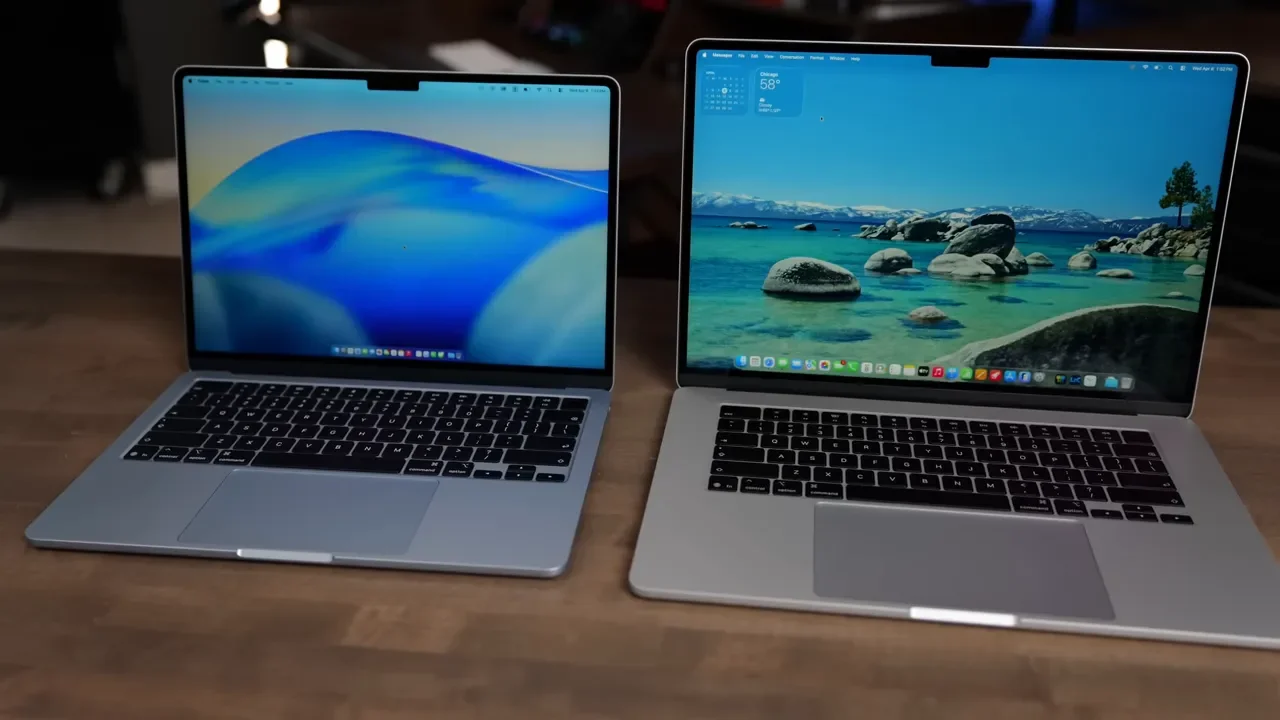
Apple offers the M5 MacBook Air in both 13-inch and 15-inch versions, and the 15-inch model is one of the best options in the lineup. It costs just $200 more, and that upgrade also bumps you from an 8-core GPU to a 10-core GPU. That makes it a surprisingly strong value if you want more screen space.
The larger display is especially useful in apps with lots of panels, controls, and menus, like Final Cut Pro. That is where the extra room really helps. For basic multitasking, the difference is less dramatic, but for creative apps with denser interfaces, the 15-inch model is easier to work on.
Ports, Charging, and External Display Support
The MacBook Air still has a practical port setup, even if it is not as generous as the MacBook Pro.
You get:
MagSafe for charging
Two Thunderbolt 4 / USB-C ports
3.5mm headphone jack
The inclusion of the headphone jack is still appreciated, and MagSafe remains one of the nicest charging features Apple has. You can also charge through either Thunderbolt port if needed. The M5 MacBook Air works well with docks, adapters, and external displays. It can also run dual external displays, which makes it more versatile than a lot of people might expect from an Air.
Webcam, Microphones, and Speakers
Apple did not make major changes here, but the setup is still solid. The webcam is the same basic camera system as before, with support for Center Stage and Desk View. It is not perfect, but for a laptop webcam, it still looks quite good. The placement near the notch and the visible green indicator also make it easy to know exactly where to look for better eye contact.
The built-in microphone also sounds respectable, which is important if you spend a lot of time on calls. Speaker quality is good too, especially considering how thin the laptop is. Movies, YouTube, music, and podcasts all sound perfectly fine. The MacBook Pro still sounds better, but the Air is absolutely good enough on its own.
Battery Life and Charging
Apple rates the M5 MacBook Air for up to 18 hours of battery life. In real life, you are probably not going to hit that exact number, but battery life is still strong enough for all-day use.
The laptop supports charging at up to 70W, while the included charger is Apple’s 40W Dynamic Charger. That charger can temporarily boost up to 60W when the battery is low, which helps the system recharge faster without requiring a much larger brick. Apple also includes the MagSafe cable in the box, which is good to see.

Colors and The Fingerprint Problem
The M5 MacBook Air comes in:
Midnight
Silver
Starlight
Sky Blue
Midnight looks great, but it picks up fingerprints quickly. If that drives you crazy, Sky Blue is the safer pick and probably the standout color in the lineup.
Pricing and The Smartest Upgrade Path
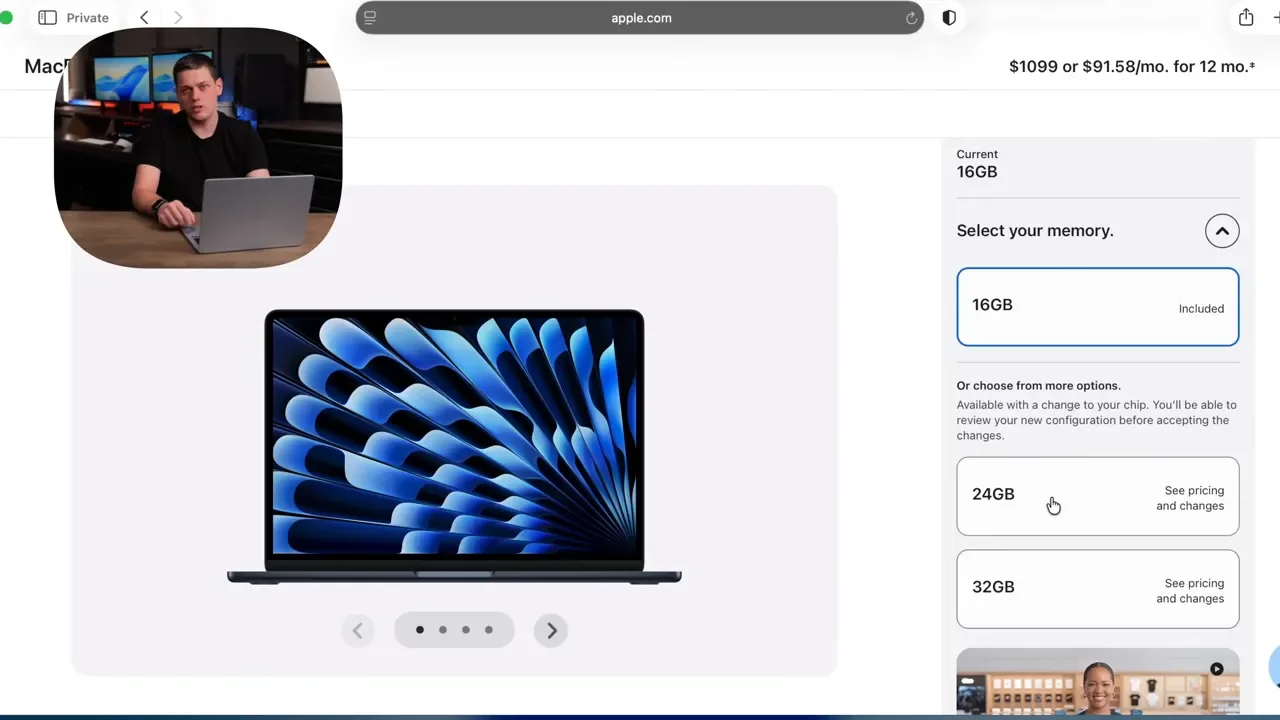
The M5 MacBook Air starts at $1,100, and the base model is finally in a place where it makes sense for most buyers: 16GB RAM and 512GB SSD. That base configuration is good. Really good, actually.
You do have upgrade options, though:
GPU: from 8-core to 10-core
Memory: from 16GB up to 32GB
Storage: from 512GB up to 4TB
If you are considering upgrades, the smartest one for most people is RAM, not storage. There is an important pricing wrinkle here. Upgrading only to the 10-core GPU is not the best value. But if you move to 24GB of RAM, the 10-core GPU comes along with it, and that makes much more sense.
So my advice is simple:
Skip the standalone GPU upgrade
Choose 24GB RAM if you want a meaningful upgrade
Stick with 512GB storage unless you know you need more onboard space
Why RAM first? Because external SSDs are easy. You can always plug in more storage later. You cannot add memory after the fact, and extra RAM makes a real difference for Adobe apps, heavier multitasking, and local AI tools.
M5 MacBook Air vs. MacBook Neo
The MacBook Neo starts around $600 for the 256GB model, which makes it look very tempting. But once you configure it more sensibly, the gap gets narrower. To get the version with 512GB of storage and Touch ID, you are looking at a machine that is still about $400 cheaper than the MacBook Air.
That extra money gets you a lot with the Air:
Backlit keyboard
Better trackpad
Slightly larger display
Thunderbolt ports instead of basic USB ports
16GB of RAM instead of 8GB
Much better app performance and multitasking
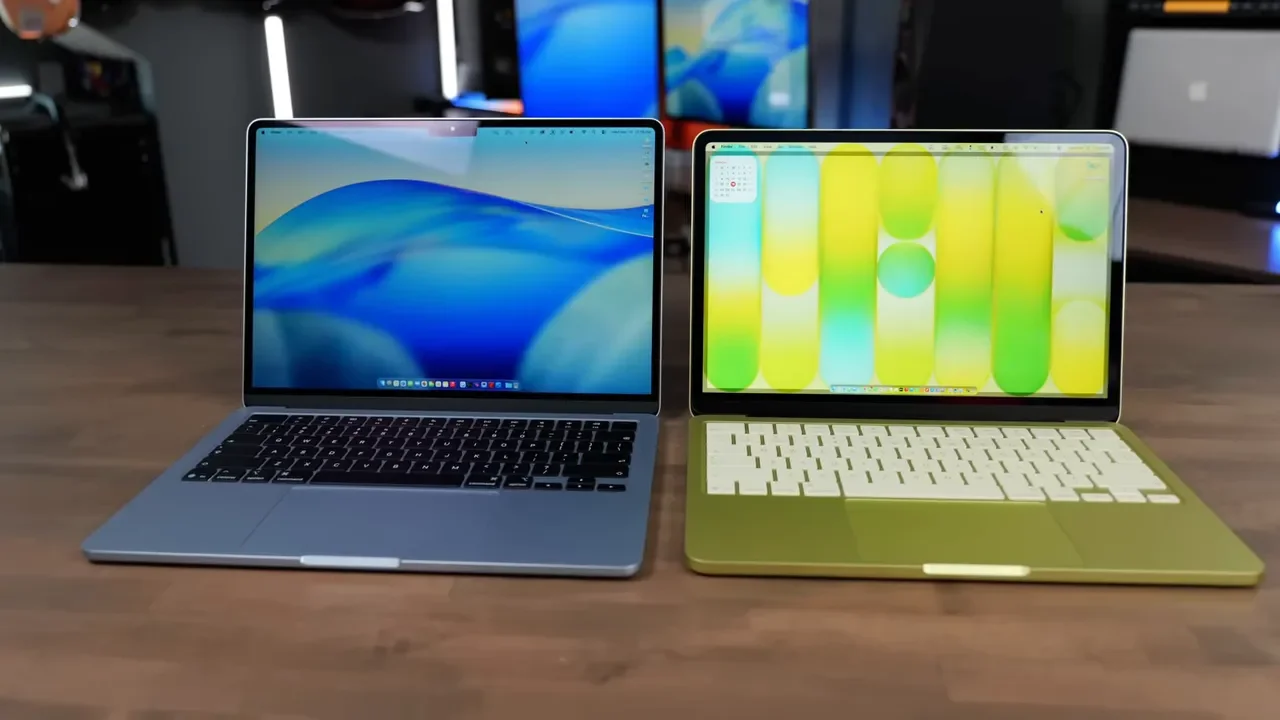
The MacBook Neo only makes sense if saving money is the top priority and your work is mostly web-based or cloud-based. If you are mainly using one lightweight app at a time, like Pages, Numbers, or Microsoft Office, Neo is probably fine.
But if you want a machine you can keep for five to ten years without feeling cramped too quickly, the M5 MacBook Air is the much better buy. It handles normal laptop tasks without slowing down, and it can stretch into more demanding work when needed. The Neo hits its limits a lot faster.
M5 MacBook Air vs. M5 MacBook Pro
This is the harder comparison, because the MacBook Pro is excellent too. The issue is price. You are spending roughly $600 more to move from the Air to the Pro.
What do you get for that money?
A much better display
120Hz ProMotion
Better speakers
Better microphones
A slightly nicer trackpad
An extra Thunderbolt port
HDMI port
SD card slot
Active cooling with a fan
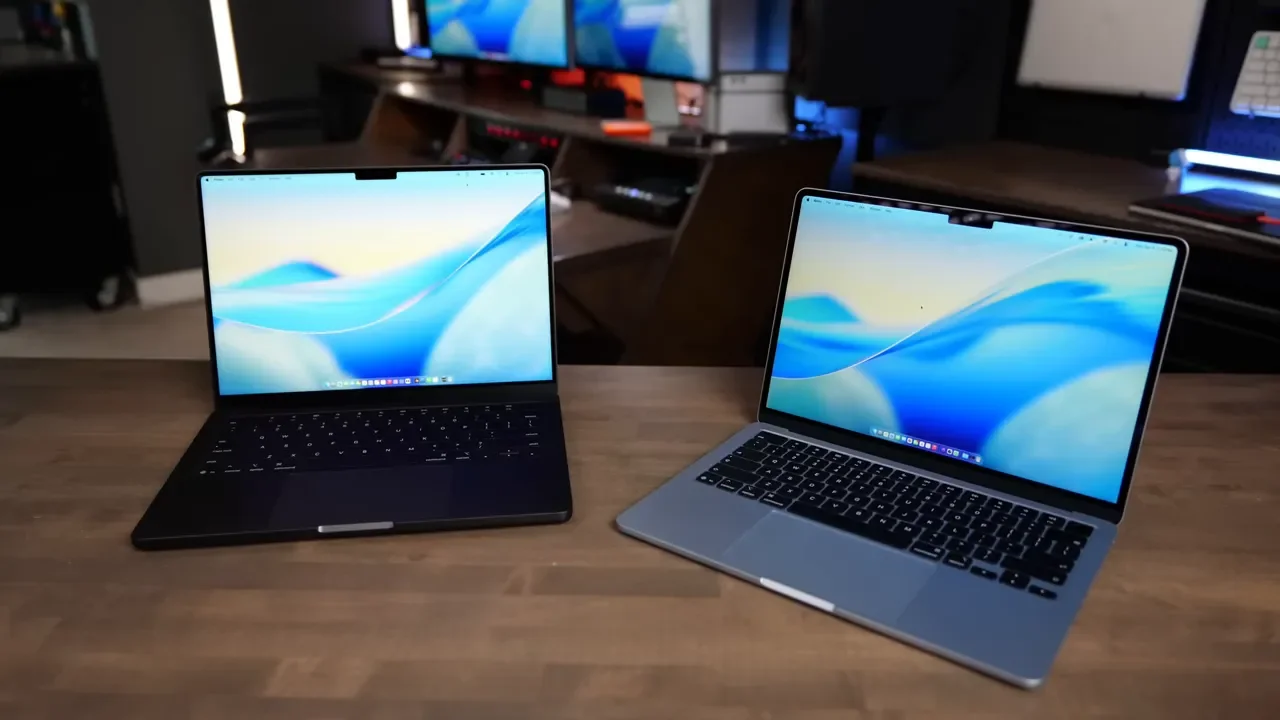
Those are all real benefits. The problem is that for a lot of people, they are not $600 worth of benefits. The Pro also weighs about 0.7 pounds more. That does not sound huge on paper, but in day-to-day use it can feel surprisingly noticeable. Once you get used to the Air, the Pro starts to feel heavier than the spec sheet suggests.
There is one case where the Pro clearly pulls away: sustained performance. The Air is still fanless, which keeps it silent, slim, and lightweight. But during longer heavy tasks like:
3D rendering in Blender
Massive Lightroom exports
Long video exports
The MacBook Air will thermal throttle sooner than the MacBook Pro. If your work regularly pushes the machine hard for long stretches, the Pro is the better tool. For everyone else, the Air gets very close while being lighter and far less expensive.
Should You Upgrade From An Older MacBook Air or MacBook Pro?
If you are coming from an M1 or M2 MacBook Air, the M5 is a meaningful upgrade.
If you already have an M3 or M4 MacBook Air, the jump is much smaller. Unless you are running into speed limits in your workflow, there probably is not a strong reason to upgrade immediately.
If you have an older M1 Pro or M1 Max MacBook Pro, the M5 MacBook Air is also an interesting option. You may be able to get a much lighter computer that still handles the same everyday tasks comfortably, depending on how intense your workload is.
Who Should Actually Buy The M5 MacBook Air?
The M5 MacBook Air is for the person who wants one laptop that can do almost everything well, without spending MacBook Pro money.
It is a great fit if you want:
A lightweight laptop that is easy to carry
Enough performance for school, work, creative projects, and general multitasking
A machine that should age well over several years
A silent fanless design
Strong battery life
A better long-term buy than a budget MacBook Neo
You should look at the MacBook Pro instead if you care a lot about:
Display quality
120Hz refresh rate
HDR brightness
Sustained heavy workloads
Built-in HDMI or SD card support
And if your budget is very tight and your work is basic, the Neo still has a place. It is just not the laptop most people should buy.
Final Verdict
After using the M5 MacBook Air for a month, the conclusion is pretty simple: I really have no complaints, other than the screen.
Apple fixed a lot of what used to make the Air feel like a compromise. The base specs are finally right. Performance is strong. The SSD is faster. Wireless connectivity is better. The design is still excellent. And for 90% to 99% of daily tasks, this thing is more than enough.
The one piece holding it back from being almost untouchable is the display. If Apple ever brings a 120Hz ProMotion panel, OLED, or mini-LED down to the Air, there would be very little reason for most people to buy a MacBook Pro at all.
As it stands right now, the M5 MacBook Air is still the laptop I would point most people toward. If you want the best balance of price, portability, longevity, and performance, this is it. If I were configuring one myself, the recommendation would be simple: start with the base model, and if you can justify one upgrade, make it 24GB of RAM.
