M5 MacBook Air vs M5 MacBook Pro: Which Is Right for You?
Some of the links in this post are affiliate links, which means I may earn a small commission if you choose to make a purchase at no extra cost to you. As an Amazon Associate, I earn from qualifying purchases. Read my full Ethics & Affiliate Relationship Disclaimer.
The M5 MacBook Pro arrived first, but now that the M5 MacBook Air is here, the more interesting question is pretty simple: which one should you actually buy?
On paper, these two laptops look close. They both have the M5 chip, they both feel extremely fast for everyday work, and they both can handle a wide range of creative apps. But once you get past the spec sheet, there are some meaningful differences in display quality, ports, portability, thermals, and sustained performance.
After comparing them side by side in real-world tests, the answer is not just “the Pro is faster.” It is more nuanced than that. For a lot of people, the M5 MacBook Air is the smarter buy. For others, the MacBook Pro earns its extra cost with a better screen, better speakers, more ports, and slightly stronger performance under longer workloads.
M5 MacBook Air vs M5 MacBook Pro At A Glance
Here’s the basic positioning of each machine:
M5 MacBook Air: lighter, fanless, cheaper, and available in 13-inch and 15-inch sizes
M5 MacBook Pro: heavier, more expensive, slightly more capable under sustained loads, and equipped with a better display and extra ports
If your work is mostly email, web browsing, office apps, meetings, light editing, or general productivity, these machines feel very similar.
If your work involves longer exports, repeated code compiles, 3D rendering, or large batch photo exports, the MacBook Pro starts to separate itself. Even then, the jump is often not huge unless you move beyond the base M5 and step up to an M5 Pro or M5 Max.
Chip Differences: Same M5 Family, Slightly Different GPU Setup
Both laptops use the M5 chip, but there is a small catch. The base M5 MacBook Pro comes with a 10-core GPU, while the stock M5 MacBook Air starts with an 8-core GPU.
That sounds like a bigger difference than it often feels in practice. Also, if you configure the MacBook Air with 24GB of RAM or a larger SSD, Apple includes the 10-core GPU version of the M5 chip there as well. So if you are comparing a higher-spec Air to the base Pro, you may be much closer in graphics performance than you would assume at first glance.
Size, Weight, and Portability
This is one of the easiest places to feel the difference immediately.
MacBook Air: about 2.7 pounds
MacBook Pro: about 3.4 pounds
That 0.7-pound gap may not sound dramatic, but in day-to-day use it absolutely is. The Air feels noticeably lighter and easier to carry around. It is the laptop I would naturally grab more often if portability is high on the priority list. The Air is also more flexible in size. You can buy it in either a 13-inch or 15-inch version. If you want the base M5 in a MacBook Pro, you are limited to the 14-inch model.
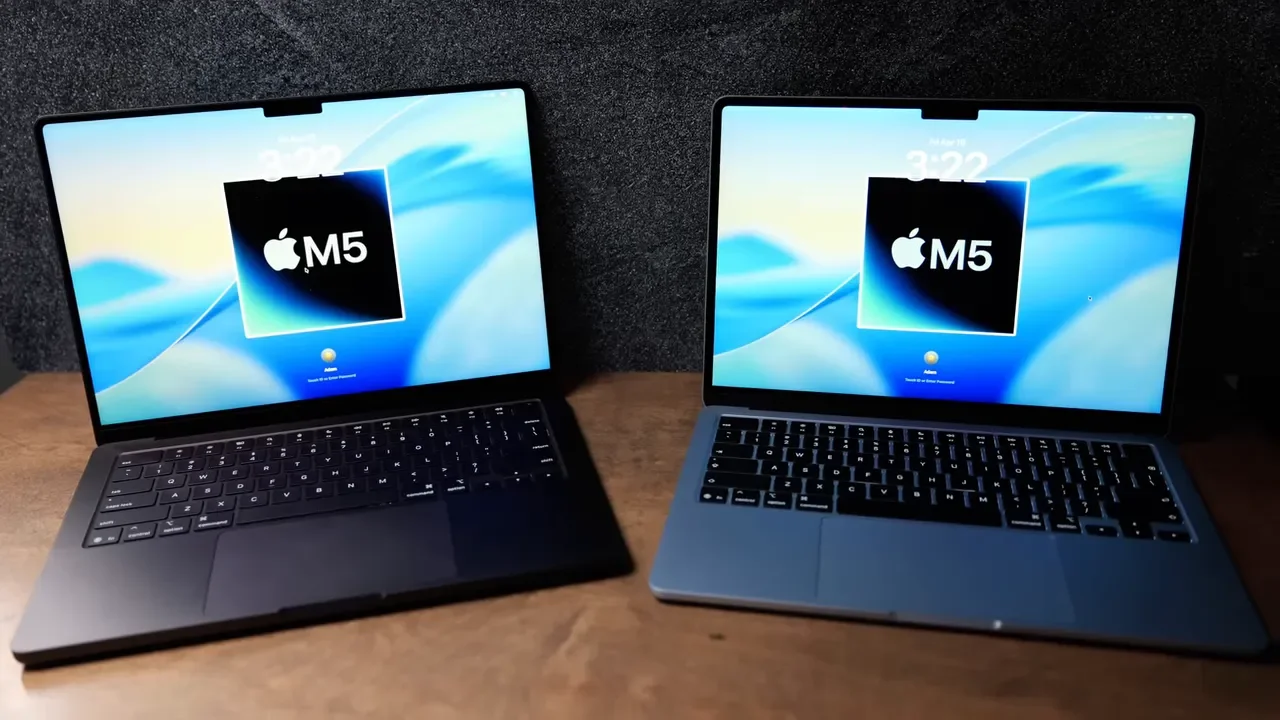
For anyone commuting, moving between rooms, working on the couch, or traveling often, the MacBook Air has a real advantage that goes beyond specs.
The Display: One Of The Biggest Reasons To Pay More For The Pro
If there is one hardware upgrade that consistently makes the MacBook Pro feel more premium, it is the screen.
The MacBook Pro has:
A slightly larger display
Mini-LED technology instead of standard LED
120Hz ProMotion
Much higher brightness
The MacBook Air display is still good. For most indoor use, it is completely fine. But the Pro’s panel is simply better.
Brightness And HDR
The MacBook Air tops out at 500 nits, which works well indoors and in most normal environments.
The MacBook Pro goes much further:
Up to 1,000 nits for standard content
Up to 1,600 nits for HDR content
That extra brightness matters if you work near windows or outdoors. In direct sunlight, the Air can feel limited. The Pro holds up much better.
ProMotion Makes Everyday Use Feel Smoother
The Pro’s 120Hz ProMotion display is not just a spec-sheet flex. It makes the whole interface feel smoother. Cursor movement looks cleaner, scrolling feels more fluid, and the refresh rate adapts depending on what is on screen. It is the kind of upgrade that can be hard to give up once you get used to it.
Nano-Texture Is An Option On The Pro
If reflections are a constant annoyance, the MacBook Pro can also be configured with Apple’s nano-texture display coating, which is designed to cut down on glare.
Webcam, Microphones, And Speakers
Both laptops are good here. Neither is weak. You get solid webcams, good microphones, and built-in speakers that are more than usable for calls, casual media consumption, and general daily work. But the MacBook Pro is better across the board, especially when it comes to speakers.
The reason is simple:
MacBook Pro: 6-speaker system
MacBook Air: 4-speaker system
The Pro has more low-end and sounds fuller. The microphone is also a bit better, though not by a huge amount. Webcam quality between the two is pretty similar. If you care about built-in audio quality, the Pro does feel like a step up. If you mostly use headphones or external speakers, it matters less.
Surprising Win For The Air: Wireless Connectivity
One unexpected advantage for the M5 MacBook Air is wireless connectivity.
Apple added the N1 chip to the M5 MacBook Air, which gives it:
Wi-Fi 7
Bluetooth 6
Meanwhile, the base M5 MacBook Pro is stuck with:
Wi-Fi 6E
Bluetooth 5.3
If you upgrade the Pro to the M5 Pro or M5 Max, then you do get Apple’s newer wireless chip. But at the base M5 level, the Air actually has the newer wireless standard. That is not enough on its own to determine the purchase, but it is definitely worth knowing.
Ports: This Is Where The Pro Is Much More Convenient
The MacBook Air keeps things simple:
2 Thunderbolt 4 ports on the left side
MagSafe charging
Headphone jack on the right side
The MacBook Pro gives you more flexibility:
3 Thunderbolt 4 ports total
HDMI port
SD card reader
MagSafe charging
Headphone jack
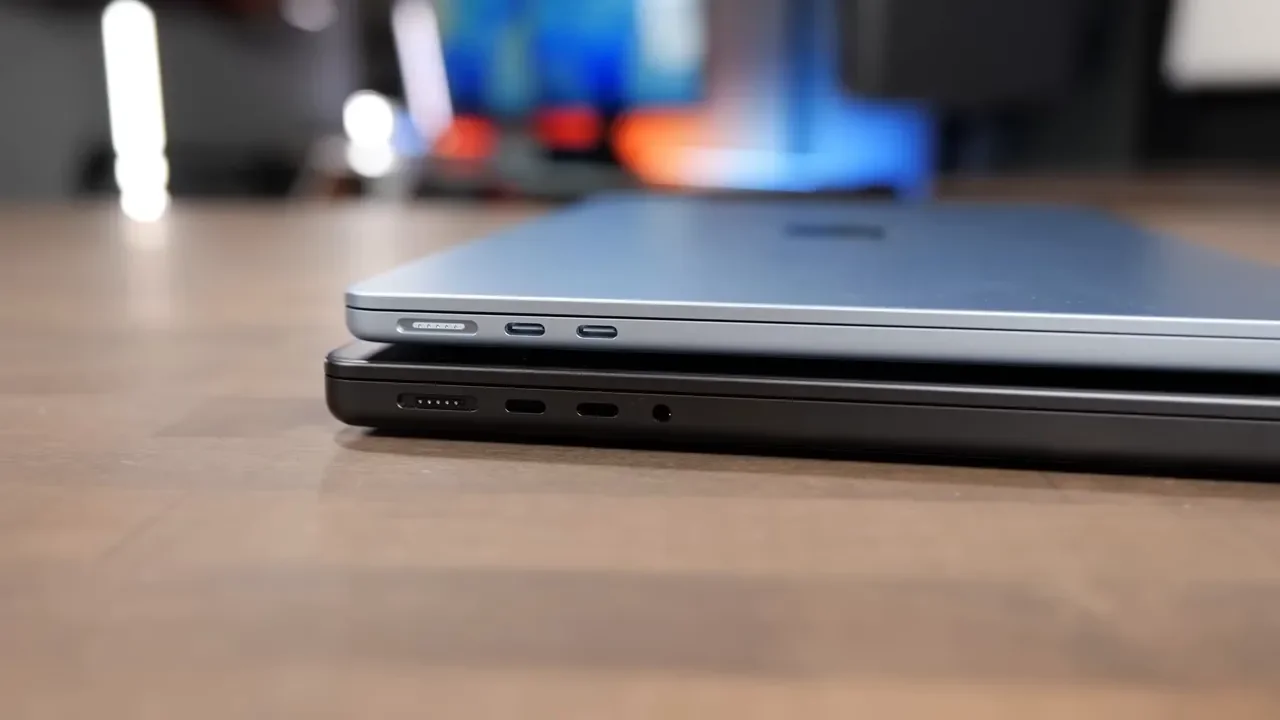
Those extra built-in ports make a difference, especially if you work with cameras, external displays, or a desk setup with multiple accessories. It is just nicer not having to reach for a dongle every time. One disappointment here is that the base M5 MacBook Pro still uses Thunderbolt 4. If you want Thunderbolt 5, you need to move up to an M5 Pro or M5 Max configuration.
RAM and SSD Speeds
Both machines start with 16GB of unified memory, and both can be configured with 24GB or 32GB. At the base M5 level, they also share the same 153GB/s memory bandwidth, which means memory communication with the CPU and GPU is equally fast on paper.
Storage performance is a little more mixed. On the MacBook Air, SSD speeds landed around 5,500 to 6,500 MB/s for both read and write speeds. On the tested MacBook Pro with the older 512GB configuration, speeds were around 6,500 MB/s.
Apple has since changed the base MacBook Pro configuration so it now starts with a 1TB SSD, which is a welcome improvement. Higher-end 1TB M5 Pro and M5 Max MacBook Pros reached around 11,500 MB/s in testing, though it is not confirmed that the standard 1TB M5 Pro-less MacBook Pro hits that same level. If you step up to M5 Pro or M5 Max, you can also configure far more RAM than on the base M5 systems.
Fanless Air vs Single-Fan Pro
This is one of the most important practical differences.
The MacBook Air is fanless. That means:
It is completely silent
It has no fan noise at all
It thermal throttles sooner under sustained workloads
The M5 MacBook Pro has a fan, which helps it sustain performance longer. But there is a catch here too: the base M5 MacBook Pro only has one fan. That is a bit frustrating because the chassis has room for a second fan, and Apple only includes that if you buy an M5 Pro or M5 Max model.
So yes, the MacBook Pro does perform better on longer jobs than the Air. But it can still run into thermal limits, and it does not feel like the base M5 Pro chassis is being used to its full potential.
Real-World Performance Tests
This is where things get interesting, because the numbers show a pattern: The MacBook Pro is usually faster, but often only a little faster. The biggest gains tend to show up in longer, more demanding tasks where heat buildup matters.
Xcode Compile Test
M5 MacBook Pro: 160 seconds
M5 MacBook Air: 196 seconds
The Pro had a clear edge here. If you compile code all day, time savings do add up.
Blender 3D Rendering
Two Blender scenes were tested: Classroom and Barbershop.
Classroom scene:
MacBook Air: 51 seconds
MacBook Pro: 29 seconds
Barbershop scene:
MacBook Air: 5 minutes 53 seconds
MacBook Pro: 3 minutes 30 seconds
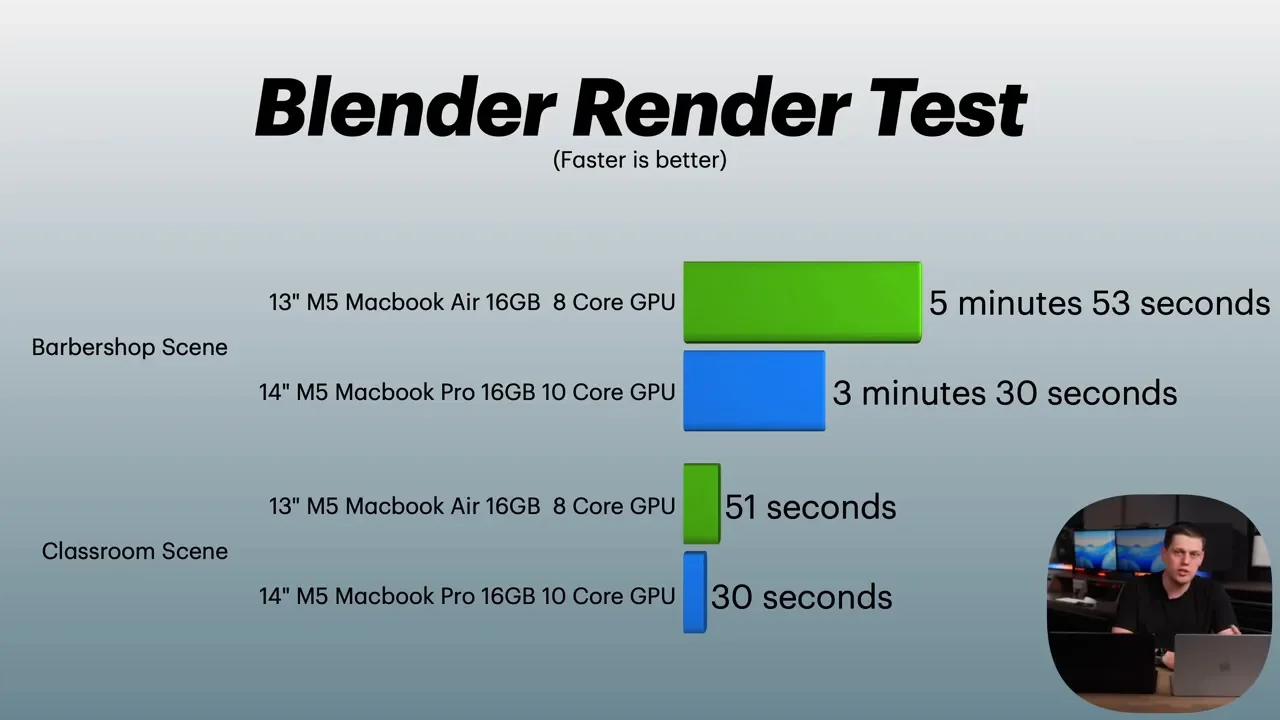
This is one of the clearest examples of the Pro benefiting from better sustained performance. For 3D rendering, the gap is real.
Logic Pro Music Production
Music production results were much closer.
Maximum MIDI tracks:
MacBook Pro: 130 tracks
MacBook Air: 120 tracks
Offline bounce of 64 tracks:
Both: 30 seconds
Offline bounce of 512 tracks:
MacBook Air: 4 minutes 30 seconds
MacBook Pro: 3 minutes 51 seconds
That is a win for the Pro, but it is not a dramatic one. For many music workflows, the Air is still plenty capable.
Final Cut Pro Video Editing
General timeline performance in Final Cut Pro felt similar on both. Scrubbing was smooth, and both handled editing well.
Where the base M5 systems lag behind is not necessarily basic timeline use. It is things like:
Rendering waveforms
Reloading thumbnails after edits
Heavier rendering and export tasks
Those are areas where the M5 Pro and M5 Max chips pull ahead much more noticeably.
Magnetic Mask on an 18-second clip:
MacBook Air: 28 seconds
MacBook Pro: 26 seconds
3-minute 4K export with titles, effects, and audio effects:
Both: about 1 minute 30 seconds
30-minute export:
MacBook Air: 15 minutes 30 seconds
MacBook Pro: 14 minutes 53 seconds
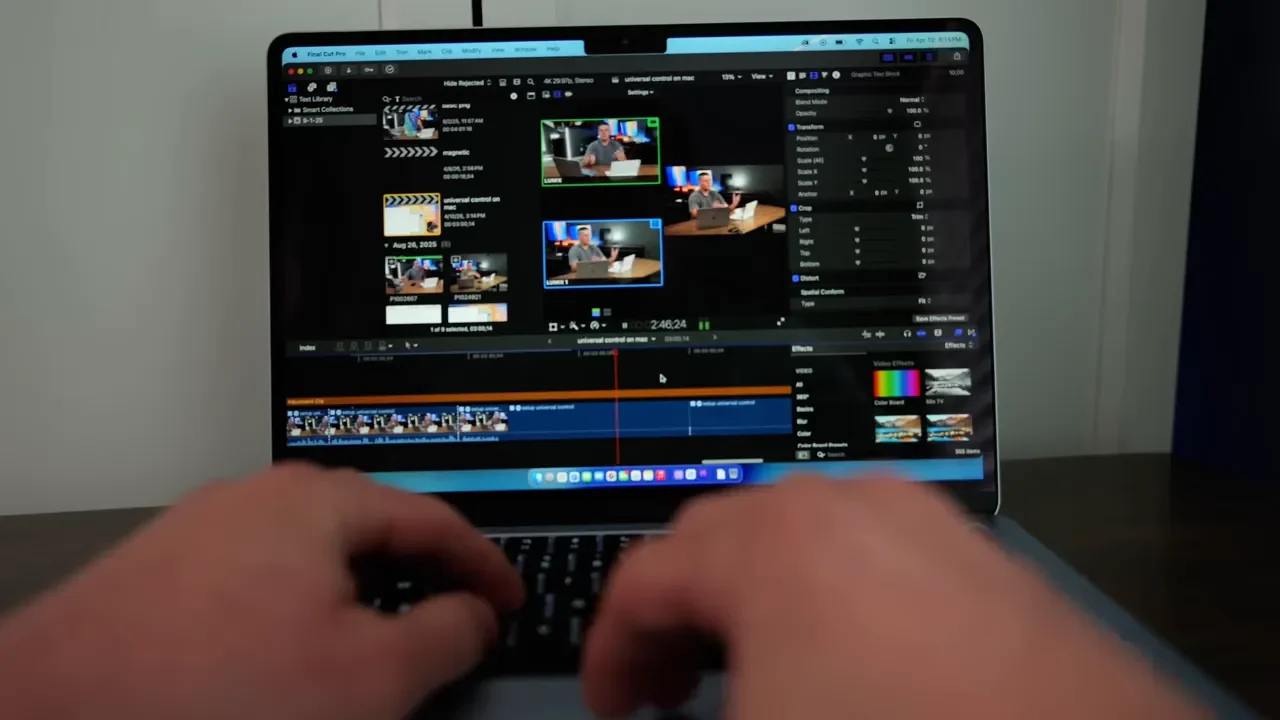
The fan helps the Pro a bit on longer exports, but not as much as you might expect. That suggests the base M5 MacBook Pro is still hitting thermal limits of its own.
Lightroom Classic Photo Editing
This was one of the categories where the MacBook Pro started to build a more significant lead.
Importing 500 RAW photos and fetching initial previews:
MacBook Air: 26 seconds
MacBook Pro: 21 seconds
Exporting 500 photos:
MacBook Pro: 2 minutes 23 seconds
MacBook Air: 8 minutes 8 seconds
Exporting 200 photos:
MacBook Air: 2 minutes 8 seconds
MacBook Pro: 59 seconds
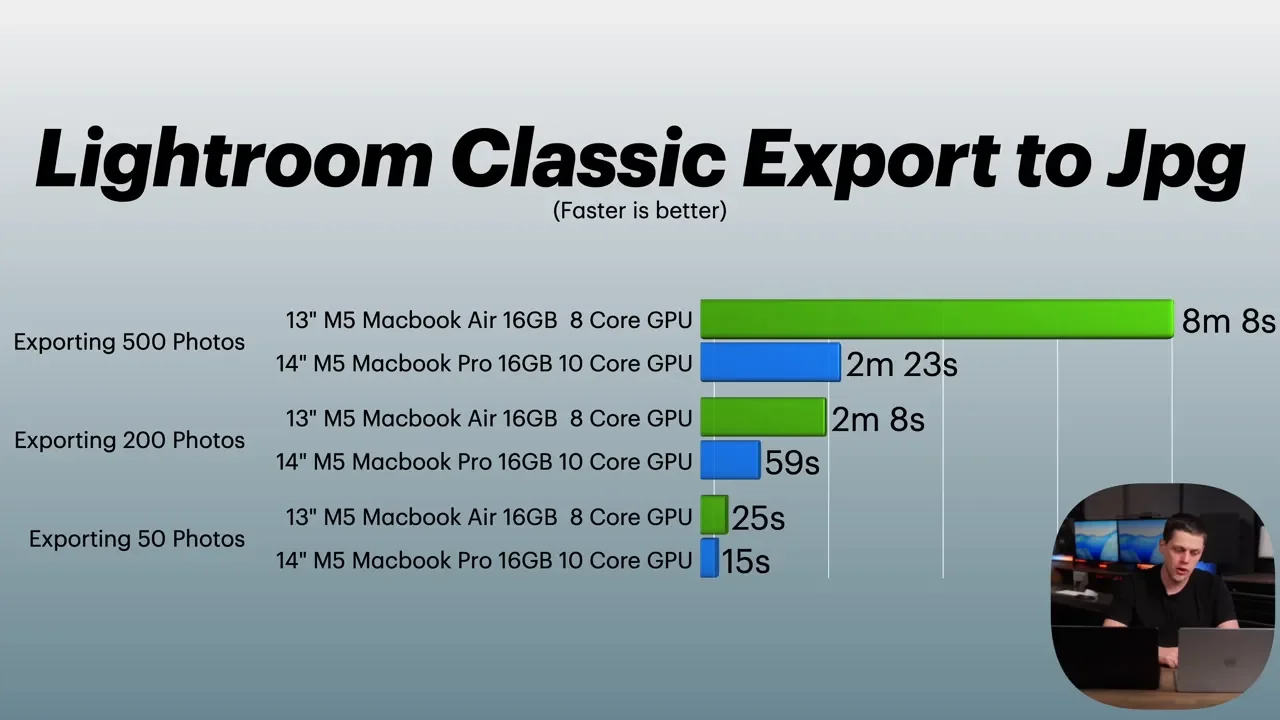
That is a major difference, especially on bigger exports. If your workflow regularly involves batch exporting lots of photos, the MacBook Pro is the safer pick. That said, basic photo editing felt similar. Adjusting exposure, applying effects, cropping, and normal editing tasks were all very usable on both machines.
Local AI Testing
Local AI tasks were also tested with both image generation and language model performance.
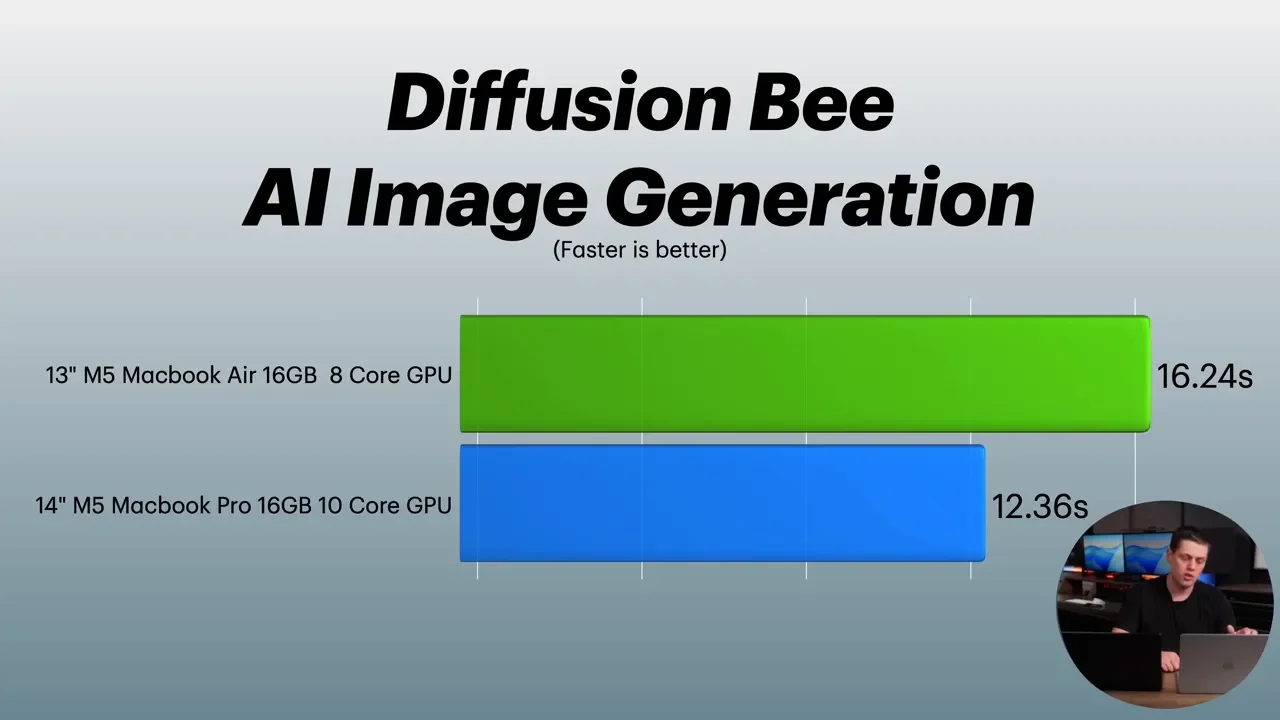
Diffusion Bee image generation:
MacBook Air: 16.24 seconds
MacBook Pro: 12.36 seconds
For LM Studio running Gemma 3 4B, the results were much closer. Time to first token and tokens-per-second performance were often within roughly half a second to one second of each other, and total throughput was basically identical depending on the specific run. So for local LLM use, there was not a meaningful gap between these two base M5 laptops in this testing.
Geekbench, Geekbench AI, and Cinebench
Synthetic benchmarks supported the same overall story.
Single-core scores: very close
Multi-core scores: Pro pulled ahead
Metal GPU scores: Pro pulled ahead more clearly
Geekbench AI: very similar between the two
That matches what showed up in real workloads. Short, bursty tasks feel almost the same. Longer jobs reveal the Pro’s advantage.
What Actually Feels Different In Everyday Use?
For normal day-to-day computing, these machines are much closer than their names suggest.
Tasks like these feel essentially identical:
Answering emails
Browsing the web
Office work
Video calls
General multitasking
Both are fast. Both are responsive. Both can handle the overwhelming majority of common apps without issue. The MacBook Pro feels slightly nicer. The display is better. The speakers are better. The extra ports are convenient. But in raw everyday responsiveness, the difference is not huge.
Is The M5 MacBook Pro Worth The Extra $400?
This is really the core buying decision.
If you are comparing the base M5 MacBook Air to the base M5 MacBook Pro, the Pro is not a bad laptop at all. But the premium mostly gets you:
A better display
An extra Thunderbolt port
HDMI and SD card reader
Better speakers
Slightly better sustained performance
What it does not get you is a dramatic leap in speed across every workflow. That is why the answer depends heavily on your priorities.
Who Should Buy The M5 MacBook Air?
The M5 MacBook Air is the right choice if you want:
The lighter, more portable machine
Silent operation with no fan noise
A laptop that can still handle nearly any normal task
Excellent value for the money
It is especially compelling if you are not doing repeated long exports, large code compiles all day, or heavy Blender rendering. For many people, this is the sweet spot in Apple’s laptop lineup. The combination of power and size is extremely hard to beat.
Who Should Buy The M5 MacBook Pro?
The M5 MacBook Pro makes more sense if you care about:
The better mini-LED ProMotion display
Higher brightness for bright rooms or outdoor use
Better built-in speakers
More ports without adapters
Better sustained performance on longer workloads
If this will be your main computer and you spend all day on it, those quality-of-life upgrades can matter a lot. But there is one more important point.
The Real Jump Starts At The M5 Pro MacBook Pro
After testing both systems for a month, the biggest takeaway is that the base M5 MacBook Pro only delivers marginally better performance than the M5 MacBook Air. If you truly need a performance-focused MacBook Pro, the model that makes the strongest case is not the base M5. It is the M5 Pro MacBook Pro.
That is where export times, rendering performance, and heavier creative workflows start to improve in a much more noticeable way. So if you are already considering spending more for a Pro and your work is genuinely demanding, it may be smarter to skip the base M5 Pro chassis and put that money toward the M5 Pro upgrade instead.
Final Verdict
If I had to simplify it:
Buy the M5 MacBook Air if you want the best balance of power, portability, and value.
Buy the M5 MacBook Pro if you care more about the display, speakers, ports, and modest gains in sustained workloads.
Buy the M5 MacBook Pro if you actually need a meaningful step up in performance.
For day-to-day use, the Air is incredibly hard to beat. The Pro is nicer, but the Air is still the better overall deal for a lot of people. That is what makes this comparison interesting. The MacBook Pro wins on features, but the MacBook Air still feels like the standout product because of just how much power it packs into such a light, small machine.
